Rehearse in the free demo: live prices and the real rules, no sign-up, orders switched off.
Plan on the chart first; open the ticket only when entry, stop and target are clear.
Read Risk at SL and the daily and overall limits before and after, then send.
Before you open the ticket
Open the free MyFundedCapital Terminal demo on a computer or a phone. It has live prices and the real rules and needs no sign-up. Orders are switched off, so you can rehearse every step below without sending anything.
Three checks first:
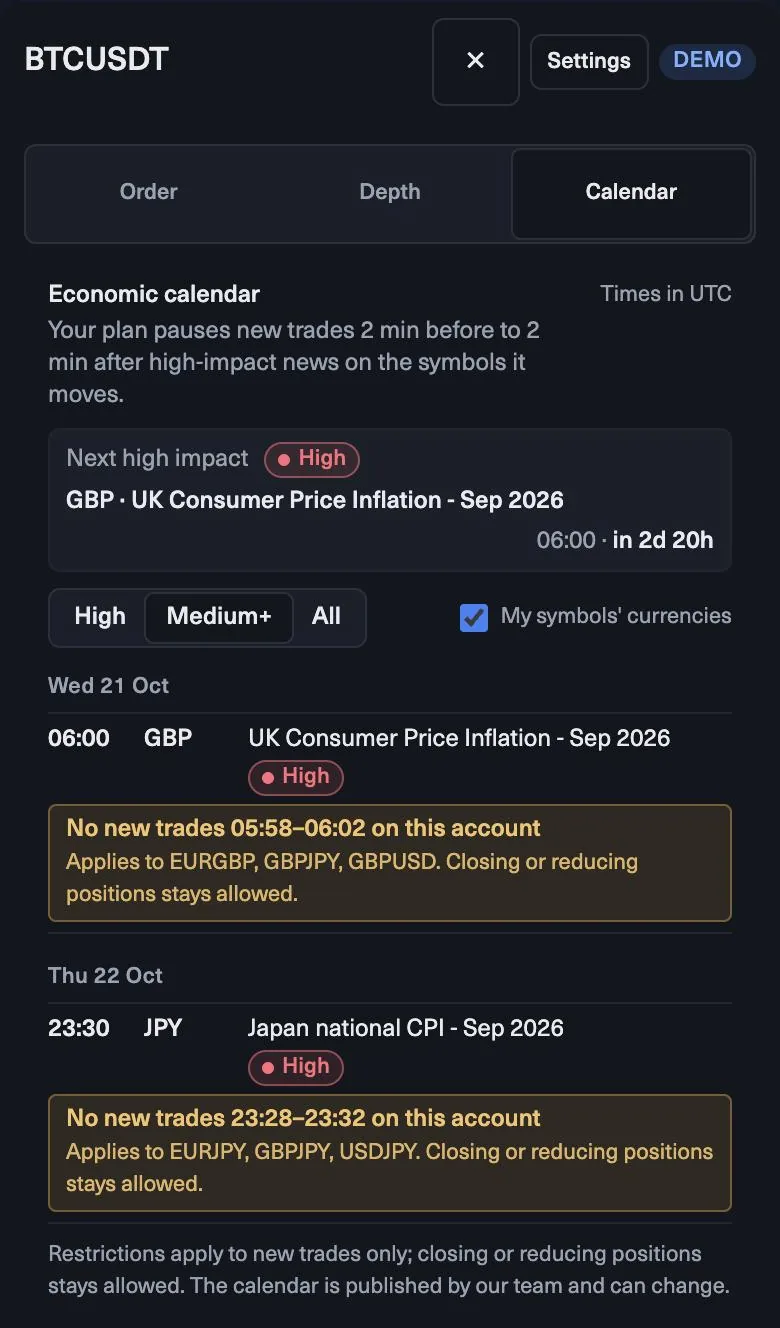
- Calendar. The Calendar tab lists events in UTC. Your plan pauses new trades from 2 minutes before to 2 minutes after high-impact news on the symbols it moves.
- Account panel. Balance, equity, free margin, and Daily loss limit … left and Overall loss limit … left.
- One market. Pick one symbol for your first trades, for example EURUSD.
Plan the trade on the chart
On 4h, EURUSD is making higher highs and higher lows above a rising 50 EMA. You marked support at 1.0815–1.0820. On 1h, price pulls back into the zone and a hammer closes with its low at 1.0812.
The plan: buy near 1.0840, stop below the zone and the wick at 1.0808 (32 pips), take profit at the next resistance, 1.0890 (50 pips). The ratio is about 1:1.6. That meets a minimum of 1:1.5, so the trade passes. If resistance had been at 1.0860, it would not.
Fill the ticket
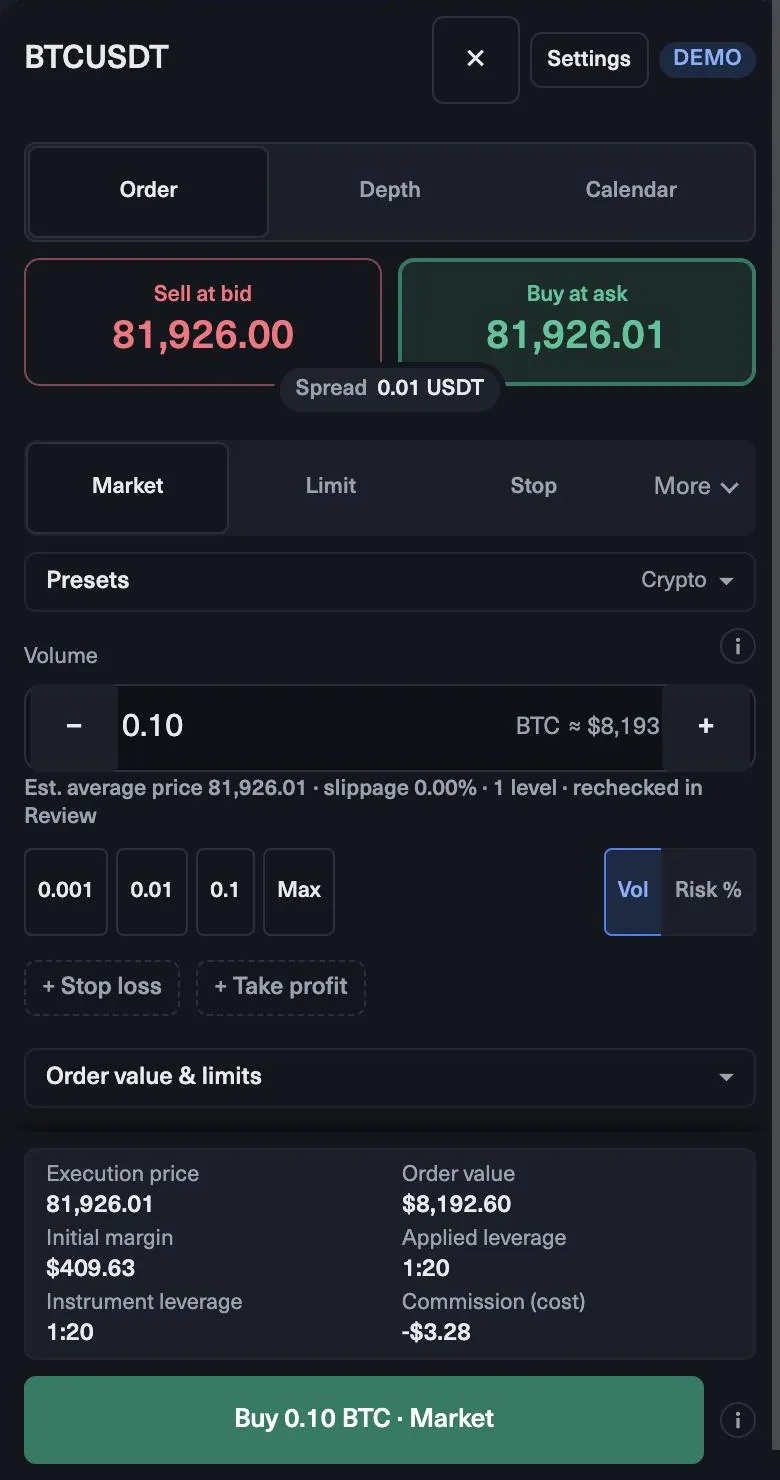
- Choose Market to enter now at the ask, or Limit at a lower price with a time in force such as Good till cancelled.
- Press Buy. The ticket shows the ask, the bid and the spread.
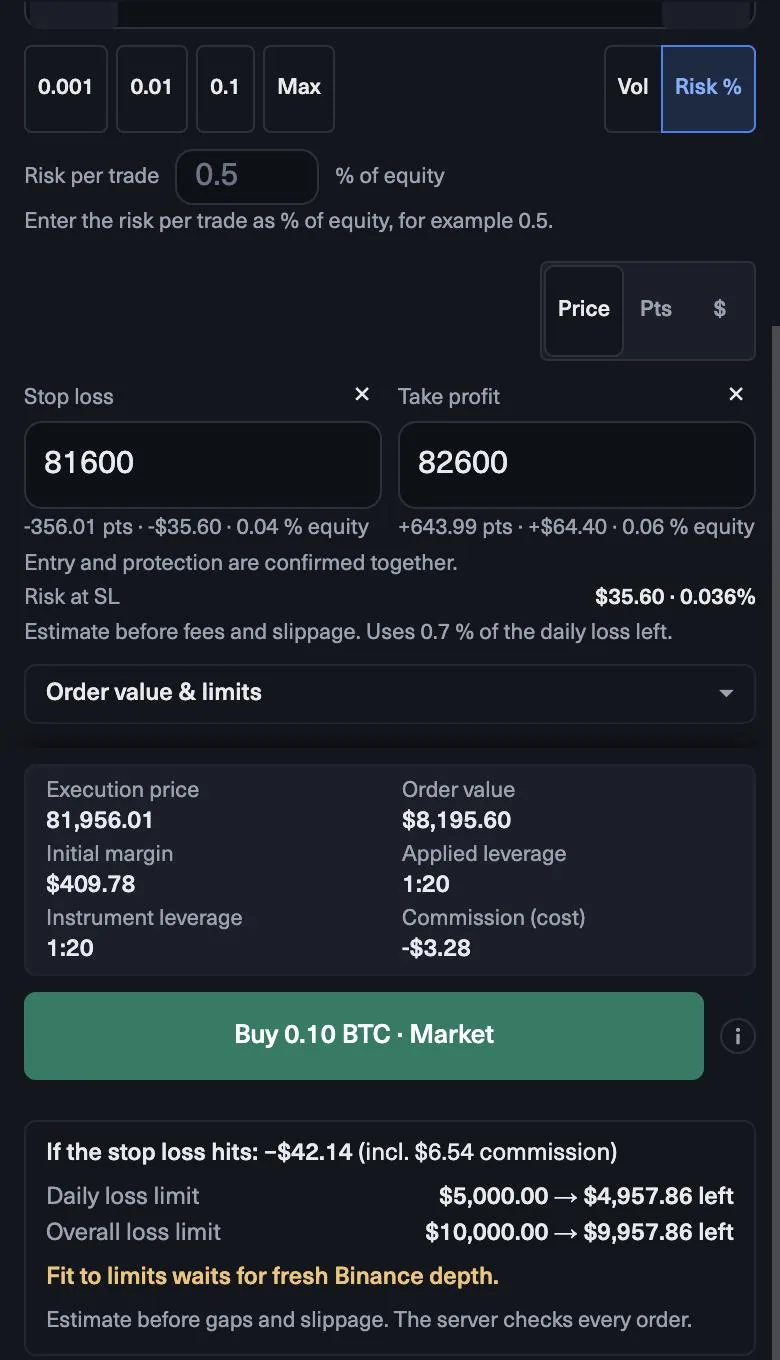
- Switch sizing to Risk % and enter 0.5.
- Press + Stop loss and enter 1.0808 as a price. Press + Take profit and enter 1.0890.
- On a $10,000 account, Risk at SL should show about $50, with the volume near 0.15 lots.
- Read the share of the daily loss left that the order uses, and the box If the stop loss hits: your daily and overall loss limits before and after.
- Open Order value & limits for margin, applied leverage and commission. Then send.
After you send
The trade appears in the Positions panel, and the stop shows on the chart. From here the plan does the work: do not widen the stop, and do not add to a losing trade. Closing or reducing a position stays allowed during the news window if you need to step aside.
When the trade closes, take a chart snapshot and fill in your journal card: reason, prices, risk, result in R, and whether you followed the plan.
A first-week plan
- One market and one setup.
- The same risk on every trade, for example 0.5%.
- No more than two trades a day, and stop for the day after two losses.
- A personal daily loss limit under Details, below the plan’s. On a $10,000 1-Step Challenge account the plan’s limit is $500.
- A review at the end of the week, in R.
The goal of the first week is a clean record, not a profit figure. A week where every trade had a stop, the same risk and a journal entry is a good week, whatever the result. Once that is routine, you can add a second market or a second setup, one at a time.
Quiz
Check yourself
0 / 4
Lesson complete
Nice work. … of 15 lessons in Trading basics in the MyFundedCapital Terminal done.
MyFundedCapital School
Trading basics in the MyFundedCapital Terminal checklist
Rules as of 17 Oct 2026. Tick each line before your next session.
1. What is the difference between market, limit and stop orders?
- A market order buys at the ask and sells at the bid, so you pay the spread the moment you enter.
- A limit waits for a better price; a stop waits for price to prove a move. Neither is sure to fill.
- Add a stop loss before you send any order; the ticket shows what it costs against both loss limits.
2. How do you read a price chart?
- Each candle is one period: its body runs from open to close, its wicks to the high and low.
- Read top-down: direction on 1D or 4h, structure on 1h, entry on 15m or lower.
- Your planned stop shows on the chart as a line, so you see the risk before you send.
3. Which candlestick patterns should a beginner know?
- Body = open to close, wicks = the extremes. Long wicks show where price was rejected.
- A pattern counts only after its candle closes, and only at a level you marked earlier.
- Put the stop beyond the pattern’s wick and size the trade from that distance.
4. What are support and resistance levels?
- Mark levels on 1D and 4h first; they carry more weight than levels found on 1m.
- A broken resistance often turns into support on the retest, and the other way round.
- Stops go beyond the zone with a buffer; a stop on the line is where many others sit too.
5. How do you identify a trend in trading?
- Structure first: higher highs and higher lows up, lower highs and lower lows down.
- The higher timeframe sets the direction; the lower one only times the entry.
- A break of the last higher low puts an uptrend in question; it does not prove a reversal.
6. What are moving averages and how do you use them?
- The period counts candles, not days: a 50 EMA on 1h averages the last 50 hourly closes.
- Use the slope for direction and the line as a zone in pullbacks, not as a precise signal.
- Moving averages lag. Your stop still goes beyond structure, never just past the line.
7. What is the RSI indicator and how do you read it?
- RSI measures momentum, not value. “Overbought” is not a sell signal by itself.
- In an uptrend RSI tends to hold above the middle; in a downtrend below it.
- Use RSI to confirm a setup at a level in the trend direction, never alone.
8. What is the MACD indicator and how does it work?
- Above zero, the faster average is above the slower one: the trend leans up. Below zero, down.
- A shrinking histogram warns that momentum is fading before a crossover appears.
- MACD is built from moving averages, so it confirms; it does not predict.
9. How do you use the ATR indicator to set a stop loss?
- ATR measures how far price usually moves per candle. It says nothing about direction.
- A stop tighter than one normal candle is often hit by noise, not by a failed idea.
- When ATR rises, the stop widens and the volume shrinks. The dollars at risk stay the same.
10. How do you confirm a trading signal before you enter?
- A signal needs context, location and a trigger. One of the three alone is a guess.
- Use one tool per job; three oscillators agreeing are one opinion, not three.
- Expert advisors and trading bots are allowed only by agreement: write to support first.
11. What is the risk-reward ratio in trading?
- R:R = distance to the stop : distance to the take profit. Both come from the chart.
- At 1:2 about one winner in three breaks even before costs; at 1:1 you need one in two.
- Set the target at the next level. A ratio you want is not a ratio the chart offers.
12. Where should you place a stop loss?
- The chart sets the stop’s place; your risk per trade sets the size. Never the other way round.
- Every order should carry a stop; the ticket warns when the loss is not limited.
- Move a stop only in your favour, and only for a reason on the chart.
13. How do you size a position in the MyFundedCapital Terminal?
- Size from the stop and a fixed risk; the volume is the result, not the starting point.
- Risk % mode sizes from a share of equity and shows Risk at SL before you send.
- Fit to limits is a ceiling. Your own risk per trade is usually far below it.
14. What should you record in a trading journal for every trade?
- Write the reason before you enter; reasons written afterwards tend to fit the result.
- Measure results in R, so trades of different sizes and markets compare fairly.
- Review once a week on a day you are not trading, and change one thing at a time.
15. How do you place your first trade step by step?
- Rehearse in the free demo: live prices and the real rules, no sign-up, orders switched off.
- Plan on the chart first; open the ticket only when entry, stop and target are clear.
- Read Risk at SL and the daily and overall limits before and after, then send.
myfundedcapital.com/learn/
Questions
Do I need an account to practise?
No. The free demo has live prices and the real rules and needs no sign-up. Orders are switched off there, so it is for practice only.
Can I trade from my phone?
Yes. The Terminal runs in the phone browser with Chart, Trade, Positions and Markets tabs.
Related lessons
- What is the difference between market, limit and stop orders?Trading basics in the MyFundedCapital TerminalBeginner4 min
- How do you size a position in the MyFundedCapital Terminal?Trading basics in the MyFundedCapital TerminalEssential3 min
- How do you log in to MyFundedCapital Terminal for the first time?MyFundedCapital TerminalBeginner3 min
Tools and rules
Rules shown here come from the help center and the live rulebook; your program terms apply.