

Your dashboard is green, but the withdrawal screen shows less money than you expected, or the payout button still isn't available. A profit sharing check is the amount approved under your account terms, not necessarily the profit on the trading screen. Before requesting it, reconcile the available balance, check the payout window, and save the records that let you verify what arrives.
Payout Schedules and What Your Split Pays
Trader share by split tier on $3,000 gross profit
| Profit split | Trader share of $3,000 | Firm share of $3,000 |
|---|---|---|
| 80/20 | $2,400 | $600 |
| 90/10 | $2,700 | $300 |
| 100% | $3,000 | $0 |
These are worked examples, not guaranteed payouts. The arithmetic is straightforward: trader share = gross profit × trader percentage, assuming the entire profit qualifies for allocation and no further adjustments apply.
Say you earn $3,000 of eligible gross profit during a 14-day cycle on a 90/10 split. Your share is $2,700, and the firm keeps $300. That calculation establishes your contractual share before any withdrawal-level fees, conversion costs, or required balance retention.
Timing is separate from the split
The company's stated options include scheduled payouts every 7–14 days, on-demand requests, average processing of 1:46h, and an optional faster-payout add-on; check the payout schedule by program against your account terms before relying on those timings. Processing is not the same as receipt, and an average isn't a deadline.
Before the cycle ends, check the dashboard's cutoff date and time zone. Don't assume your local midnight determines which trades enter the payout calculation.
- Losing cycle Without eligible profit, there's nothing to split. A high trader percentage doesn't change that.
- Open trade at cutoff Unrealized profit may not qualify until you close the position. Check the agreement rather than treating floating profit as payable.
- Late closure A trade closed after the cutoff may fall into the next statement period. Preserve the trade timestamp if the allocation looks wrong.
Practical rule: Choose scheduled payouts for a predictable withdrawal routine. Use on-demand access when you need funds between cycles, not simply because the button is available.
Frequent withdrawals can leave less room for adverse price movement. Before taking the full available amount, check what your remaining equity would mean for the next trade and your drawdown allowance.
Check the Net Amount and Records Before You Withdraw
The displayed gain and the withdrawable amount answer different questions. One describes trading performance; the other reflects payout eligibility, account restrictions, and applicable deductions.
Say the dashboard shows a $2,000 gain, while open positions carry $400 in losses and a platform fee applies. If your agreement offsets those losses against eligibility, the amount to reconcile starts below the headline gain, before applying the relevant split and fee rules.
Reconcile the account before requesting cash
The SEC's day-trading guidance warns that borrowing magnifies losses as well as gains, and some margin arrangements can produce losses exceeding the original investment. Simulated prop-account rules aren't identical to brokerage margin rules, but a profit-sharing arrangement doesn't remove trading risk.
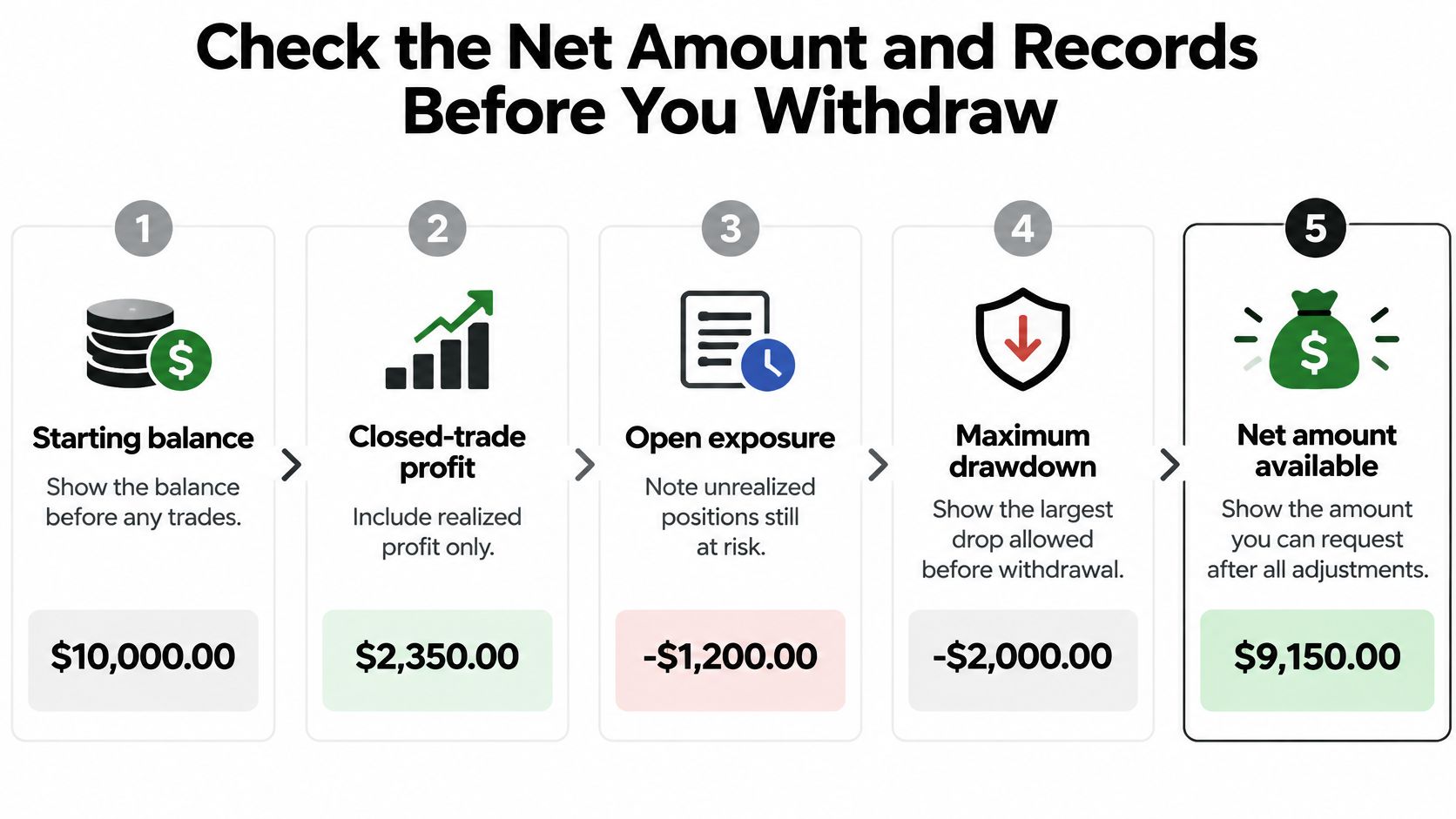
Check these fields together:
- Starting balance Match the statement's opening balance to the beginning of the payout period.
- Closed-trade profit Use realized results and check whether commissions, spreads, and financing are already included.
- Open exposure Review unrealized losses and positions that remain at risk.
- Risk limits Check your account's maximum drawdown, up to 10%, and daily loss limit of 5%, including how a withdrawal affects the remaining allowance.
- Deductions Identify every contractual fee or required buffer. Don't subtract a charge twice if it's already included in net trading profit.
Keep a payout file
Save the request ID, date and time, amount requested, amount received, payment method, currency-conversion rate, crypto transaction hash where applicable, and downloadable statement. The identifier and timestamp help support locate the request; the amounts and conversion details explain any difference at receipt.
Keep the original statement file alongside the bank entry or wallet transaction. A dashboard screenshot helps capture what you saw, but it shouldn't replace the downloadable record.
For U.S. recipients, employee wages and bonuses generally belong on Form W-2, while contractor service payments generally require Form 1099-NEC when the applicable $2,000 annual threshold for payments made after December 31, 2025 is reached, according to the IRS reporting instructions. Keep taxpayer details current because missing or incorrect identification can cause reporting problems.
Under IRS Publication 550, gains from selling securities or commodities as a trader generally aren't subject to self-employment tax, but that doesn't automatically classify a prop-firm payment. Have a qualified tax professional review your agreement before filing rather than applying a flat tax rate.
If you're considering receiving income through a company, Stewart Accounting Services' guidance for sole traders becoming company directors explains why withdrawing company money differs from taking sole-trader income. Your country and legal structure determine which treatment applies.
Choose Between Bank and Crypto Payouts
Choose the destination by its total cost, preparation requirements, and record trail, not just its apparent speed. Firm processing, bank settlement, and blockchain confirmation are separate stages.
Bank transfer versus crypto payout on the same criteria
| Factor | Bank transfer | Crypto payout |
|---|---|---|
| Typical processing | Average 1:46h, company figure; receiving bank may add time | Average 1:46h, company figure; blockchain confirmation adds time |
| Fees | Unknown until checked in the dashboard; conversion or intermediary charges may apply | Unknown until checked in the dashboard; network fee may apply |
| What to prepare | Account holder name matching your verified profile; account number or IBAN | Wallet address on the selected network; confirm network compatibility |
| Most common error | Name mismatch or wrong account number | Wrong network or mistyped address |
| Record trail | Bank statement and payout statement | Transaction hash and wallet statement |
The processing estimate is the company figure described in its payout methods and processing-time guide, not a guaranteed arrival time. Fee amounts and conversion spreads aren't established here, so read the current dashboard quote before choosing.

Choose for the destination you actually need
- Home-currency spending A bank payout can avoid the extra task of selling crypto and withdrawing the proceeds. Compare the credited currency with your bank account currency.
- Existing supported wallet Crypto can suit a trader who already understands the supported asset and network. Don't introduce an unfamiliar exchange just to receive a payout.
- Bank-statement reconciliation A direct transfer usually makes it easier to match the payout statement to a deposit without documenting intermediate wallet movements.
For South African traders considering a crypto-to-bank route, Zaro's guide to South African crypto exchanges provides context for comparing exchange options. Separately verify deposit-network support, conversion costs, and withdrawal requirements before transferring funds.
Match the bank account name to your verified profile, or confirm the wallet address and network character by character. A familiar wallet address doesn't prove you've selected the right network.
If the destination belongs to an exchange, check whether it requires a memo or destination tag. Never assume a payout marked sent means the receiving service has credited your balance.
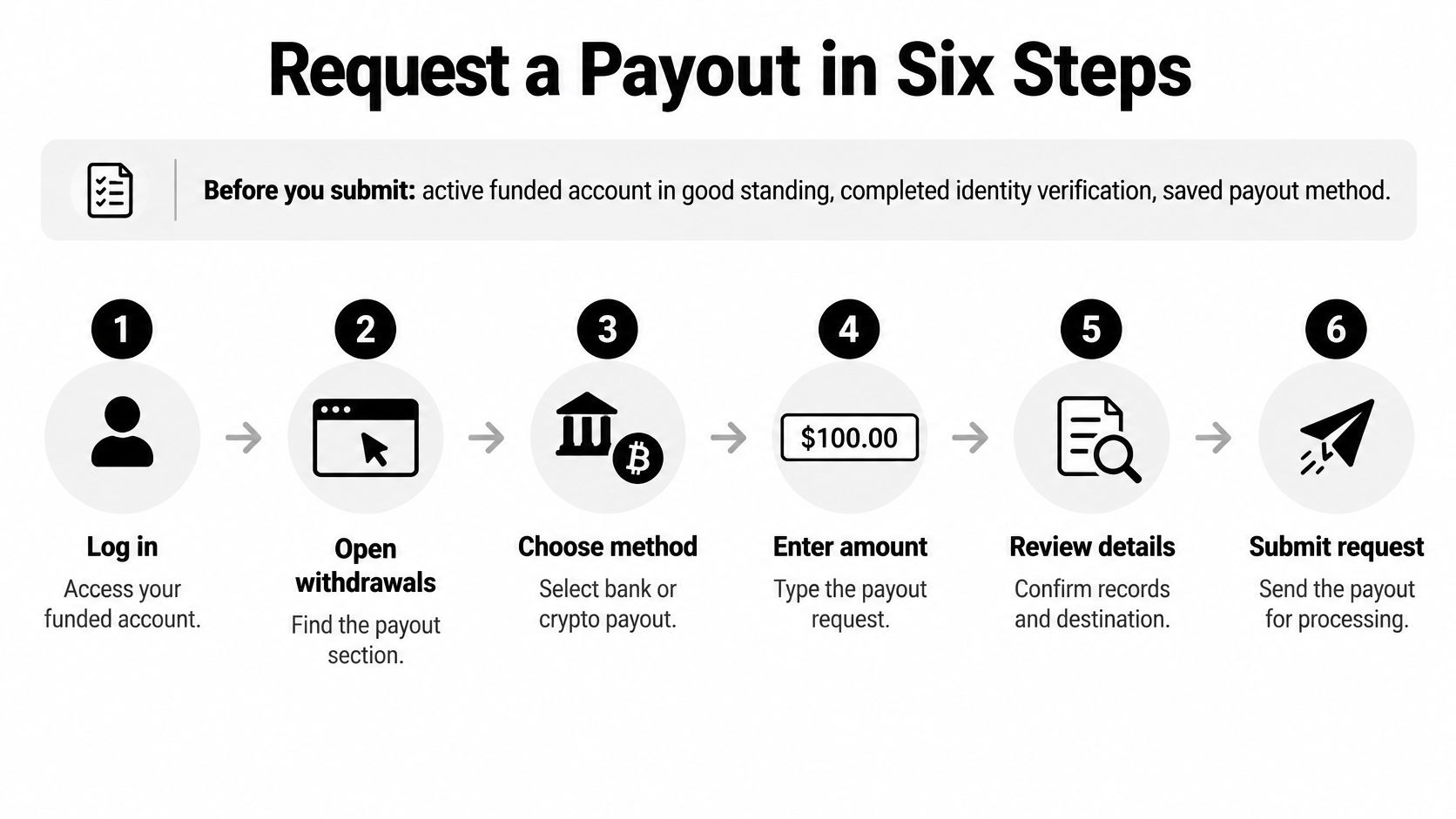
Request a Payout in Six Steps
A payout displayed on the dashboard isn't always cash you can withdraw immediately. Use this workflow to request, time, and verify the payment without confusing closed profit with the available amount.
Before submitting, have an active funded account in good standing, completed identity verification, and a saved payout method. Resolve outstanding dashboard notices first, particularly anything affecting account eligibility or beneficiary details.
Submit only after the amounts reconcile
Open the payout section. Read the available amount rather than relying on the headline profit tile. Check the statement period and whether the amount is currently requestable.
Confirm your profit split. Match the displayed split (80%, or 90% or 95% with an upgrade) to your account agreement. If they disagree, resolve the discrepancy before submitting.
Choose bank or crypto. Select the saved destination, then inspect the details again. A saved beneficiary can still be outdated, and a wallet service can change its supported deposit instructions.
Enter the amount and review. Check the currency, any displayed deduction, and the balance that will remain before you submit. Don't request the maximum automatically if that would leave an uncomfortable trading buffer.
Save the request ID and timestamp. Watch for the status to move from pending to processing. Capture any action-required notice instead of submitting another request.
Confirm receipt and download the statement. Match the received amount to the approved payout and identify any receiving-side charges. Keep the statement with the corresponding bank deposit or wallet transaction.
Pause when the available amount needs explaining
For example, suppose closed profit is $1,800 but the withdrawal screen shows $1,500 available. The $300 gap might reflect open exposure, an allocation adjustment, or deductions, but the difference alone doesn't identify the cause.
Open the calculation or statement details and account for each adjustment. If the dashboard doesn't explain it, ask support for the payout calculation before approving the request.
Scheduled requests follow the account's cycle, while on-demand access allows requests between eligible cycles. Check the schedule and cutoff in your dashboard rather than assuming a newly closed trade immediately becomes withdrawable.
Before submitting: You should be able to explain the difference between trading profit, your allocated share, and the amount requested without guessing.
Copy these steps into a personal checklist for your first request. Keep using it after changing accounts, payout methods, or add-ons, because those changes can alter eligibility and processing.
Common Payout Delays and How to Fix Them
A payout can look late while it's still pending within the normal processing window, 1:46h on average under the company’s stated timing. Start by identifying its status, then work through the relevant symptom instead of sending repeated requests.
Payout delay symptoms, causes and fixes
| Symptom | Likely cause | Fix |
|---|---|---|
| Pending well beyond the 1:46h average | Normal queue or cycle cutoff timing | Check the cutoff date, then wait one business day before contacting support |
| Request rejected | Missing or mismatched verification details | Match the name and documents to your profile, then resubmit once |
| Payout on hold | Account under review for a rule question | Check dashboard notices and documents, then contact support with the request ID |
| Crypto not received | Wrong network or mistyped address | Check the transaction hash on the network explorer and send the hash to support |
| Bank deposit short | Currency conversion or intermediary bank fee | Compare the amount against the payout statement and your bank's fee notice |
| Amount lower than expected | Open exposure or deductions excluded from headline profit | Reconcile the account calculation against the statement |
Escalate with evidence
First, allow the normal processing window unless the dashboard shows a rejection, security problem, or action-required notice. A pending status alone doesn't establish that funds have been sent.
Next, inspect dashboard notifications and outstanding documents. For identity or beneficiary issues, follow the account verification process rather than uploading unrelated documents into a general chat.
Finally, contact the company's 24/7 multilingual support with the request ID, timestamp, payout method, and transaction hash or bank reference. Attach the statement and relevant receipt details from your payout file so support can compare approval, dispatch, and receipt.
For example, if a crypto transfer appears on a different chain from the one you expected, include the transaction hash in your first message. An explorer may confirm where the transaction went, but it doesn't establish that recovery is possible.
Don't repeatedly resubmit the same payout while support investigates. That creates duplicate records and makes reconciliation harder.
Use official support for account decisions. Community members may offer useful context, but don't follow private-message instructions to transfer funds, reveal credentials, or pay a recovery charge.
Frequently Asked Questions
These answers address the usual sticking points; the detailed checks are in the relevant payout guidance above.
Does a losing cycle still produce a payout?
No eligible profit means nothing to split, so the profit-share amount is zero for that cycle. Check the scheduled period and cutoff before deciding which trades belong in the calculation.
What if my bank account name differs from my profile?
A name mismatch is a common reason for rejection, so match the beneficiary to your verified profile before submitting. If you've changed your legal name, resolve the verification record rather than trying different spellings.
Is an open trade at cutoff included in my payout?
It may not qualify until it's closed, even if the position currently shows a gain. Check the cutoff date and treatment of unrealized positions in your dashboard before the cycle ends.
Do I need to report my payout for tax?
Your reporting obligations depend on your country, legal relationship, and agreement, not just the profit-share label. Bring the payout statements and payment records to a qualified tax professional instead of estimating spendable income with a flat rate.
Compare Account Types Before Your Next Request
The next step is to choose the account whose rules fit the payout cycle and split you've reviewed. MyFundedCapital is one prop-firm option offering simulated funded accounts with profit-share payouts, rather than a personal brokerage balance you own.
- Instant Funding Provides immediate access to live-style trading in a simulated environment.
- Challenge routes The 1-Step or 2-Step Challenge offers access to account sizes from $5K to $100K, with scaling paths up to $500K, subject to program requirements.
- Faster-payout add-on Changes the timing of eligible on-demand requests. Compare the cost with your actual cash-flow needs before choosing it.
Before selecting an account, read the 5% daily loss limit and up to 10% maximum drawdown rules. Calculate how a losing day and a withdrawal would affect your available balance, and verify whether the drawdown calculation changes after payout.
Compare the account types on the firm's website, then start a challenge only when the rules fit your plan and you accept the risk. Trading involves risk of loss, profit splits depend on account terms, and this article is educational only and not financial advice.
MyFundedCapital offers Instant Funding and challenge-based simulated accounts with profit-share payouts through bank and crypto methods. Visit MyFundedCapital to compare account terms, payout schedules, and withdrawal options before choosing a program that fits your trading and cash-flow plan.
