If you're trying to manage several prop firm accounts at once, the hard part isn't finding entries. It's keeping execution, sizing, and risk perfectly aligned while rules stay tight and a single mistake can wipe out multiple accounts at the same time. Apex trade copier can solve that, but only if you set it up like a risk tool first and a convenience tool second.
Most guides stop at "pick a leader and followers." That isn't enough. Configuring the copier is the critical task, as it must respect account size differences, daily loss limits, and the risk of local software failure at the worst possible moment.
Why Use a Trade Copier for Prop Firm Accounts
Manual execution across multiple prop accounts breaks down fast. One missed stop, one late exit, or one wrong size on a follower account can create a compliance problem even if your original trade idea was fine.
That is why traders use apex trade copier in the first place. It isn't just about saving clicks. It's about keeping a single trading decision consistent across a group of accounts.
What the tool actually changes
Apex trade copier is built to mirror entries, exits, and stop-loss handling across multiple accounts with trade replication speeds under 100 milliseconds, and it supports contract ratio management such as 1.0, 3.0, or 0.5 for different account sizes and risk profiles, according to QuantVPS's overview of Apex Trade Copier.
That matters when you're copying one strategy into several evaluations or funded accounts that aren't all the same size.
A practical example:
- Same-size accounts A 1.0 ratio makes sense when the leader and follower should take identical exposure.
- Smaller follower account A 0.5 ratio reduces copied size when the follower needs less risk.
- More aggressive scaling A 3.0 ratio increases follower size, but that only makes sense if the follower account can safely carry that exposure.
Why prop traders rely on it
In a prop setup, consistency is part of risk control. If your main account gets in, every other approved account should get in cleanly. If your stop moves, the rest should move. If you flatten, everything should flatten.
Practical rule: The bigger your account group gets, the less room there is for manual execution.
That doesn't mean every prop firm allows the same workflow. Before using any copier, check the firm's policy on mirrored execution and account management. This list of prop firms that allow copy trading is a useful starting point when you're comparing what is and isn't permitted.
Where traders get this wrong
The common mistake is treating apex trade copier like a "set it and forget it" tool. It isn't. It works best when:
- Your leader account is deliberate One account should control trade logic. Don't improvise across multiple masters.
- Your ratios are mapped before market open If you size on the fly, errors creep in.
- Your exits are just as important as entries A copier that opens positions correctly but closes them poorly still creates account damage.
Used properly, a trade copier reduces operational noise. Used casually, it just spreads one mistake across more accounts.
Initial Installation and Core Setup
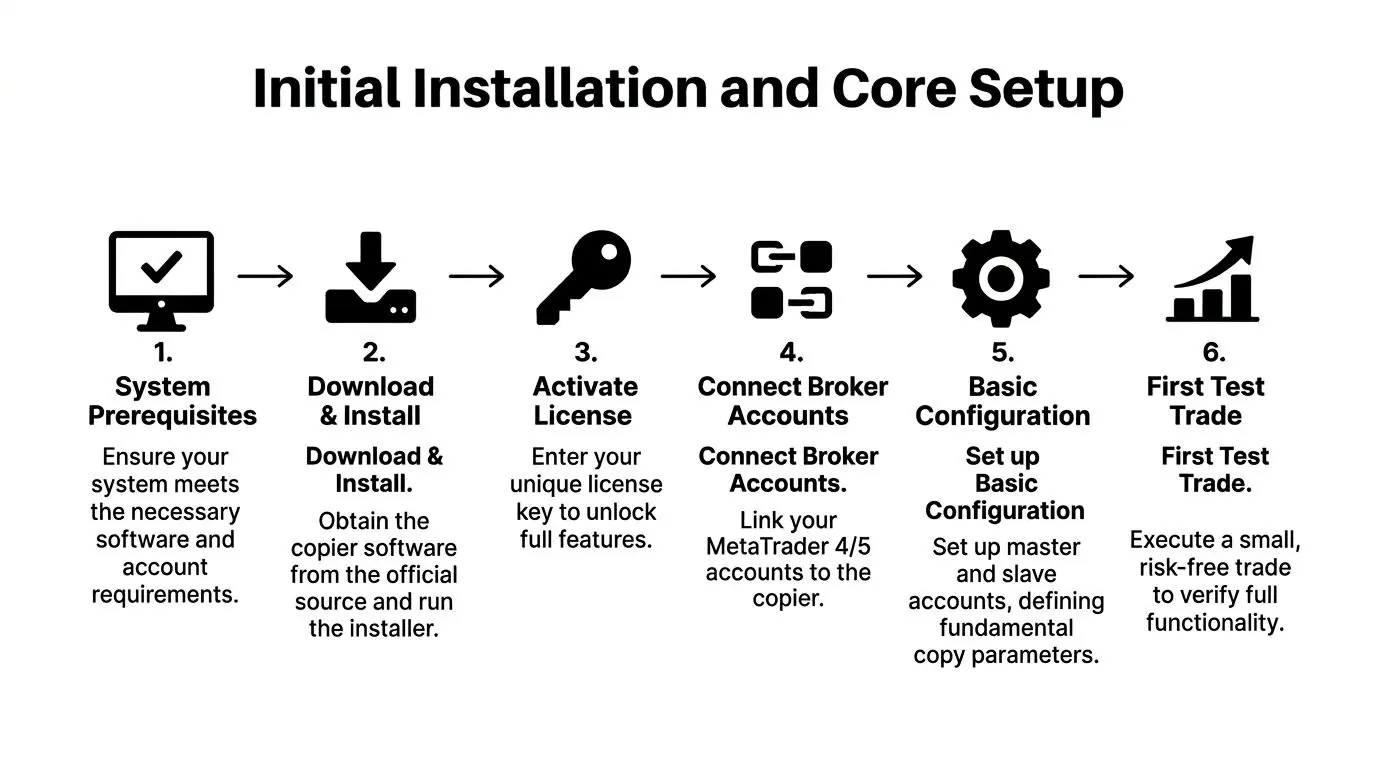
Apex trade copier is straightforward at the basic level, but the setup still needs discipline. Most problems start before the first live trade. The issue usually isn't the software itself. It's that traders rush through account mapping, skip simulation, or fail to confirm that the follower accounts are behaving exactly the way they expect.
What you need before installing
Start with the obvious requirements first:
- A working NinjaTrader 8 environment Apex trade copier is built around NT8 workflows.
- All accounts connected and visible If an account connection is unstable now, it won't improve once copying starts.
- A clear account plan Decide which account is the leader and which ones are followers before you touch the settings.
- A low-risk test environment Run the first setup in sim before introducing real prop risk.
If you want a broader view of software options before committing to your workflow, this overview of a copy trading app is a useful comparison point.
Basic install flow
The install itself is not the hard part. The hard part is making sure the first configuration is clean.
Download and install the copier
Use the official installer from the vendor you purchased from. Don't mix versions across machines or keep outdated backups running in parallel.Activate the license
Enter the license information and confirm the tool loads correctly inside NinjaTrader 8.Open the copier from the platform menu
The standard workflow uses the Apex Desktop Assistant and then the copier interface inside NinjaTrader.Choose the leader account
This account becomes the source of truth. Every copied order will originate from here.Select follower accounts
Add only the accounts you intend to mirror. Leaving extra accounts checked is how accidental participation happens.Assign initial ratios
Keep them simple for the first test. If all accounts are identical, use a one-to-one relationship. If they aren't, scale conservatively until you verify behavior.
The settings that matter on day one
You don't need every advanced option enabled right away. You do need the basics right.
| Setup item | What to check | Why it matters |
|---|---|---|
| Leader selection | Correct source account | Prevents copying from the wrong account |
| Follower checkboxes | Only intended accounts enabled | Avoids accidental fills in excluded accounts |
| Quantity ratio | Conservative and intentional | Keeps risk aligned from the start |
| Entry and exit copying | Both enabled if that's your plan | Half-configured logic causes uneven positions |
| Instrument handling | Match the product you trade | Reduces symbol confusion and crossover mistakes |
My standard first test
The first live-style test should be boring. That's the point.
- Enter one small simulated trade Don't test with speed, size, or multiple instruments.
- Check follower fills immediately Verify that all intended accounts copied the order.
- Modify the stop or target Make sure management changes carry through.
- Close the position manually Confirm followers flatten as expected.
- Review the account list again Make sure no extra account was involved.
If your first test looks perfect, test again. One clean trade proves less than most traders think.
What works and what doesn't
What works:
- A single leader account
- A short follower list at first
- Simple ratios
- Sim testing before market hours
What doesn't:
- Building the setup while the market is moving
- Changing account roles mid-session
- Assuming all followers can safely handle the same size
- Going live before you've confirmed order entry and order management behavior
Apex trade copier is easy to start. Running it safely is a separate skill.
Configuring Settings for Prop Firm Rule Compliance
An apex trade copier is either useful or dangerous in this situation. A copier that mirrors trades correctly but ignores prop firm limits can still burn accounts. The whole point is to translate one strategy into multiple accounts without turning account-size differences into rule violations.
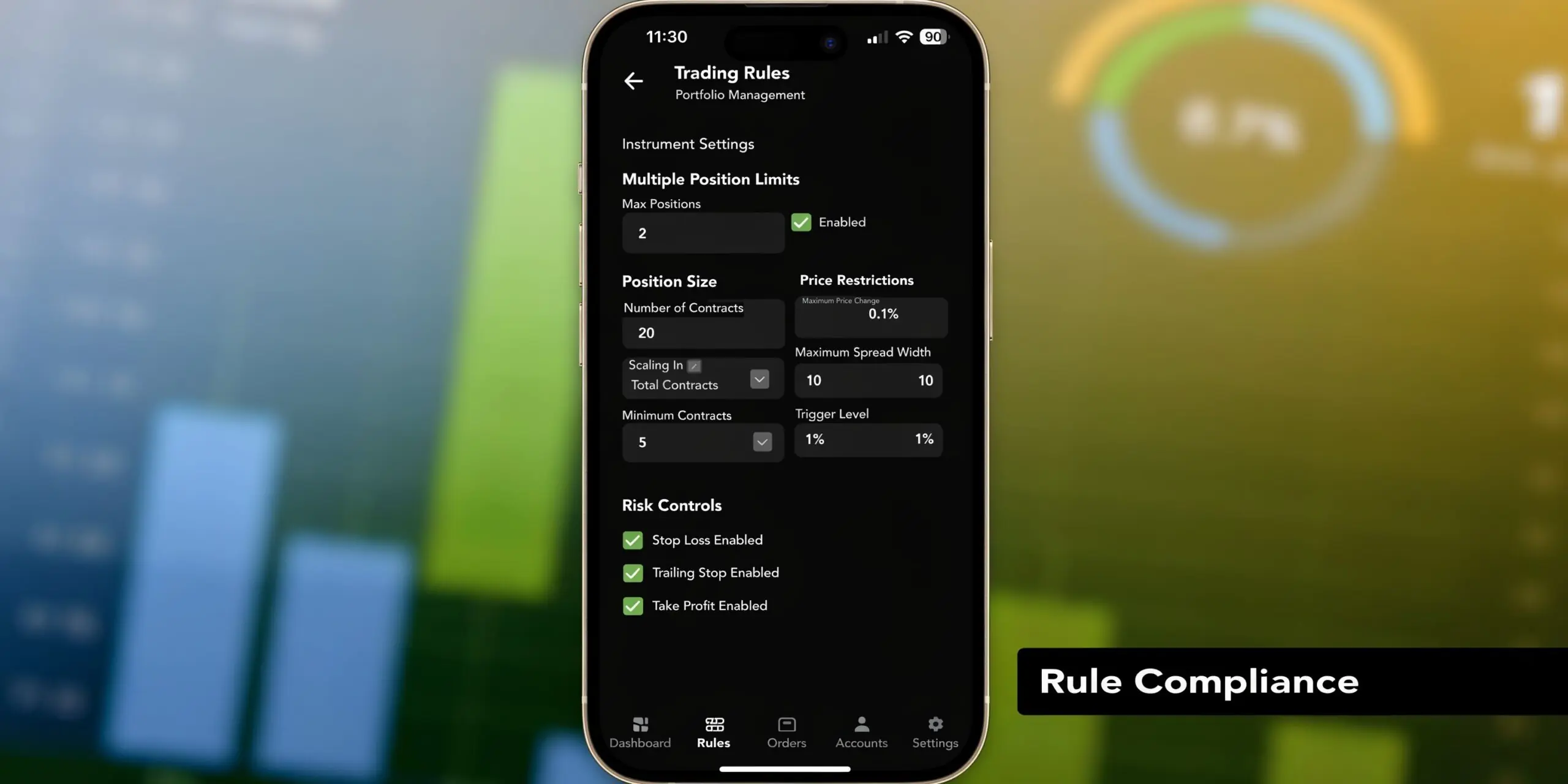
Apex trade copier includes prop-focused controls such as trailing drawdown tracking and daily loss limits, including a flat 5% threshold example, and it can auto-liquidate positions when thresholds are breached, according to Affordable Indicators' Apex Trade Copier overview.
Start with risk mapping, not contract mapping
Many traders begin with contracts. I think that's backwards. Start with account risk.
Ask three questions before assigning any ratio:
- How much loss can each follower account tolerate before you get close to the firm's limit?
- Are all followers the same account size?
- Is the leader the largest account, the smallest, or just the most convenient account to click from?
If your leader account carries more room than a follower, a one-to-one setup may be the wrong choice even if it looks simple.
A practical ratio example
Suppose you're copying from a larger account into a smaller one. A 0.5 ratio is a common way to reduce follower exposure when the smaller account shouldn't mirror full size.
That is the kind of setting that keeps one strategy consistent without pretending every account has the same cushion.
Use ratio logic like this:
Equal account profile
Use 1.0 when the leader and follower should take the same exposure.Follower needs half the size
Use 0.5 when the follower account has less room for drawdown.Follower intended to scale up
Use a higher multiplier only when that account's risk tolerance supports it.
The mistake is choosing ratios based on profit goals. Choose them based on the account most likely to break first.
Your smallest or most fragile account should often dictate the copier setup, not your strongest account.
Compliance settings that deserve attention
A lot of traders underuse the built-in protections. That's a mistake in prop trading.
Focus on these areas:
Daily loss protection
If your firm uses a hard daily loss rule, your copier setup should reflect that. A flat 5% style daily loss threshold is specifically referenced in the tool's prop-focused feature set in the source above.
That doesn't remove your responsibility. You still need to know where each account stands before putting on a trade, especially after a losing streak earlier in the session.
Drawdown monitoring
Trailing drawdown is where traders get surprised. A setup can be profitable overall and still violate a rule because one follower account drifted into the wrong size or took a slightly different fill.
Keep drawdown logic in view. Don't assume account equity movement stays identical just because the leader and follower started synchronized.
Auto-liquidation behavior
Auto-liquidation is useful, but it should be treated as a last line of defense, not your primary exit plan. If the system closes positions because a threshold is breached, your process has already entered damage-control mode.
My compliance checklist before live trading
I want these answers before the session starts:
Which account is the risk reference
Usually the weakest account in the group.Are all ratios intentional
Not "left over" from yesterday's setup.Are all followers allowed to trade this instrument
Don't assume every account should mirror every market.Are daily and trailing limits understood
If you don't know today's available room, don't start copying.Is the stop distance realistic for all followers
A stop that makes sense on the leader can still be too large for a smaller account.
What usually fails in practice
The ugly failures aren't complicated. They come from basic sloppiness:
| Bad setup habit | Result |
|---|---|
| One-to-one copying into uneven accounts | Smaller followers take too much heat |
| Ratio changes during active trades | Follower risk becomes inconsistent |
| Ignoring firm-specific loss rules | Accounts can breach even with a valid strategy |
| Treating the copier as a substitute for a daily plan | Traders lose track of available risk |
Prop compliance isn't about adding more settings. It's about removing ambiguity. Apex trade copier works best when every follower has a reason for being in the group, every ratio has a risk basis, and every session begins with limits already defined.
Advanced Latency and Execution Tips
Apex trade copier can be configured well and still perform badly if your execution environment is weak. In fast markets, the difference between a clean copy and a messy one often comes down to sync settings, machine stability, and where the platform is hosted.

According to the WealthCharts setup guide, around 60% of user errors come from mismatched Sync Intervals, and using a VPS can improve fill accuracy to 98% compared with around 75% on a local PC. The same source notes that short Time intervals in low-liquidity conditions can trigger premature desyncs, while oversized Tick intervals can create slippage during news events. Those details are in WealthCharts' Apex Trader Funding trade copier guide.
Time mode versus Tick mode
This is the setting traders overlook most.
Time-based sync
Time mode is easier to understand. The copier checks synchronization on a time interval.
It can work well in normal conditions, but if you set that interval too short in thin markets, desync protection can trigger when nothing is wrong. That's why overnight sessions and slower conditions need more patience than the open.
Tick-based sync
Tick mode reacts to market movement instead of elapsed time.
That can be useful, but if you let the tick threshold get too wide, fast news conditions can move the market far enough that followers don't stay aligned the way you expected.
Fast execution isn't just about speed. It's about choosing a sync method that matches the session you're trading.
Why VPS usually wins
Running the copier on your home machine sounds fine until your internet drops, Windows updates, charts freeze, or another platform process starts eating resources. That's why serious multi-account traders usually move the setup to a VPS.
A practical workflow:
- Use local only for testing Fine for sim, not ideal for critical live copying.
- Use VPS for routine execution Better consistency, fewer interruptions.
- Keep the setup lean Extra indicators, browser tabs, and unrelated tools increase the chance of lag.
- Monitor connection quality If your platform starts lagging, fix that before blaming the copier.
If your setup throws network-related failures, this guide to connection refused errors is a useful troubleshooting reference because those issues often show up before traders realize the platform environment itself is unstable.
If you're still choosing where to run your broader trading stack, comparing the best FX trading platform options can also help you think through platform stability and workflow fit.
How I handle desync warnings
Treat desync flags as operational alerts, not background noise.
When one appears, I check:
- Did the leader fill normally
- Did every follower receive the same entry logic
- Was the sync interval too aggressive for the market
- Did platform lag or connection instability show up at the same time
Don't just re-enable copying and hope. Find the cause first. In multi-account prop trading, a small execution mismatch can become a bigger compliance issue once exits start diverging.
Security Best Practices and Failure Management
Apex trade copier has one weakness that traders need to take seriously. It runs locally inside NinjaTrader 8. That means if your PC locks up, NT8 crashes, or the platform loses state during volatility, you're dealing with a software problem while positions may still be open.
That risk isn't theoretical. A key concern raised in discussion around the tool is that its local NinjaTrader 8 architecture lacks server-side state recovery, which leaves traders exposed to PC or platform crashes and can leave positions open across multiple accounts without synchronized closure during volatile conditions, as discussed in this YouTube review on Apex Trade Copier failure risk.
The failure that matters most
The dangerous scenario isn't that copying stops before you enter. It's that copying breaks after you enter.
If that happens, you may have:
- a leader account that exits,
- one follower that exits late,
- another follower still open,
- and no reliable automated recovery inside the same local session.
That is how a normal trade becomes a rule violation problem.
A copier failure is manageable only if you've already decided who checks what, in what order, and how to flatten manually.
The minimum failure plan
Every trader using apex trade copier should have a written response plan. Not a mental one.
Mine would include:
Identify the account state
Check which accounts are still open, which are flat, and whether stops are still working.Flatten risk first
If anything looks uncertain, reduce open risk before troubleshooting the software.Pause the copier
Don't let a broken session keep issuing instructions.Reconcile positions account by account
Confirm quantities, direction, and protective orders manually.Review logs after the event
Figure out whether the issue came from NT8, connectivity, system load, or configuration.
Practical hardening steps
Most traders focus on entries. Fewer spend time hardening the machine that is supposed to manage every account at once.
Use a checklist mentality:
- Keep the trading machine clean Don't run random software, background downloads, or non-trading workloads during the session.
- Reduce restart risk Disable anything that might interrupt the platform unexpectedly during trading hours.
- Separate testing from live use A machine used for experiments becomes less predictable.
- Document credentials and broker access securely If you need to intervene fast, fumbling for access wastes time.
For traders hosting their setup remotely, a general server hardening checklist is worth reviewing because basic system hygiene reduces the chance that infrastructure issues become trading issues.
What works better than optimism
These habits matter more than clever settings:
| Best practice | Why it helps |
|---|---|
| Sim test before live deployment | Exposes misconfiguration without account damage |
| Monitor platform health during the session | Lets you catch lag before orders drift |
| Keep a manual flatten routine ready | Gives you an immediate fallback |
| Limit complexity | Fewer moving parts means fewer failure paths |
Apex trade copier can be reliable enough for disciplined traders. It is not a substitute for operational preparedness. If you scale accounts with local software, you have to trade with the possibility of local failure in mind.
Frequently Asked Questions about the Apex Trade Copier
Can apex trade copier work with cTrader or DXtrade
This is one of the most common points of confusion. Apex trade copier is optimized for NinjaTrader 8, and discussion around non-NT8 use points out that integrations with platforms like cTrader or DXtrade often depend on alert-to-webhook bridges, with little data on performance, latency, or reliability across those environments, according to this YouTube discussion of Apex Trade Copier platform compatibility.
The practical answer is simple. If your workflow depends on cTrader or DXtrade, don't assume the same stability you'd expect from a native NT8 setup. Test every bridge in simulation first. Pay close attention to symbol mapping, quantity handling, and whether trade management events carry over cleanly.
What should I do if the copier fails during a live trade
Act like risk manager first, technician second.
Use this order:
- Check open positions across every account
- Flatten anything uncertain
- Pause the copier
- Confirm whether protective orders still exist
- Only restart after you know the exact account state
If you start troubleshooting before confirming exposure, you can make the problem worse.
How should I choose ratios for accounts of different sizes
Don't base ratios on what you'd like to earn. Base them on what the weakest account can survive.
A simple framework:
- Use 1.0 when account size and risk tolerance are effectively the same.
- Use 0.5 when a follower needs materially less exposure.
- Use larger multipliers carefully and only when the follower account has room for that added risk.
If one follower is much smaller than the rest, build around that account or remove it from the group.
Is apex trade copier safe to leave running unattended
I wouldn't treat any local copier as something to leave completely unattended during active market hours. It can reduce manual workload, but it doesn't remove responsibility.
The safer approach is:
- run it in a stable environment,
- watch for desyncs or platform issues,
- know your manual exit plan,
- and avoid adding unnecessary complexity to the session.
Trading involves risk of loss, and copy trading multiplies operational mistakes as easily as it multiplies convenience. This article is for educational purposes only and isn't financial advice.
If you're looking for a prop firm that supports manual, algorithmic, and copy-trading workflows across modern platforms, explore MyFundedCapital. You can compare account types, review funding paths, and choose the setup that fits your trading style before starting a challenge.