Vector-1144.svg
Vector-1143.svg
Vector-1148.svg
Vector-1141.svg
Vector-1149.svg

Not just different
from MT5

In many ways, better.

Trailing stops, built-in risk calculator, desktop app, native algo support. cTrader has everything MT5 has — and then some. Nothing to fear here.

BG-v1.png

Trailing Stop

Risk-Reward Tool

Desktop App

Python & C# Bots

Level II Depth

introduction-0
iconamoon_attention-circle-fill.svg

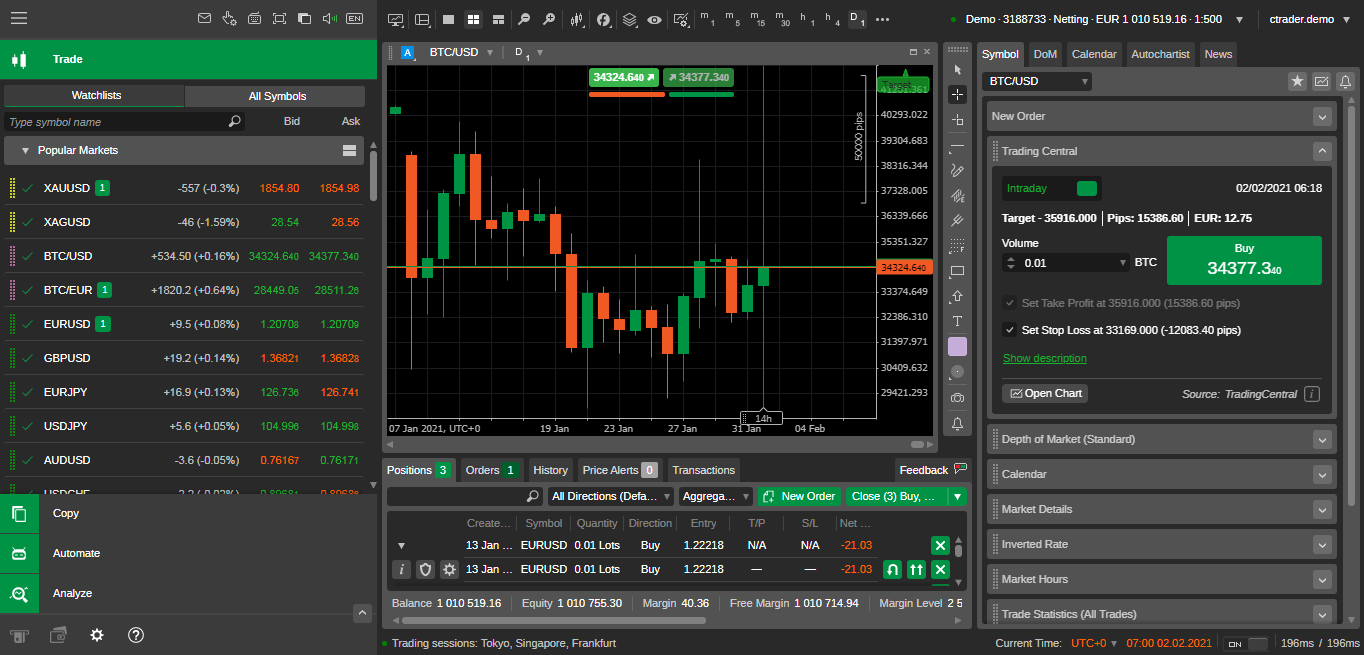
cTrader web platform — chart with indicators, Trade Watch panel, Level II depth, and order management.

Why traders love cTrader

Everything familiar from MT5 — plus tools you'll wish you had sooner.

Trailing stop — native

Toggle trailing on any position. Follows price automatically. No scripts, no EAs — just a switch.

Risk-Reward tool

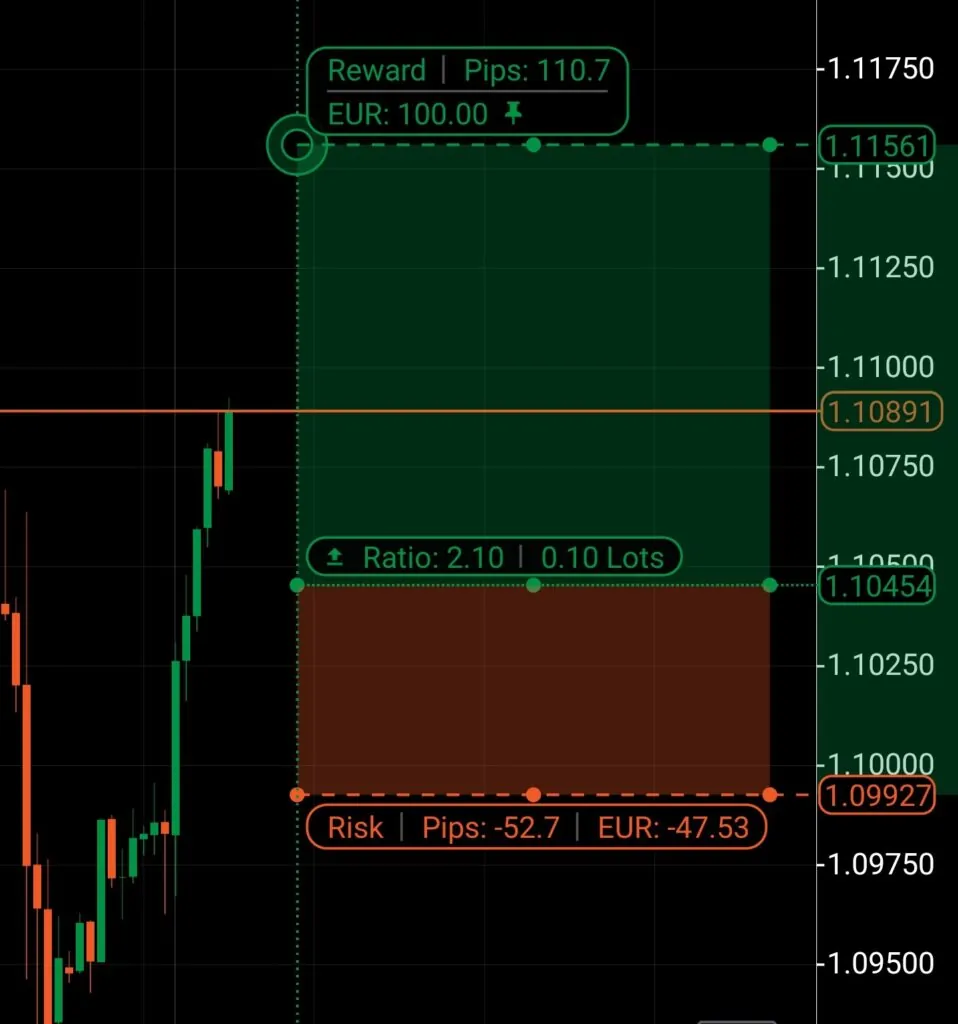
Set risk as $, % equity, or % balance — tool calculates lot size and places the trade. Right from the chart.

Desktop + Web + Mobile

Full apps for Windows, Mac, Web, iOS, Android. Same features everywhere. Switch devices seamlessly.

C# & Python bots

cTrader Algo: build bots in C# or Python. Backtest, optimize, deploy — even in the cloud, no VPS needed.

All order types + more

Market, Limit, Stop, Stop-Limit — everything from MT5. Plus zero minimum SL distance and weekend order placement.

Level II Market Depth

Three views: Standard, Price, VWAP. See where real liquidity sits — more transparent than most MT5 setups.

iconamoon_attention-circle-fill.svg

All MFC rules work the same on cTrader. Same 5% daily loss limit, 10% max drawdown, same leverage.
The platform is new — your trading conditions aren't.

BG-v1.png
Vector-1144.svg
Vector-1143.svg
Vector-1148.svg
Vector-1141.svg
Vector-1149.svg

The Risk-Reward Tool

The feature MFC traders love most about cTrader.

Size every trade from your risk limit

No more calculators. Set your max risk — the tool calculates lot size instantly.

With MFC's 5% daily limit, this keeps you in bounds on every trade — automatically.

dots-adjust-risk-reward-object
BG-v1.png

Start trading in 3 steps

From zero to first trade.

1

Create cTrader ID

Sign up with your email — one universal login for all cTrader brokers. Same email as MFC = auto-links your account.

2

Pick Hedging mode

When asked, choose Hedging — multiple positions per symbol, exactly like MT5 FX trading. Can't be changed later.

3

Place a test trade

Set Quick Trade preference. Open a small position. Toggle trailing stop. Try the Risk-Reward tool. You're ready.

cTrader vs MT5 — at a glance

Feature cTrader MT5
Access Desktop, Web, Mobile Desktop, Web, Mobile
Trailing stop Native toggle Available
Risk sizing Built-in chart tool Scripts / calculators
Market depth Level II (3 views) DOM window
Algo trading C# + Python bots MQL5 EAs
Copy trading cTrader Copy MQL5 Signals
Weekend orders Yes No
Min SL distance Zero Broker-set

See it in action

Official cTrader video tutorials.

Questions?

Quick answers. For anything deeper — our support team is here for you.

No — MQL5 doesn’t run on cTrader. You’d rewrite as a cBot in C# or Python. Same concepts, different language. cTrader Algo has templates and a built-in backtester.

One email/password login that works across all cTrader brokers. Your MFC trading account links to it. Sign in once — switch accounts freely.

Choose Hedging for FX/CFD trading — multiple positions per symbol, exactly like MT5. Can’t be changed later. When in doubt, ask our support before activating.

Payouts are handled by MFC, not cTrader. For account and payout questions, contact MFC support directly.

Get Your 100k Account For Free!

Sign up today for your chance to win a free $100K account. 1 winner every month!