

You're holding a losing trade, the daily reset is approaching, and the dashboard still shows room to trade, but one price move could violate several rules at once. Understanding at risk limitation rules means knowing which balance, equity figure, floor, and clock the firm actually measures, not just remembering a percentage.
At Risk Limitation Rules at a Glance
A funded-account rulebook usually separates daily loss, maximum drawdown, and trading permissions. Passing one test doesn't mean you've passed the others: an account can remain above its overall drawdown floor while violating its daily limit or a restricted trading window.
There's also a separate tax meaning. Under Internal Revenue Code §465, the at-risk limitation generally caps deductible activity losses at the taxpayer's economic amount at risk. That's a tax-deductibility rule, not a funded-account trading limit; the discussion below concerns trading controls only.
Core at Risk Limitation Rules and What They Cap
Use a hypothetical $10,000 account throughout, with a daily allowance equal to 5% of starting balance and a maximum drawdown allowance of 10%. These are worked-example assumptions, not a substitute for a particular program's current contract.
| Rule | What It Measures | Typical Limit | Reset Point |
|---|---|---|---|
| Daily loss limit | Loss within one trading day, including open and closed results | Example rule: 5% of starting balance, or $500 | Daily, at the program's set time |
| Maximum drawdown | Total loss from the starting balance or a qualifying peak | Example allowance: up to 10%, giving an initial $9,000 floor | Does not reset while the account is open; a trailing floor can rise |
| Session and news windows | When and how you may trade around sessions and events | Set by program terms and any enabled add-on | Each session or event window |
| Weekend holding | Whether positions may remain open over a weekend | Off unless enabled under the selected terms | Each weekend |
The limit that binds first governs the next decision. Having room under maximum drawdown doesn't give you permission to exceed the daily allowance, and spare loss capacity doesn't override a session restriction.
Read the Rulebook as Separate Tests
Before trading, extract the operative wording rather than relying on a marketing summary:
- Measurement Does the firm check balance, equity, or a defined combination?
- Reference figure Does the allowance use initial capital, the daily opening figure, or a peak?
- Trigger Does reaching the boundary count, or must the account move beyond it?
- Permission Is the instrument, session, news event, or holding period allowed?
Keep the answers beside your order-entry screen. A spreadsheet can calculate buffers, but it can't resolve an undefined reset rule or tell you whether an add-on is active.
Daily-loss arithmetic, drawdown mechanics, and trading-window permissions require separate checks. Trading involves risk of loss, and an account limit doesn't guarantee that an order will close at the intended price.
How Daily Loss Limits Are Calculated
Start with the reference figure recorded at the daily reset. A program may use closed balance, equity, or another expressly defined calculation, so don't assume the terminal's daily profit-and-loss display matches the firm's breach engine.
For this worked example, assume the account starts the trading day at $10,000, the daily allowance is $500, and the rule includes realised and floating losses. Ignore transaction costs initially so the arithmetic stays visible, then include any commissions, financing charges, and other adjustments specified in the terms.

Follow the Calculation in Order
- Record the reset figure. The example starts at $10,000, with no earlier results allocated to the new trading day.
- Add realised results. An earlier closed trade lost $100, leaving a closed balance of $9,900.
- Add floating results. The remaining open trade shows minus $350, bringing current equity to $9,550.
- Calculate the remaining buffer. The total daily loss is $450, leaving $50 beneath the example's $500 allowance.
A further $50 adverse move takes equity to $9,500 and uses the full allowance. For planning, treat that boundary as a breach rather than a usable execution target; confirm whether the actual contract triggers at the limit or only beyond it.
A later recovery doesn't erase an earlier violation under continuous measurement. Closing the trade after the dashboard flashes a breach is damage control, not a reset of the account's eligibility.
Practical rule: Your remaining daily buffer is a ceiling on account exposure, not a target loss for the next trade.
Check What the Platform Includes
The useful comparison isn't balance versus equity alone. You also need to know how the firm allocates an overnight position, whether trading costs count immediately, and whether a profitable closed trade changes the day's available allowance.
If you're comparing different funded-trading models, Pineflows' guide to compare Topstep futures and spot forex provides context for investigating their different structures. Use any comparison as a starting point, then verify the exact calculation in the selected program's terms.
Don't increase size because the dashboard appears to show extra room after a profitable trade. First establish whether that profit genuinely expands the permitted loss or merely changes the displayed account result.
Maximum Drawdown Types and Worked Examples
The drawdown floor is the account value that the relevant rule doesn't permit you to reach or cross. The important distinction is whether that floor stays fixed or rises after gains.
A static floor is the simplest baseline. In the hypothetical $10,000 account with a 10% allowance, the floor is $9,000: initial balance less the permitted loss.
Trailing rules require another question: what moves the floor? A floating equity peak and a closed-balance peak aren't interchangeable.
Drawdown Floor by Method on a $10,000 Account
The trailing examples below assume a percentage-based floor equal to 90% of the qualifying peak. A program using a fixed-dollar trailing distance produces different results.
| Drawdown Type | How the Floor Is Set | Main Risk |
|---|---|---|
| Static | Initial balance minus allowance: $10,000 − $1,000 = $9,000 | Open losses can reach the floor before a trade closes |
| Trailing equity | Highest equity less the percentage allowance: $10,600 × 90% = $9,540 | A pullback from floating gains can reach the raised floor |
| Trailing balance | Highest closed balance less the percentage allowance: $10,400 × 90% = $9,360 | Open losses reduce the buffer even though open gains don't raise this floor |
A rule described only as trailing drawdown is incomplete for position sizing. Establish whether the distance is a percentage of the peak or a fixed cash amount, whether peaks update intraday or after the session, and whether trailing stops at a specified level.
The Floating-Profit Trap
Suppose the same account reaches $10,600 equity and subsequently falls to $9,600. Under the percentage-based trailing-equity example, the floor remains $9,540, leaving just $60 of room.
That account is below its original $10,000 starting balance, despite having made an earlier floating gain. The trade gave back enough profit, and then capital, to leave almost no usable buffer.
The trader's mistake would be sizing from the original allowance rather than the current floor. A trade that looked modest before the peak may be too large after the floor rises.
- Static method Calculate exposure against the fixed boundary.
- Trailing equity method Monitor qualifying peaks while positions remain open.
- Trailing balance method Recalculate after closing profits that raise the reference balance.
Partial profit-taking can reduce remaining exposure, but it isn't a universal fix. Under a trailing-balance rule, closing a winner may itself raise the floor.
A profit on the screen isn't the same thing as permanent room to take another loss.
Confirm the drawdown method before sizing any position. Maximum drawdown is a contractual loss limit, not a guarantee of protection against market losses.
Session Rules, Resets and Trading Windows
Timing rules can invalidate a trade even when its cash risk is comfortably inside the account's limits. Put the permitted schedule into your trading platform's calendar rather than relying on memory.
- Reset clock Confirm server time and its relationship to local time. A trade entered at 1 a.m. local time, for example, may belong to a different server trading day.
- Starting figure Establish whether the new day begins from closed balance or equity, including the treatment of existing positions.
- Session restrictions List permitted instruments and hours before placing orders.
- News windows Check whether restrictions cover entries, exits, pending orders, or holding through a release. Confirm the exact window and any active add-on.
- Weekend holding Treat permission as something to verify, not something implied by access to an open market.
- Holiday schedules Check exchange hours, broker notices, and executable spreads before trading thin sessions.
Write the reset time, news restrictions, and weekend permissions into the checklist before the first evaluation session. An enabled trading terminal isn't proof that the program permits the trade.
How to Check Your Limits Before Each Trade
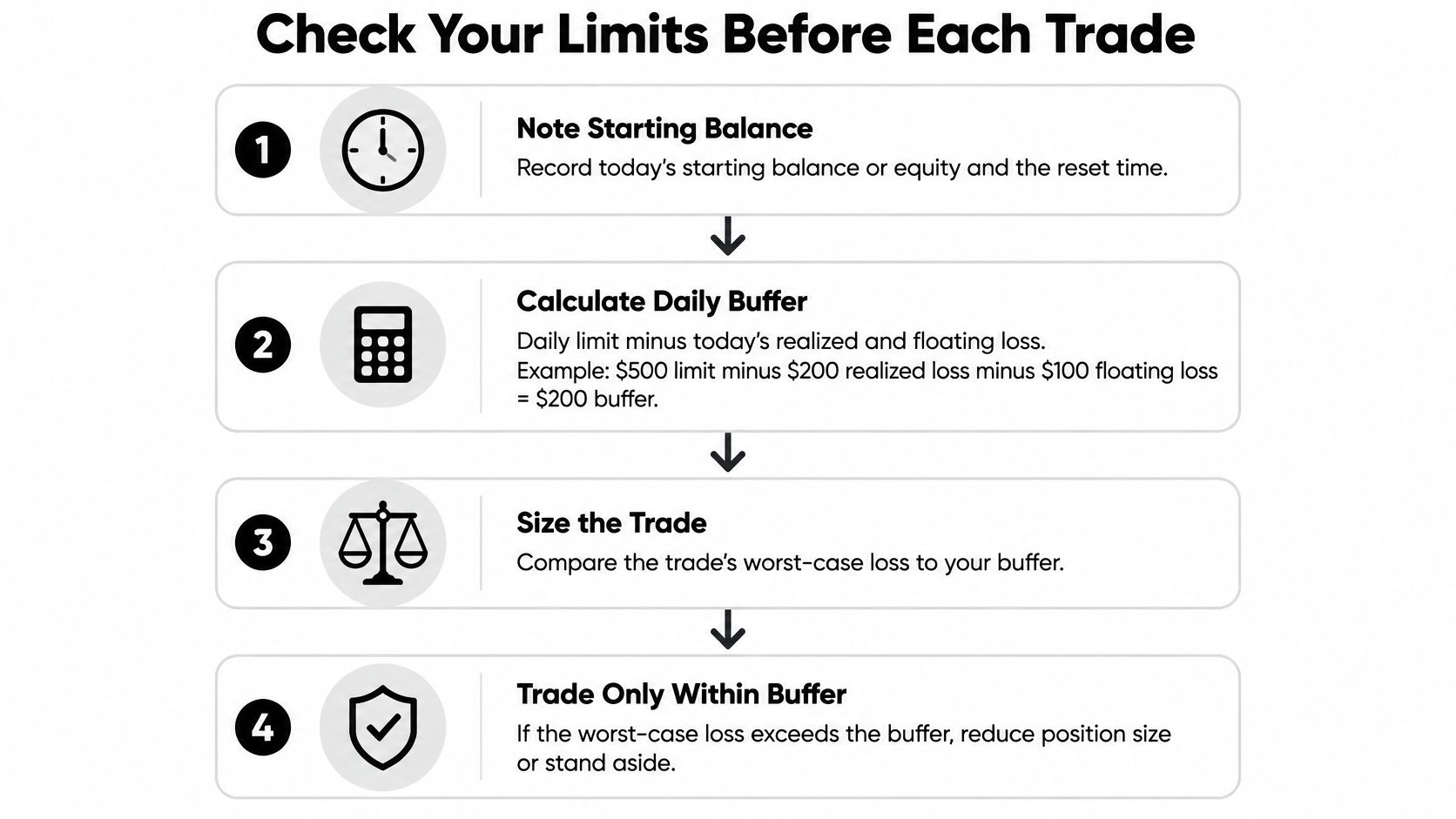
Use an account-level pre-trade check, not a separate risk estimate for each strategy. The smallest remaining allowance determines how much additional adverse movement the account can absorb.
The following routine uses the same hypothetical account after a different trading sequence. Its current equity is $9,820, with $180 of daily losses already counted.
Run the Numbers Before Sending the Order
- Record the daily reference and reset. Write down the example's $10,000 starting figure, the applicable server reset, and whether the dashboard uses equity or balance.
- Calculate the daily buffer. A $500 allowance minus $180 of counted losses leaves $320. Include floating exposure and relevant trading costs.
- Calculate the drawdown buffer. With a static $9,000 floor, current equity of $9,820 leaves $820.
- Choose the governing number. Use $320, the smaller buffer, because exhausting either allowance can breach the account.
- Set a working trade cap. An illustrative cap of one third of $320 is about $107, rounded down to $100. This is an example operating rule, not a recommendation for a particular account.
- Convert cash risk into size. With a $100 cap, a 20-point stop, and $1 per point per unit, size equals $100 ÷ (20 × $1) = 5 units, before costs and execution allowance.
- Check permissions and place the stop. Confirm session, news, and weekend terms before committing the example's $100 of planned price risk.
- Recalculate after execution. An illustrative daily stopping threshold of 60% of the $500 allowance is $300. Stop initiating trades when that self-imposed threshold is reached, rather than waiting for the contractual boundary.
The one-third cap doesn't account automatically for correlated positions, slippage, or an existing trade's remaining downside. Subtract committed exposure before deciding what a new order may risk.
Reconcile Your Calculation With the Terminal
Use the guide to tracking daily loss in the terminal to identify the relevant account displays. Keep a separate worksheet showing the reference figure, counted daily result, current floor, and already committed risk.
If the worksheet and dashboard disagree, don't choose whichever number permits a larger trade. Check trading costs, server-day allocation, open positions, and the rule definition before sending another order.
For instruments with contract-specific tick values, currency conversion, or minimum size increments, use the platform's contract specification. Round size down to a valid increment and leave execution room; a mathematically exact stop-risk calculation isn't a guaranteed maximum fill loss.
Edge Cases That Trigger a Breach
A gap beyond the stop can be especially costly because it defeats the price assumption used to size the trade. The order may be valid, the planned risk may fit, and the eventual fill may still push the account through a boundary.
The same problem appears in less obvious forms: uncounted exposure, an updated trailing floor, or multiple systems treating the same remaining buffer as their own.
Edge Cases, Breach Mechanisms and Prevention
| Edge Case | How It Triggers a Breach | Prevention |
|---|---|---|
| Open trade across reset | Existing floating loss enters the new day's calculation under the applicable reset method | Confirm reset treatment and reduce exposure before the cutoff |
| Weekend or holiday gap | Price opens beyond the stop, making the realised loss larger than planned | Verify holding permission and reduce size for gap exposure |
| Slippage on stops | Execution beyond the stop widens the actual loss | Rehearse on demo, review actual fills, and retain unused buffer |
| Trailing peak then pullback | A qualifying gain raises the floor before the account retreats | Track every floor update and reduce remaining exposure where appropriate |
| Stacked EAs or copy followers | Combined positions exceed the risk each system assumed was available | Apply one account-level exposure cap across all systems |
| Adding size during drawdown | Additional entries consume the remaining allowance faster | Pre-set the maximum number and total cash risk of adds |
| News release | Wider spreads and discontinuous prices invalidate normal execution assumptions | Follow news-window terms and avoid last-moment entries |
Demo execution helps test workflow, but it doesn't establish a reliable upper bound for future slippage. Review the program's news and weekend trading rules before assuming an add-on removes every restriction.
How One Open Trade Can Fail Several Tests
Consider a later session on the hypothetical account: the daily reference is $10,040, the daily allowance remains $500, and an earlier equity peak established a $9,540 trailing floor. If one open trade takes equity to $9,539, the account is $501 below the daily reference and $1 below the trailing floor.
If that trade is also held inside a prohibited session or event window, the same position violates a timing rule as well. Closing it can stop further exposure, but it doesn't make the earlier measurements disappear.
The Two Easy-to-Miss Problems
Reset exposure requires the actual formula. A position's floating result may affect the new reference figure, the next day's counted result, or both according to the contract; don't assume a reset wipes the slate clean.
Shared-system exposure requires central control. Two EAs trading related instruments can create overlapping directional risk even if they use different entry signals, and a copied position may arrive after another strategy has consumed the available allowance.
Account-level safeguard: Give every manual trade, EA, and copy follower access to the same risk budget.
Limits apply to the whole account, not independently to each strategy, chart, or terminal.
How Breaches Are Enforced and Recorded
Suppose the hypothetical account touches $9,499 for two seconds and then recovers to $9,800, with an applicable daily boundary of $9,500. Under continuous tick-based equity measurement, that excursion breaches the rule; under a closing-value-only rule, it wouldn't breach that particular test if the specified closing observation is above the boundary.
The measurement method therefore matters as much as the headline allowance. A chart candle, a terminal balance, and the firm's server-side equity record can show different aspects of the same event.
Establish What the Firm Actually Observes
Ask whether the program measures every eligible price update, scheduled snapshots, session-close values, or another defined observation. Also establish which prices mark open positions and how the system handles fees and financing.
Institutional risk regulation illustrates why a threshold alone isn't a complete risk model. The Basel Committee's revised market-risk framework uses Expected Shortfall to assess losses beyond a cutoff and recognises differing liquidity horizons; it doesn't prescribe retail prop-account rules, but the distinction is useful when planning for losses beyond normal execution assumptions.
Possible contractual outcomes include:
- Evaluation failure The relevant stage ends without qualification.
- Funded-account closure Trading access or account eligibility ends.
- Conduct-based termination Separate prohibited-trading provisions determine the consequence.
A breach may be recorded in account history even if the trade later recovers. Appeals, corrections, and any reinstatement depend on written terms and the firm's review process, not on whether the original trade eventually became profitable.
Keep Evidence You Can Reconcile
Maintain a personal log with server timestamps, instrument, position size, order identifiers, balance, equity, and the displayed risk floor. Save order-history exports and screenshots around disputed events, including the dashboard rather than only the price chart.
A screenshot is supporting evidence, not necessarily a complete record of an intraday excursion. Ask support to identify the observed value, timestamp, reference figure, and rule clause so you can reproduce the calculation.
Don't reopen a position to recover a disputed loss while the account's status is unclear. Confirm the exact measurement method, consequences, and review procedure before trading, because those details are program-specific.
Choose Account Limits You Can Follow
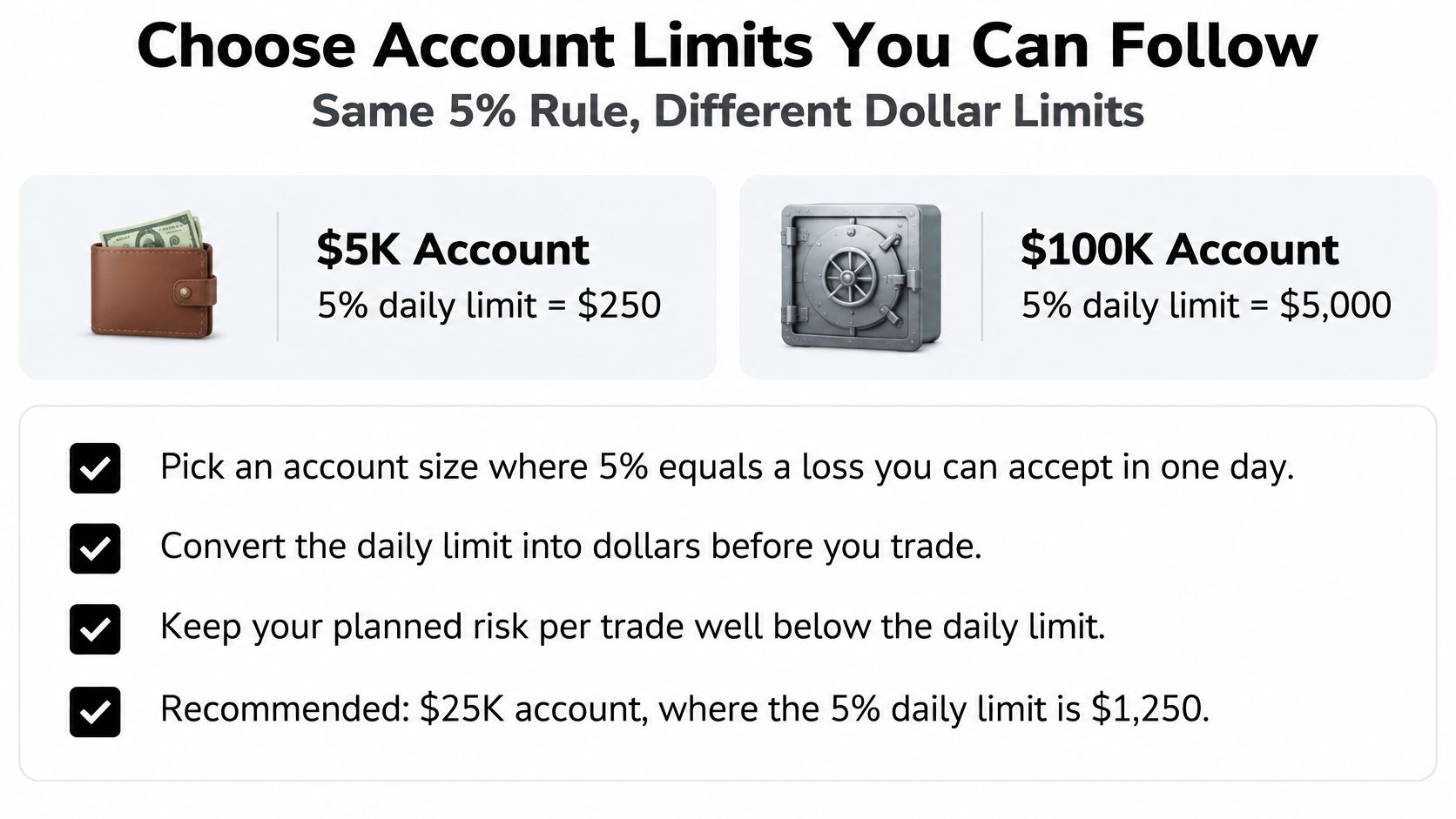
Choose an account whose working risk budget fits your strategy, not merely the largest nominal balance. In the hypothetical 5% daily-limit model, account size changes the dollar allowance as follows.
Daily Limit and Working Cap by Account Size
| Account Size | Daily Limit (5%) |
|---|---|
| $5K | $250, with an illustrative one-third working cap of about $83 |
| $10K | $500, with an illustrative one-third working cap of about $167 |
| $100K | $5,000, with an illustrative one-third working cap of about $1,667 |
A planned $150 trade risk fits inside the approximately $167 cap on the example's fresh $10K account. It doesn't automatically require a larger account, but costs, existing exposure, or earlier losses could require smaller size.
Use the funded-account sizing guide to compare your normal stop distance and cash risk with the available allowance. Compare 1-Step Challenge, 2-Step Challenge, and Instant Funding terms individually, especially their drawdown methods and reset calculations.
FAQ
Does a stop-loss guarantee compliance?
No. A stop controls the requested exit process, but gaps and slippage can produce a larger loss.
Does the daily reset restore maximum drawdown room?
Don't assume so. Daily measurement and the account's drawdown floor are separate rules.
Should I choose a larger account to keep my normal size?
Only if its fees, terms, and risk budget suit your circumstances. Reducing position size may be the more practical choice.
Trading involves risk of loss. This content is educational only and isn't financial advice.
MyFundedCapital offers simulated-capital evaluations through its 1-Step and 2-Step Challenges, alongside Instant Funding, with program-specific risk parameters. Visit MyFundedCapital to compare account types, check the current loss and holding rules, and start a challenge only after you've written your sizing and reset routine.
