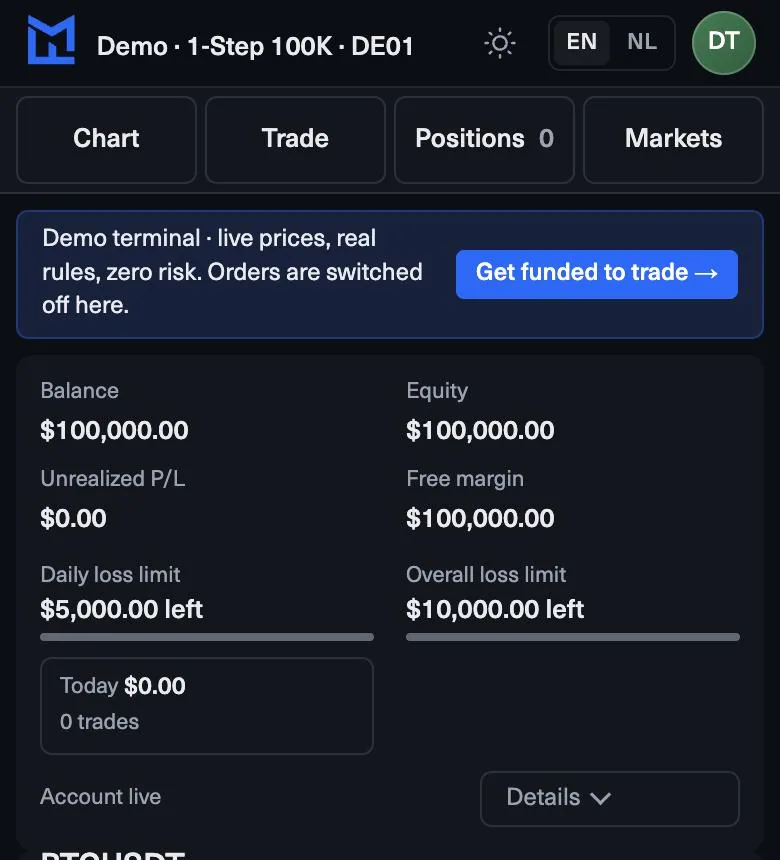
The header shows dollars left for the daily and the overall limit; the smaller one is your real room.
Open losses count: the plan checks equity, not only closed trades.
A personal daily limit below the plan’s pauses new trades for the rest of the day.
Where the limits live
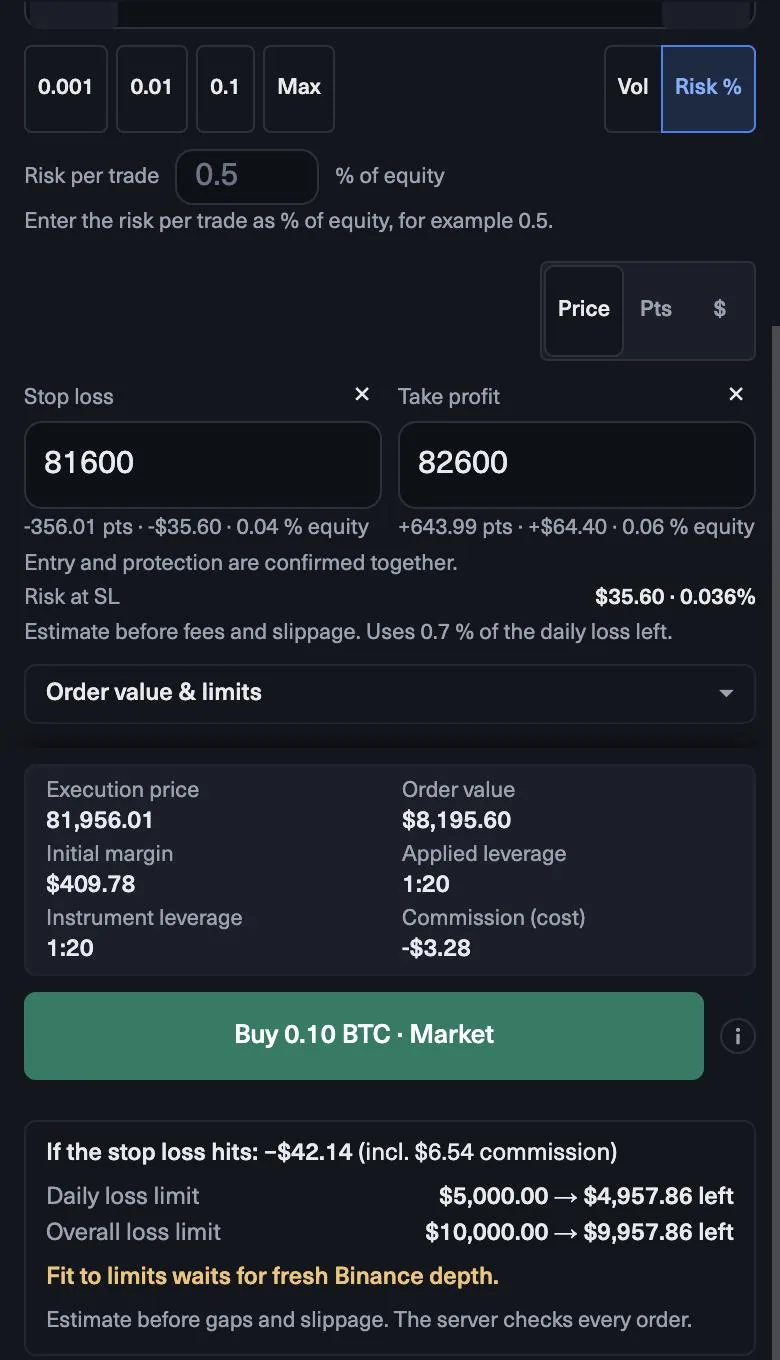
You see your limits in three places. The terminal header shows the daily and overall loss limit with the dollars left, plus your progress to the target. The order ticket shows what each limit would have left if the stop of the order you are about to send hits. The MyFundedCapital Dashboard shows each challenge with its limits, its progress and its payouts.
The header is the one to watch while you trade. It replaces checking a separate dashboard for your daily drawdown between trades.
How the daily room is set
On the 1-Step Challenge, the daily limit is 5% of the balance you closed at the day before, and the day resets at 17:00 New York time. On a new $10,000 account you may lose $500 today, so the floor is $9,500. Close at $10,300 and tomorrow’s floor is $9,785.
The other programs work the same way with their own figure: 5% on the 2-Step Challenge, 3% on Instant Funded and 3% on Prediction Markets.
Daily versus overall
The overall limit is the account’s maximum loss. On the 1-Step Challenge it is 10% and trails your highest closed balance until it locks at the starting balance. Both limits apply at the same time, and the one with fewer dollars left is your real room.
Early in an account the daily limit is usually the smaller one. After a few losing days the overall limit can come closer than the daily one. When the header shows less left on the overall limit than on the daily, size every trade from the overall figure.
Read an open trade
The plan checks equity, which includes open positions. Say the header shows $400 left on the daily limit before you trade. You open a position and it moves $150 against you: the header now shows about $250 left, even though nothing has closed.
The ticket helps you plan this before the trade. If the order would lose $200 at its stop, it shows that the daily limit would have $200 left after it. Look at that number, not just at the trade idea. If it is close to zero, the order is too big for the day.
Set your own daily limit
You can set a personal daily limit below the plan’s. When you reach it, new trades pause for the rest of the day. Many traders set it at about half the plan’s limit: on a $10,000 1-Step account, around $250. It keeps one bad session from turning into a breach, and it makes the decision to stop before you are under pressure.
Set it at the start of the week, not in the middle of a losing day. A limit you lower calmly on Monday protects you; a limit you raise after three losses only moves the problem to the plan’s own floor.
Quiz
Check yourself
0 / 3
Lesson complete
Nice work. … of 5 lessons in MyFundedCapital Terminal done.
MyFundedCapital School
MyFundedCapital Terminal checklist
Rules as of 17 Oct 2026. Tick each line before your next session.
1. How do you log in to MyFundedCapital Terminal for the first time?
- Two sign-ins: the Dashboard uses your order email; the terminal uses the login shown for each account.
- Nothing to install: it runs in Chrome, Edge, Safari or Firefox on your computer or your phone.
- Never share a password or a one-time code, not even with support.
2. How do you place an order with a stop loss and take profit?
- Every ticket shows the loss if the stop hits and what each limit would have left after it.
- Fit to limits sets the largest volume that fits; your own risk plan usually calls for less.
- One net position per symbol: no hedging, and Reverse flips a trade in one reviewed order.
3. How do you track your daily loss limit in the terminal?
- The header shows dollars left for the daily and the overall limit; the smaller one is your real room.
- Open losses count: the plan checks equity, not only closed trades.
- A personal daily limit below the plan’s pauses new trades for the rest of the day.
4. How do you use charts and timeframes in MyFundedCapital Terminal?
- Thirteen timeframes, from one minute to one month, on every symbol in the watchlist.
- Drawings are saved, so mark your levels once on the higher timeframe.
- Custom indicators are not supported; the built-in set covers the basics. Expert advisors run only by agreement, so write to support before you use one.
5. How do you request a payout in the MyFundedCapital Dashboard?
- Eligibility is a date plus conditions; the Dashboard shows both before you submit.
- Identity verification through Didit in the Dashboard must be done before your first payout.
- Processing averages 1:46h from request to approval, by bank transfer, e-wallet, crypto or local method.
myfundedcapital.com/learn/
Questions
Does the terminal stop me from breaking a rule?
It shows what every order would cost against your limits before you send it, and Fit to limits sizes the order inside them. The figures are estimates before gaps and slippage, and your plan’s rules still apply.
When does the daily limit reset?
At 17:00 New York time. The new day’s room is set from the balance you closed at.
Related lessons
Tools and rules
Rules shown here come from the help center and the live rulebook; your program terms apply.