You can have the cleanest setup on the screen and still blow the trade by sizing it wrong. That's the quiet problem with forex, the entry isn't usually what wrecks the account, it's the lot size, the pip value, and the part most traders skip, the account-currency conversion.
Free tool: work out the exact position size from your stop distance and risk per trade with our position size calculator.
Why Guessing Lot Sizes Destroys Funded Accounts
A trader sees EUR/USD, feels confident, and sizes the position by eye. The stop gets hit, and the loss is nothing like what they expected because they never translated their risk into an exact lot size or checked how the pip value interacts with the account currency. That mistake is brutal on funded accounts, where one sloppy order can turn a decent setup into a rules violation.
A risk calculator forex tool exists for one reason, to kill guesswork before the trade goes live. It turns a vague idea like “I only want to risk a little” into a number you can act on, and that number is the lot size that fits your stop-loss and account balance.
Practical rule: if you cannot state your max loss before entry, you do not know your position size.
For funded traders, that matters even more because the damage is not just market loss, it's rule loss. A trade can be technically correct and still push you toward a daily cap or a drawdown breach if the size is off. That's why disciplined traders treat sizing as part of the setup, not as admin work after the signal.
The rest of this guide is about making that math practical. The core formula is simple, but the details are where traders get caught, especially when account currency, cross pairs, and prop-firm drawdown limits all collide in the same session.
The Core Position Sizing Formula Explained
A trader can have a clean setup and still blow through a funded account if the size is wrong. The core risk calculator forex formula keeps that from happening by turning a risk cap into a concrete lot size. The backbone is simple, position size = (account size × risk percentage) / (stop-loss in pips × pip value). That gives you the order size before the trade goes live, and the output has to be read in the account currency or the number can mislead you.
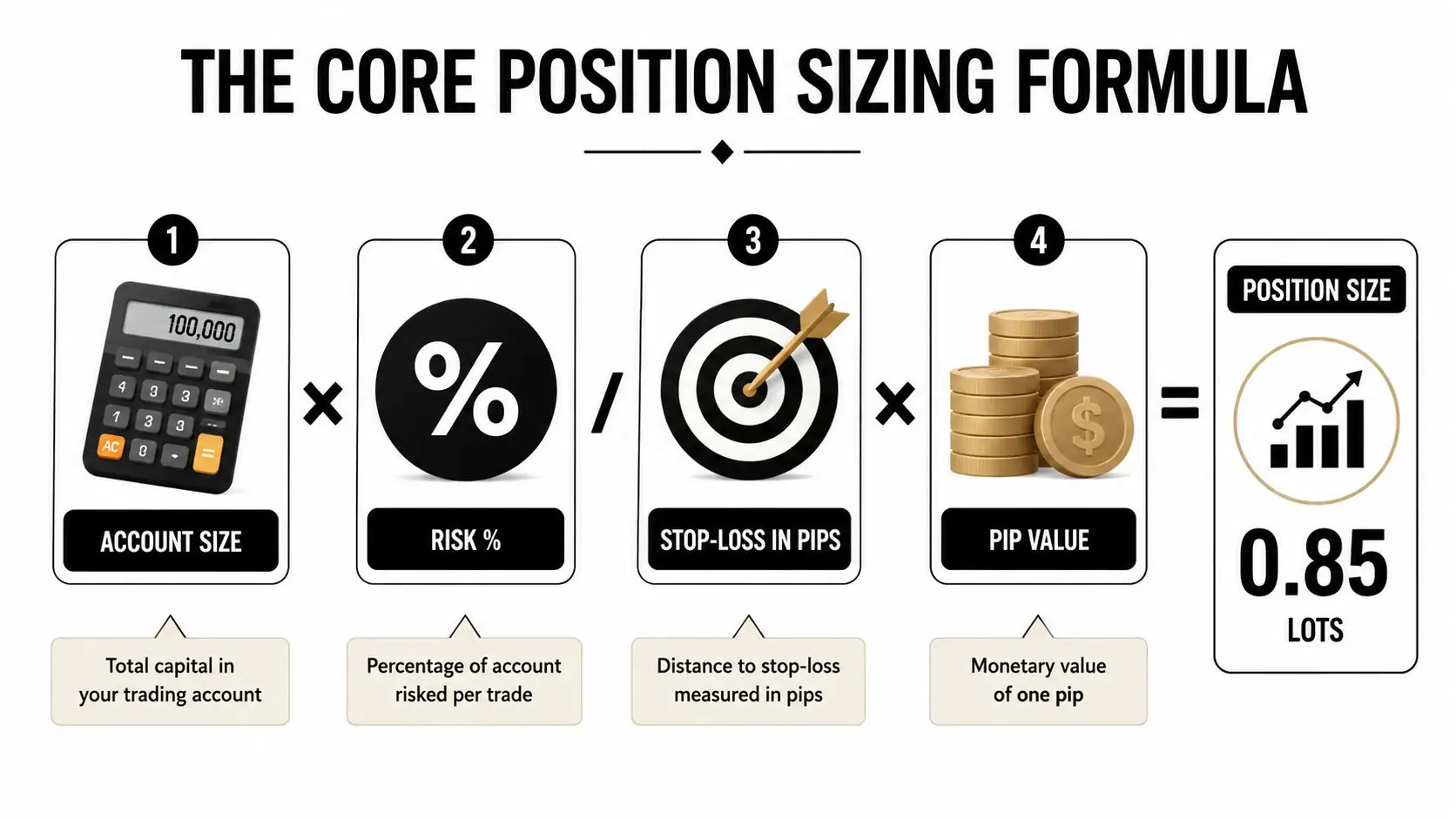
Break the formula into the four moving parts
- Account size the equity you are sizing from.
- Risk percentage the amount you are willing to lose on the idea.
- Stop-loss in pips the distance from entry to invalidation.
- Pip value how much each pip is worth in your account currency.
A simple account shows the logic fast. A trader with a $5,000 account risking 2% limits the trade to $100 in maximum loss, a benchmark often used in forex education and risk management guidance. If the stop is 20 pips, the formula tells you how large the position can be without crossing that line. That is the whole point of the calculator, it ties the trade to a loss ceiling before emotion gets a vote. A detailed breakdown of the position-sizing formula and MyFundedCapital's position-size calculator both show how the arithmetic is put together.
Keep the stop in pips and the pip value in the same currency context, or the output lies to you.
The 1% to 2% rule became common because it keeps capital preservation ahead of borrowing power. Education sources frame that range as the guardrail for a reason, a small change in risk percentage changes survival odds fast. The calculator does not make the trade good, it only makes the loss tolerable.
For traders who still work the math by hand, the sequence is repeatable. Set the account size, choose the risk cap, define the stop, plug in the pip value, and solve for position size. After a few reps, you stop thinking in lots and start thinking in acceptable damage.
Account Currency Conversion Most Guides Skip
Most calculator pages assume the account currency and the quote currency are already aligned. That works fine until you trade a cross pair or hold a non-USD account, then the pip value has to be converted before the lot size is reliable. A calculator that ignores that step can leave you overexposed without making it obvious.
Where the hidden error comes from
If your account is in USD and you trade a pair where the quote currency is not USD, the raw pip value from the pair is not yet the final number. It still needs to be translated into account currency, which is why some guides tell traders to add the conversion rate for correct pip value conversion. This pip explanation from MyFundedCapital is useful because it keeps the focus on what a pip represents before sizing gets messy.
That issue shows up fast with EUR/GBP and JPY pairs. A clean-looking 1% risk input can still produce a different lot size than expected if the quote currency and account currency don't match, or if the broker's contract size and lot-step rules force a smaller final order. Traders often blame the platform when the problem is that they skipped the conversion layer.
The practical fix is boring, but it works. Check the quote currency, confirm the account currency, then convert the pip value before trusting the output. If you are trading crosses regularly, this is not optional housekeeping, it is part of the position-sizing formula.
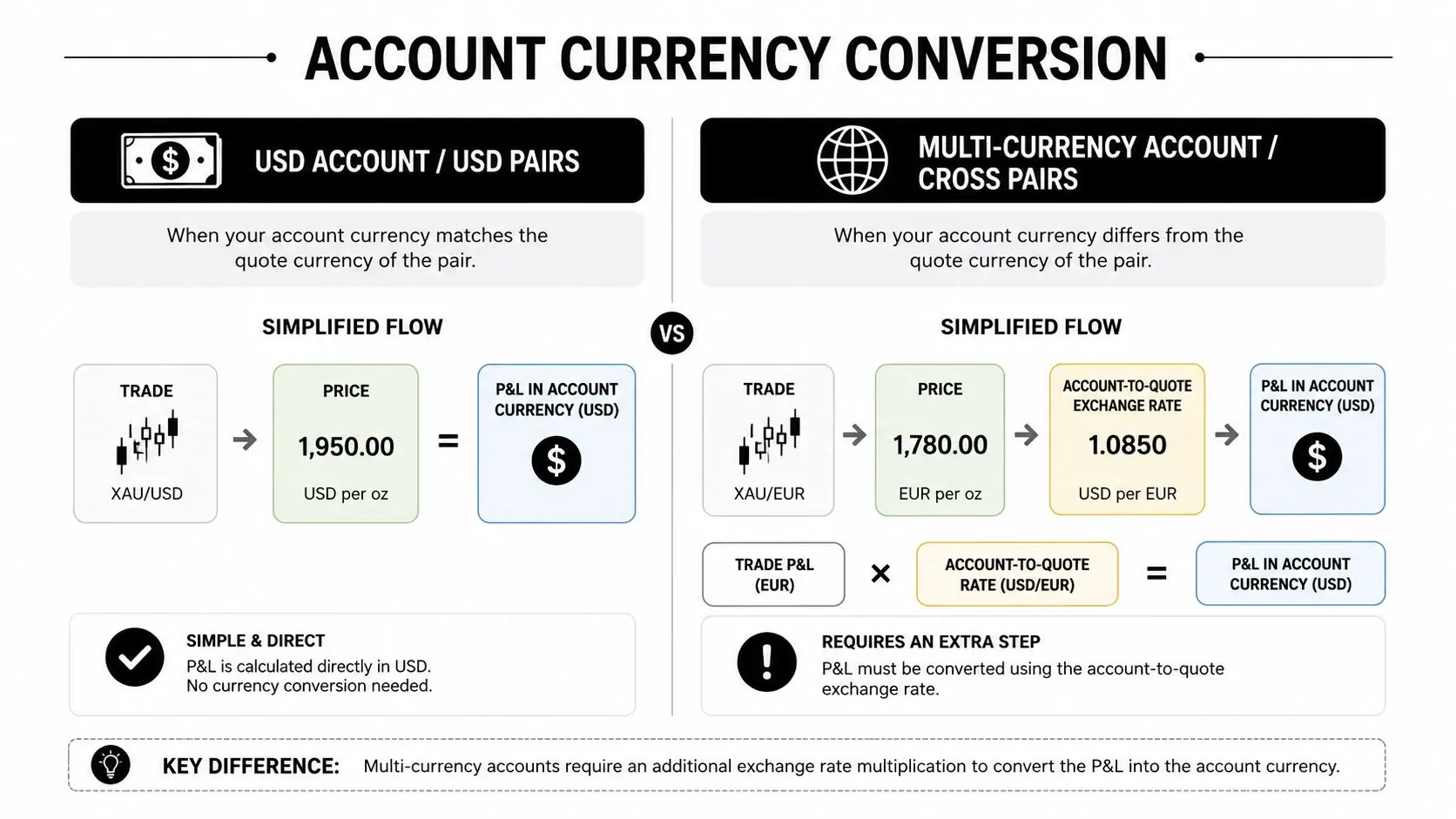
What to verify before you size the trade
- Account currency confirm whether the account is USD, EUR, GBP, or something else.
- Quote currency check whether the pair settles in the same currency.
- Pip conversion convert the pip value when the currencies differ.
- Broker constraints confirm contract size and lot-step increments before sending the order.
If the calculator doesn't show the conversion step, treat the output as provisional, not final.
That's the gap most traders miss. The math itself isn't hard, but the conversion layer is where a lot of “looks right” setups become oversized without warning.
Building a Working Calculator in Google Sheets
A spreadsheet is still the most useful home for a risk calculator forex workflow because you can see every assumption. Web tools are fast, but a sheet lets you control the inputs, add the conversion rate, and flag bad trades before they go live. That matters when you want a calculator that matches how you trade instead of how a generic website guesses you trade.
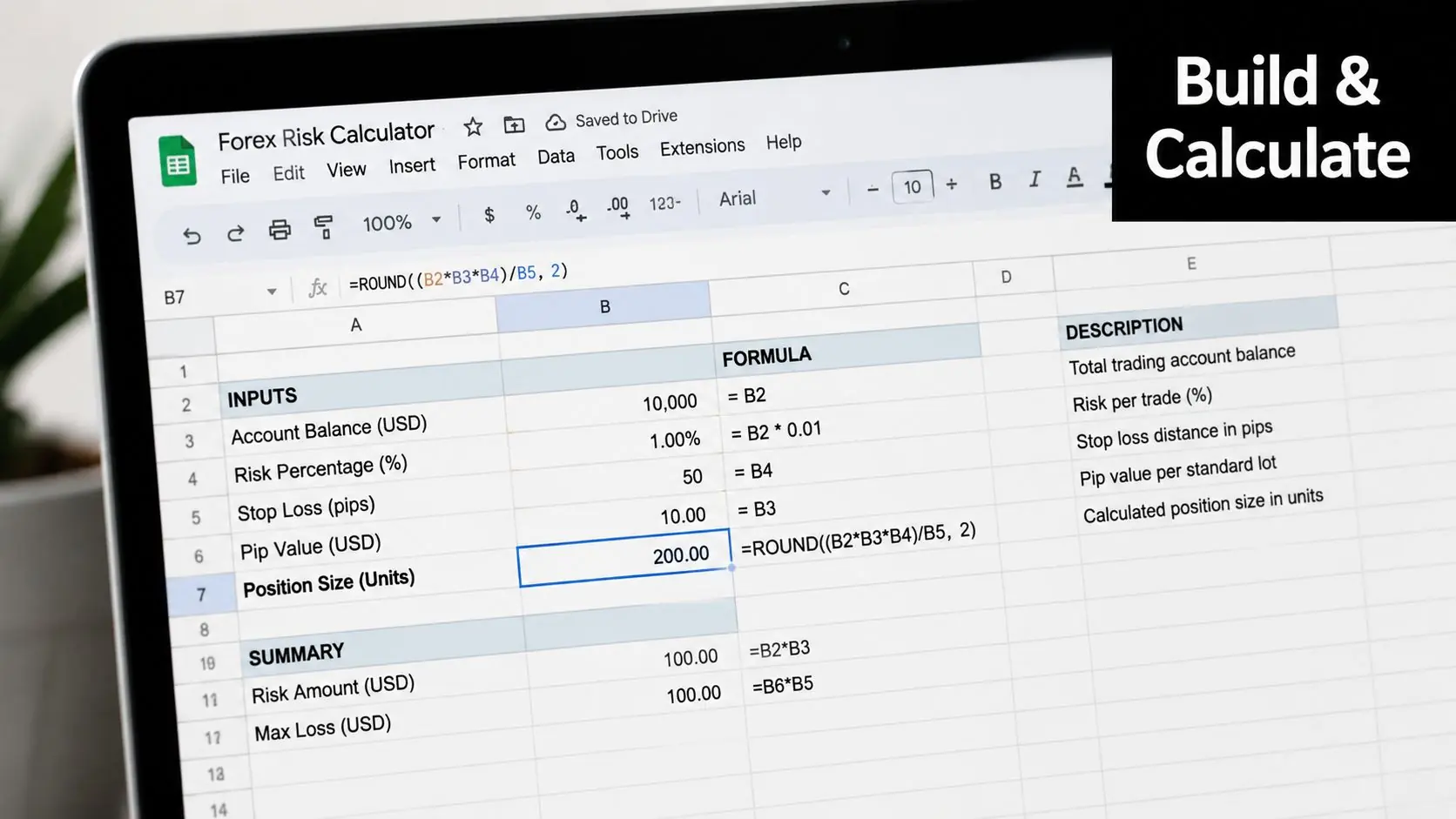
A simple sheet layout that works
Set up these inputs in column B:
- B2 Account Balance
- B3 Risk Percentage
- B4 Stop-Loss in Pips
- B5 Pip Value
- B6 Conversion Rate, if needed
Then use a formula for risk in dollars or the account currency, and another for position size. If the pair needs conversion, keep the conversion rate visible in the sheet so you can update it when the market moves. That way the lot size reflects the actual account currency, not a stale assumption.
For a second pass, use a larger account and a different pair to test the sheet. A $10,000 account risking 1% on GBP/JPY with a 25-pip stop is a good stress test because JPY pairs force you to respect pip value mechanics instead of guessing. Once the sheet handles that case cleanly, it's much closer to something you can rely on.
Add a safety flag for prop-style discipline
A sheet gets more useful when it warns you before you break your own rules. Use conditional formatting to highlight the output cell if the calculated loss would exceed your personal daily limit. That visual prompt is simple, but it stops a lot of revenge-sized decisions before they happen.
If you want a practical path, build the sheet once, test it on three pairs, then keep it open during execution. Traders who do that usually make fewer sizing errors than traders who keep reopening a web calculator and trusting the number without checking the inputs.
Aligning Calculator Output with Prop Firm Risk Rules
A lot of traders get the position size right and the account management wrong. The calculator only tells you the risk on one trade, while prop firms care about what happens across the whole day and the whole drawdown path. That is where people lose accounts with otherwise decent entries.
Why single-trade math is not enough
MyFundedCapital uses a 5% daily loss limit on its Challenges (3% on Instant Funding) and up to 10% maximum drawdown, so the trade-size decision has to fit both the setup and the session. On a $50,000 account, risking 1% per trade means $500 per trade. Four losses in one session would put realized losses at $2,000, which is still under the $2,500 daily cap, but it leaves very little room for error or slippage. The firm's trailing drawdown explanation is worth reading if you trade in bursts or scale into positions.
That is why the question is not “How much can I risk on this one idea?” It's “How many losses can I absorb today before I hit the rule that ends the session?” A trader who sizes every position in isolation is already missing the bigger constraint.
A practical drawdown check before entry
Use this simple checklist:
- Set a personal daily ceiling below the firm limit. Don't aim right at the rule line.
- Count consecutive losses at your chosen risk. This shows how fast the day can turn.
- Reduce size when already in drawdown. A fresh trade after a rough run needs less risk, not more.
- Pause after clustered losses. The calculator can't stop tilt, but your process can.
| Drawdown Scenarios by Risk Per Trade on a $50,000 Account | |||
|---|---|---|---|
| Risk Per Trade | Dollar Risk | Losses to Hit 5% Daily Limit | Losses to Hit 10% Max Drawdown |
| 1% | $500 | 5 | 10 |
| 2% | $1,000 | 2.5 | 5 |
| 4% | $2,000 | 1.25 | 2.5 |
The table makes the trade-off obvious. Bigger risk per trade shrinks your margin for error fast, and that's before you factor in spread spikes, execution differences, or a bad stretch in a correlated pair.
In prop trading, survival is a sizing problem first and a signal problem second.
That is why calculator output should never be the last checkpoint. It has to sit inside a session plan that respects both the daily cap and the maximum drawdown.
Web Calculators Versus Spreadsheets Versus Platform Indicators
A trader who sizes every ticket the same way is asking for trouble. The tool matters because the wrong setup can hide account-currency conversion, miss open exposure, or ignore a prop firm's daily loss cap until the account is already close to violation. In practice, the choice is between speed, control, and how much of the risk math you trust yourself to catch.
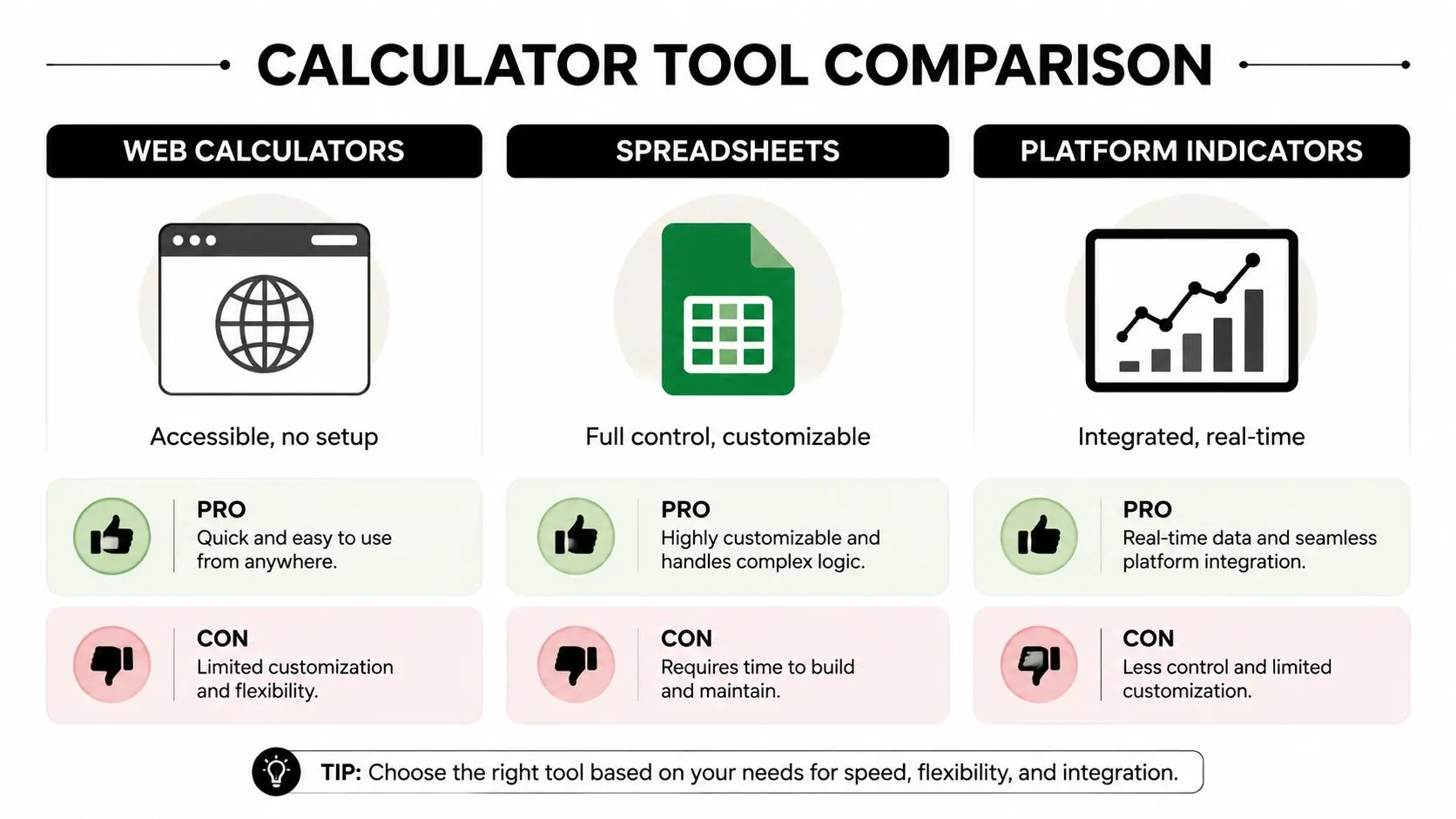
What each tool does well
- Web calculators fast, low-friction, and useful for one-off sizing checks. They can still miss account-currency conversion and session damage from clustered losses.
- Spreadsheets the best choice for custom rules. Add a conversion cell, daily-loss flags, and notes for partial exits, but expect setup time and ongoing maintenance.
- Platform indicators strong for real-time money risk and percentage risk across open positions and pending orders. They stay inside one platform, though instrument coverage and broker support can be uneven.
If you want a cleaner example of how structured software pages lay out choices, the browse SEO tool projects on SubmitMySaas page is a straightforward reference. The same idea applies here, the better tool is the one that fits the way you place and manage trades.
A manual day trader usually gets the most out of a spreadsheet or a simple browser calculator, provided the currency conversion is handled properly. An algorithmic trader is usually better off building the formula into an EA or script, because the position size should be calculated at the point of execution. A swing trader often gets the most value from a platform indicator backed by a spreadsheet, especially when several positions can overlap and the account has to stay inside a prop firm's drawdown rules.
A blunt recommendation
If you trade one pair, one account currency, and one market session, a web calculator may be enough. If you trade crosses, scale entries, or manage prop-style limits, build the spreadsheet so the conversion and drawdown checks are visible before the order goes live. If you automate, put the logic into the system itself and use the platform indicator as a final check.
Start Trading with Disciplined Risk Management
A risk calculator forex tool doesn't make a trade good, it makes the loss measurable. The edge is the discipline to use the formula, convert pip value correctly, and size every order so it fits both the setup and the drawdown rules you're trading under. Trading involves risk of loss, and no calculator can remove that.
The hard part is consistency. If you keep your risk near the usual preservation range, check the account-currency conversion, and respect the daily and max drawdown limits, your account has a chance to survive the ugly streaks that hit every trader sooner or later.
MyFundedCapital gives traders a clear way to apply this discipline inside funded accounts, with Instant Funding or a 1-Step or 2-Step Challenge, account sizes from $5K to $100K, and scaling paths up to $500K. If you're ready to trade with transparent risk limits and use sizing as a survival tool instead of a guess, visit MyFundedCapital and compare the account type that fits your process.