You click buy, the setup is clean, and MetaTrader throws Off Quotes instead of filling the order. That's frustrating in any account, but it's worse in a prop environment where one missed or delayed execution can distort risk, invalidate an EA cycle, or push you into a bad re-entry.
This guide explains what metatrader off quotes means, what tends to trigger it, and the fixes that hold up in real trading. It's educational only, not financial advice, and trading always involves risk of loss.
What "Metatrader Off Quotes" Means and Why It Happens
Metatrader off quotes means the platform couldn't execute your order at a valid available price when the request reached the server. In plain terms, the price you saw and the price the server could fill were no longer aligned.
Imagine trying to hit a moving target with a delayed signal. You clicked based on one quote, but by the time the order arrived, that quote was gone or no longer tradable.
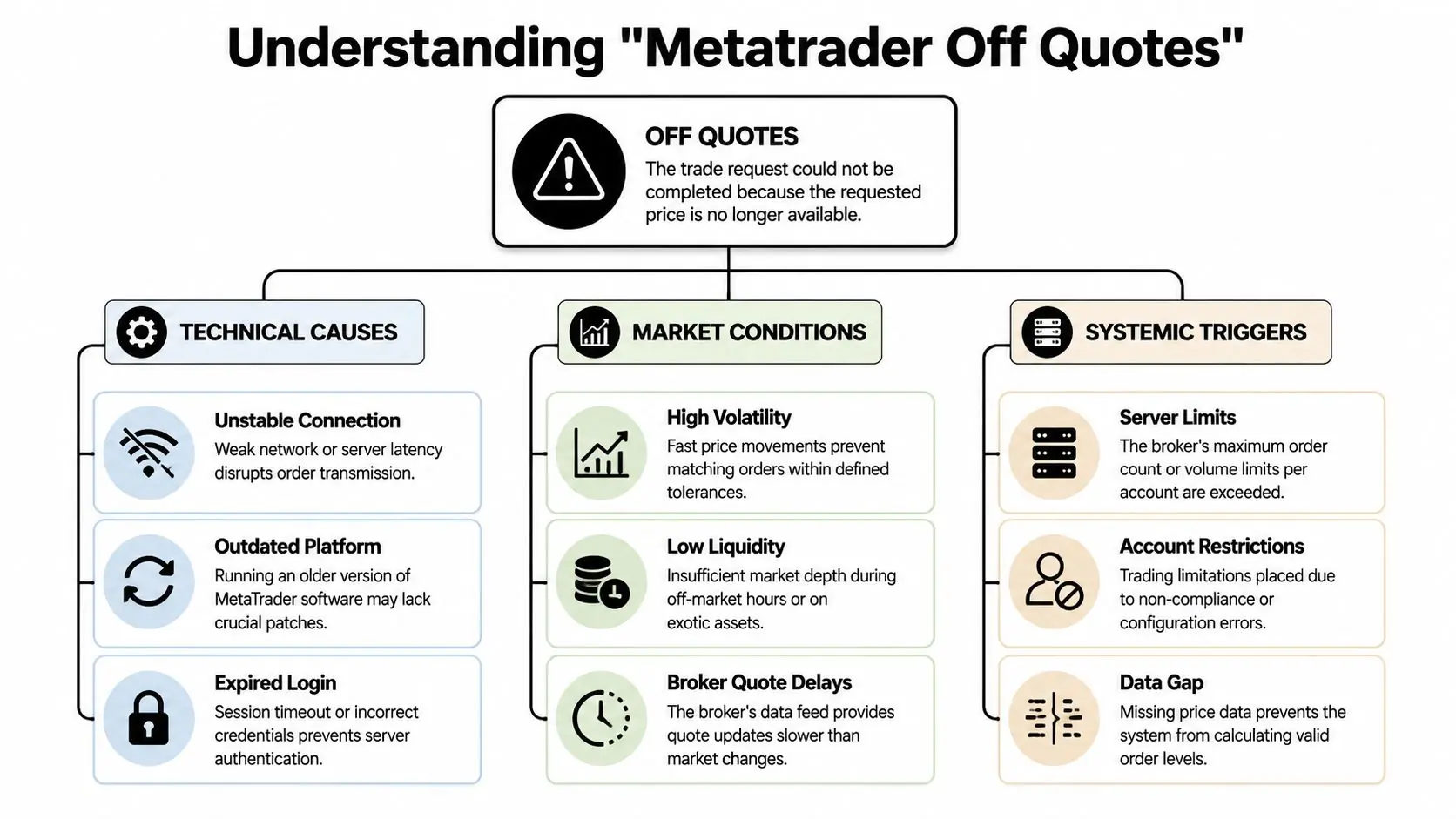
The main causes behind off quotes
A few causes show up again and again:
- Fast volatility News releases and sudden liquidity gaps can move price too quickly for your order settings.
- Latency Your internet, VPS, or route to the broker server may be too slow.
- Low liquidity Off-peak sessions, holidays, and thin books make valid quotes harder to match.
- Symbol issues You might be trading the wrong contract name or a broker-specific symbol variation.
- Server-side strain Sometimes the problem is that the broker's infrastructure is under pressure.
The historical pattern is clear. After MT4's broad adoption, off quotes became closely tied to extreme volatility. During the 2015 Swiss Franc flash crash, MT4 users reported off quotes spiking by 300 to 500%, and a CySEC study found 42% of MT4 trade rejections were off quotes, mainly during news releases where prices moved more than 20 pips in under 5 seconds according to this MT4 off quotes analysis.
Practical rule: If off quotes cluster around major news, the issue usually isn't random. Your order settings and market conditions are out of sync.
Why traders misread the error
A lot of traders treat off quotes as a platform bug. Sometimes it is a local platform issue, but most of the time it's a symptom.
Use this quick distinction:
| Situation | What it usually means |
|---|---|
| Error appears during major news | Price moved beyond your allowed tolerance |
| Error appears in quiet but thin sessions | There may not be enough valid liquidity |
| Error appears across many symbols at once | Check connection, login state, or server health |
| Error appears only on one EA | Order logic or stale price handling is likely the issue |
If you're still on MT4 and want to rule out a broken install first, use a clean terminal from the official-style MetaTrader 4 download for PC page and test from there before changing strategy logic.
What matters in prop trading
In a retail account, off quotes are annoying. In a prop evaluation, they can do more damage because execution precision matters more. You're often trading around fixed daily loss limits, tighter discipline rules, and automated systems that depend on consistent fills.
That's why the right response isn't to keep clicking. It's to identify whether the failure came from market speed, quote availability, or your own setup.
Immediate Checks for When Off Quotes Strikes
When off quotes hits, don't mash the button again. That often turns one execution problem into two.

A 2022 analysis found off quotes made up 28% of all execution errors during the London-New York overlap, and during the March 2020 market crash they surged by 450%, as noted in this MetaTrader off quotes review. So the first job is to decide whether this is a local issue or a market-wide one.
Check the bottom-right connection status
Look at the connection indicator in MetaTrader.
What you want:
- A live connection
- Data flowing
- No obvious freezes
What to do if it looks unstable:
- Restart the terminal
- Re-log into the account
- Switch from weak Wi-Fi to a stable wired or stronger connection if possible
If ticks aren't updating, your order isn't the underlying problem. Your quote feed is.
Confirm the symbol is correct
This gets overlooked more than it should. Many brokers use suffixes or alternate naming conventions.
Examples:
- EURUSD
- EURUSD.pro
- EURUSDm
If your chart, Market Watch symbol, and EA symbol mapping don't match, you can get quote mismatches or invalid execution attempts.
If the chart is moving but your order keeps failing, verify the exact tradable symbol name before changing any settings.
Check whether you're trading at a bad time for execution
You don't need a complicated diagnosis here. Ask three simple questions:
- Is there a major news release happening now?
- Is this a session change, rollover window, holiday, or weekend edge?
- Is the instrument usually thin at this time?
If the answer is yes to any of those, your next order should be more deliberate. Either widen tolerance, switch to a pending order, or stand aside.
Restart only after a quick log review
Before restarting, glance at the Journal and Experts tabs.
Look for:
- repeated off quotes
- delayed ticks
- invalid stops
- login interruptions
That tells you whether the failure is isolated or repeating. If it's repeating across multiple attempts, random retrying won't help.
Proactive Fixes for Slippage and Market Orders
A prop trader in an evaluation account does not get many execution mistakes before the stats start to matter. One bad fill, one rejected entry, one chase order, and the trade can go from valid setup to rule breach in seconds. That is why off quotes is not just a platform annoyance. It is an execution problem.
After ruling out feed stability and symbol mapping, focus on the two settings that change outcomes: slippage tolerance and order type. In MetaTrader, that typically involves the Max deviation field and a clear decision between market execution and pending execution.
Max deviation controls fills, not quality
A tight deviation gives better price control, but it also gives the broker less room to fill you when quotes are moving fast. A wider deviation raises the chance of execution, but you may enter far enough from plan to damage the trade before it even starts.
That trade-off hits harder in prop trading than in a casual retail account.
If a firm has a tight daily drawdown cap, a poor fill can turn a normal stop into an oversized loss. If you run an EA, a fill outside expected tolerance can also distort position sizing, break reward-to-risk assumptions, or trigger exits earlier than your model expects.
A practical way to set deviation:
| Market condition | Deviation approach | Main risk |
|---|---|---|
| Calm, liquid session | Keep it tight | More rejections if price starts jumping |
| Moderate volatility | Widen modestly | Entry quality slips if you overdo it |
| High-impact news or thin liquidity | Use wide tolerance only if the strategy justifies it | Fill quality can become unacceptable |
If you need a clearer breakdown of execution choices and fill behavior, this limit order vs market order guide is worth reviewing.
Pending orders reduce avoidable off quotes
For many setups, the cleanest fix is to stop chasing price with market orders. A pending order lets the server work your level instead of forcing your terminal to hit a moving quote at the worst possible moment.
That matters on MetaTrader, but I have seen the same principle hold on cTrader and DXtrade. If the strategy already defines the entry in advance, a pending order usually produces more consistent execution than manual market clicking or an EA that submits late.
Use pending orders when:
- the entry level is planned before price gets there
- the market is moving fast and spread is expanding
- the setup is a breakout, pullback, or retest with a defined trigger zone
- you are trying to avoid impulsive re-entry after a rejected market order
Use market orders when:
- the edge depends on immediate participation
- the instrument is liquid enough that quote updates are stable
- the strategy can tolerate some slippage without breaking expectancy
Manual traders feel this immediately. EA traders often miss it until the backtest and live results separate. Review what slippage in trading really changes before widening tolerance or forcing market execution.
What works in live prop conditions
The best fix depends on the setup, the session, and the account rules.
- Normal session, liquid pair Use market orders with realistic deviation. Keep fills controlled.
- News window or open/close volatility Prefer pending orders, or skip the trade if the edge depends on a perfect fill.
- Thin hours or index CFDs outside peak flow Reduce order urgency. Forced market entries create more problems than they solve.
- EA-driven trading Code separate execution rules by session and symbol instead of using one fixed deviation for everything.
One mistake shows up often. Traders widen deviation aggressively just to get filled, then blame MetaTrader when the trade starts deep in negative slippage. The platform did what it was told to do.
A better rule is simple. If you would reject that worse price in a prop evaluation because it damages the setup or pushes risk too close to the account limit, do not allow your platform or EA to accept it automatically.
Fortifying Your Expert Advisor Against Off Quotes
Manual traders can pause. EAs can't, unless you build that logic in.
This is why a fragile EA fails during the specific conditions where dependable systems continue to function. Off quotes represents more than just a rejected order for an algorithm. It can disrupt sequencing, cause duplicate attempts, distort position sizing logic, or leave the strategy half-executed.
Build retry logic the right way
Verified MQL4 guidance shows that implementing retry logic after error 4 can push execution success to over 85% during volatile news events, compared with a one-shot order. The core method is simple: call RefreshRates(), re-check whether the setup is still valid, and resend rather than blindly firing the same stale request. That comes from the MQL4 forum discussion on handling off quotes.
The key word is re-check.
Don't retry because the first attempt failed. Retry because the strategy still wants the trade at the updated price.
The logic your EA should include
A resilient EA should handle these steps in sequence:
- Pull a fresh quote
Read the current Bid or Ask immediately before sending. - Normalize prices
Make sure entry, stop, and target values respect the symbol's decimal precision. - Send with realistic slippage tolerance
Don't hard-code a value that only works in calm conditions. - On off quotes, refresh and pause briefly
A short delay can prevent rapid-fire failures. - Revalidate the setup
If your moving average cross, breakout level, or spread filter no longer qualifies, skip the trade. - Limit the number of retries
Endless loops create new problems.
Coding note: A retry loop without setup validation is just automated revenge trading.
Where EAs usually fail
The common weak points are predictable:
- Stale price references The EA stores a price too early and sends too late.
- No normalization Precision mismatches can trigger avoidable rejections.
- Invalid stop placement Stops or targets sit too close for the symbol's rules.
- No contingency path The EA treats execution failure as impossible.
If you're running automated systems in a prop-style workflow, your review shouldn't stop at strategy logic. It should include execution resilience. That's one reason many traders spend as much time on order handling as they do on entry logic. If you're developing or evaluating automation, this forex expert advisor resource is a useful place to compare manual and EA execution considerations.
What robust EA design looks like
A good EA doesn't assume perfect fills. It plans for imperfect conditions.
That means:
- handling quote refreshes
- respecting symbol precision
- detecting when a retry still makes sense
- failing safely when it doesn't
That difference matters most on volatile days, which is exactly when weak execution logic gets exposed.
Your Troubleshooting Checklist and Escalation Plan
When metatrader off quotes keeps appearing, you need a sequence, not guesses. Good traders troubleshoot in the same order every time because it reduces emotional errors.
A clean troubleshooting flow
Use this checklist in order:
- Connection first: Confirm the terminal is live and ticks are updating.
- Symbol second: Verify the exact instrument name on the chart, in Market Watch, and inside any EA inputs.
- Session context: Check whether you're trading during news, rollover, holidays, or a thin market window.
- Order type: If market orders keep failing, switch to pending orders where the strategy allows it.
- Deviation review: Increase tolerance only if the setup can absorb slippage.
- Stops and parameters: Check for invalid stop distance or malformed order values.
- EA logic: Review whether the system refreshes quotes, normalizes prices, and handles retries correctly.
In prop-style simulated environments, this discipline matters more. Verified forum-based reporting shows that with strict rules such as a 5% daily loss limit, over 40% of prop trader complaints involve EAs being rejected at key levels because of off quotes. The same source notes that simple deviation tweaks don't always solve it, and traders often get better quote stability on cTrader or DXtrade, as described in this discussion of prop trading off quotes issues.
When the issue probably isn't on your side
Escalate when you see patterns like these:
| Pattern | What it suggests |
|---|---|
| Multiple symbols fail at the same time | Possible server-side issue |
| Other orders reject despite stable internet | Execution venue or quote feed problem |
| Journal shows repeated off quotes during a specific window | Liquidity or server congestion |
| Manual trades and EA trades fail together | Not just a coding problem |
At that stage, stop experimenting mid-session. Document the issue properly.
What to send support
A strong support ticket includes:
- Timestamp Exact platform time of the rejection
- Symbol and order type Market, buy stop, sell limit, and so on
- Trade size Include the lot size used
- Screenshots Chart, terminal, and error line
- Journal and Experts log excerpts The key lines around the event
- What you already tested Restart, symbol check, deviation change, pending order test
That makes the conversation shorter and cleaner. It also protects you from vague replies.
Treat troubleshooting like process improvement. Teams in other technical fields use repeatable review loops for the same reason, and the mindset behind avoiding the shipping trap in SaaS applies surprisingly well to trading operations too.
A practical escalation standard
Don't send support a message that says only “MT4 is broken.” Send evidence. The more specific you are, the easier it is to separate a market condition from a broker-side execution problem.
That habit helps whether you're self-funded, running automation, or trading under evaluation constraints.
Frequently Asked Questions About Off Quotes
Is off quotes usually my fault or the broker's fault
Usually it's neither in the simple sense. Off quotes is an execution condition, not a moral verdict.
It can come from your side if:
- your connection is unstable
- your symbol mapping is wrong
- your EA sends stale prices
- your deviation is unrealistically tight
It can come from the broker or platform side if:
- quotes pause during extreme volatility
- server load is heavy
- the instrument is thin and the feed can't provide a tradable price
The right question isn't “who's to blame?” It's “what failed first?” Check local setup, then market conditions, then server behavior.
Will a VPS fix metatrader off quotes
A VPS can help, but it isn't a guaranteed fix.
It helps most when the problem is:
- latency from your device to the server
- unstable home internet
- EAs that need consistent uptime
- delayed quote refreshes
It won't fully solve:
- violent news spikes
- thin liquidity
- bad symbol settings
- broker-side quote gaps
Use a VPS to improve infrastructure, not as a magic cure.
Why do off quotes feel worse in prop firm challenges
Because the consequences are tighter.
In a prop environment, a rejected order can create a chain reaction:
- missed entries
- worse re-entries
- failed hedge timing
- EA desynchronization
- unnecessary drawdown pressure
Simulated environments with real market quotes can also expose execution differences more sharply, especially when traders push size, news trading, or fast automation inside strict risk limits. That's why generic retail fixes often fall short for challenge accounts.
Should I keep retrying a failed order manually
Usually no.
If the market is moving fast, repeated clicking often means you're chasing a quote that no longer exists. That can turn one rejected trade into a bad fill at a worse level.
A better approach is:
- pause
- confirm the quote feed is live
- decide whether the setup is still valid
- use a pending order if appropriate
- skip the trade if the edge is gone
That last option is underrated. Not every rejected trade should become a forced trade.
If you want a prop environment built for disciplined manual and algorithmic traders, explore MyFundedCapital. You can compare challenge models, account sizes, and platform options, then choose a path that fits your execution style.