You're in a live trade, price is moving, and you need to leave the desk. That's where a mobile trading app earns its place. For a prop trader, though, a phone isn't a freedom machine. It's a risk tool that can either help you protect a funded account or tempt you into breaking your own rules.
Introduction to Mobile Trading Applications
Application mobile trading matters most in one specific situation. You already planned the trade on desktop, price is active, and now you need to monitor or manage it away from your main setup. That's a normal part of modern trading, especially if you're handling a challenge account or funded account with hard loss limits.
A mobile app solves a real problem. It lets you check exposure, adjust a stop, close a position, and stay aware of account risk without being glued to a multi-screen desk. That's useful. It's also dangerous if you start using the phone as a substitute for proper analysis.
The mobile trading ecosystem is no longer a side category for brokers and platforms. Businesses building these products now treat mobile as a serious product layer, which is one reason teams working on trading interfaces often look at specialized finance app development solutions when they need to handle market data, execution flows, and security cleanly.
Practical rule: Use your phone to manage planned risk, not to invent new trades in random moments.
For prop traders, that distinction matters more than it does for casual investors. A bad desktop session hurts. A bad mobile impulse can also breach your daily loss rule, lock in emotional trading, or fail an evaluation. The phone is useful when it supports discipline. It becomes expensive when it replaces it.
Understanding the Role of a Mobile Trading App
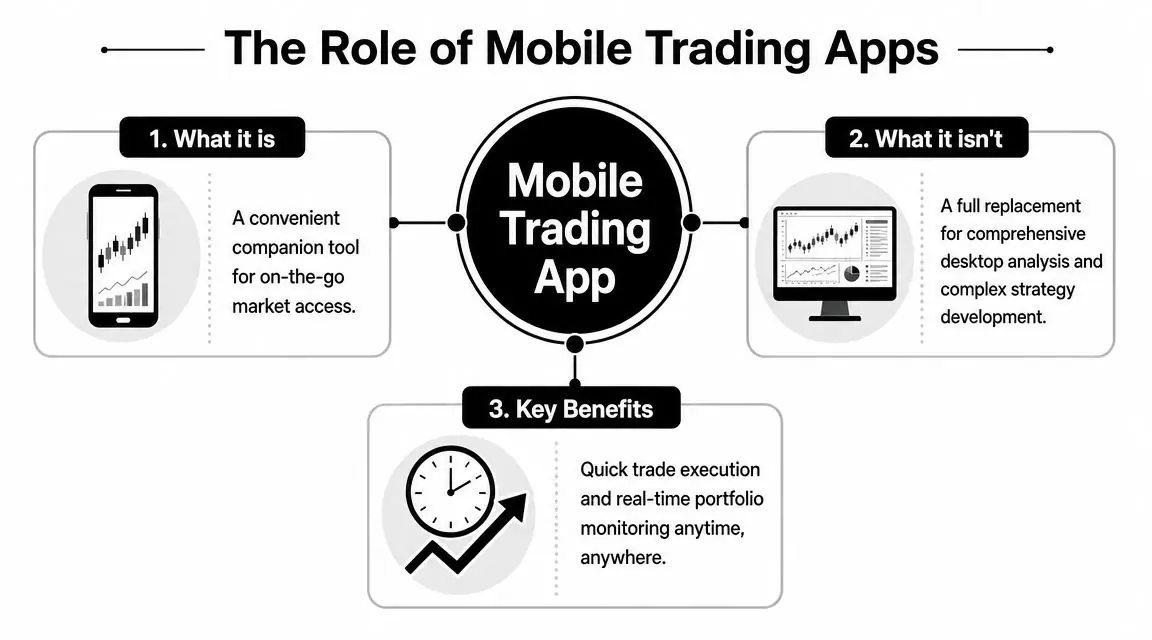
A mobile trading app is best treated as a companion platform. It gives you access, speed, and visibility when you're away from your main workstation. What it doesn't do well is replace the depth of a full trading environment.
The cleanest way to think about it is this. Your desktop is the kitchen. Your mobile app is the chef's knife. A good knife is essential, but you still need the rest of the kitchen to do serious work well.
The market shift behind this is real. The mobile stock trading and investing applications market was valued at USD 24.1 billion in 2022 and is projected to reach USD 126 billion by 2032, implying a 19% CAGR, according to GM Insights market analysis. That projected growth shows why mobile interfaces are becoming a primary channel for trading products rather than an optional extra.
What a mobile app is good for
A good app helps with short, clear tasks:
- Monitoring open positions so you know if a trade is behaving as expected
- Adjusting stops and targets when your plan already called for it
- Emergency exits if price action changes while you're away
- Checking account exposure before risk drifts too far
This is where mobile trading shines. You're not building a fresh macro view. You're managing execution and exposure.
What it doesn't do well
The phone has hard limitations:
- Smaller charts reduce context
- Less workspace makes multi-market analysis clumsy
- Faster reactions can turn into impulsive clicks
- Notifications can keep you emotionally tied to price
That's why application mobile trading should sit underneath your main process, not above it.
Mobile is excellent for staying in control. It's weak for building conviction.
The right mental model
If you're trading a funded or evaluation account, use the app as part of a simple hierarchy:
| Tool | Primary job |
|---|---|
| Desktop platform | Analysis, planning, journal review, session prep |
| Mobile app | Monitoring, alerts, risk control, emergency execution |
That setup keeps the app useful without letting it become the place where bad decisions start.
Core Features Every Trader Must Master
The difference between a decent mobile app and a dangerous one usually comes down to a few core functions. If these aren't reliable, your phone becomes a liability.

Order entry and order types
First, master the basics on a small screen. You should know exactly how to place:
- Market orders when you need immediate action
- Limit orders when price must come to you
- Stop orders for breakouts or protective execution
- Stop-loss and take-profit instructions before you confirm any position
On desktop, traders often catch mistakes because the order ticket is large and visible. On mobile, fat-finger errors happen faster. Wrong size. Wrong direction. Wrong stop level.
Before you trade live or in an evaluation, test the app in a low-pressure setting and check:
- Can you clearly see lot size or quantity?
- Can you attach stop-loss and take-profit before submitting?
- Can you modify orders quickly without hunting through menus?
- Can you close partial or full positions cleanly?
If the answer to any of those is no, don't trust the app with active trade management.
Charting and context
Mobile charting is fine for confirming structure you already identified. It's not ideal for deep top-down work. Multi-timeframe analysis, session marking, correlated markets, and detailed annotations are all easier on desktop.
That doesn't mean mobile charts are useless. They're good for:
- Checking whether price is near your preplanned level
- Watching candle behavior around an open trade
- Confirming whether market conditions changed enough to reduce risk
If you rely on custom tools, platform support matters. Some traders also want platform-specific guidance on mobile workflows and indicator limitations, which is where resources on MT4 mobile custom indicators can help frame what mobile can and can't realistically support.
Execution speed and connection quality
Latency matters most when price is moving fast and you need to protect downside. For active FX and CFD traders, tasks like placing a stop-loss have to happen quickly. ForTraders' discussion of DXtrade Mobile describes its use of a binary protocol to reduce delays and maintain smooth data flow when switching between Wi-Fi and cellular networks.
That's a practical feature, not marketing fluff. Mobile trading often fails in transition moments. Elevator. Parking lot. Walking out of the office. Home Wi-Fi drops and cellular takes over. If quotes freeze or charts lag during those moments, you don't really have mobile risk control.
Alerts and notifications
Most traders misuse notifications. They let every price tick buzz their pocket and then wonder why they overtrade.
Use notifications for only a few things:
- Price reaches your planned level
- Order filled
- Stop or target hit
- Account risk threshold reached
That's enough. Anything more turns your phone into a slot machine.
Security you should treat as mandatory
A trading app holds account access, balance data, and execution control. Treat it like banking, not social media.
Use this checklist:
- Enable 2FA
- Use device lock with biometrics or a strong passcode
- Keep the app and phone OS updated
- Don't stay logged in on shared devices
- Avoid public networks for live execution
If your app is smooth but insecure, it's not a professional tool.
Comparing Mobile Platforms DXtrade vs cTrader
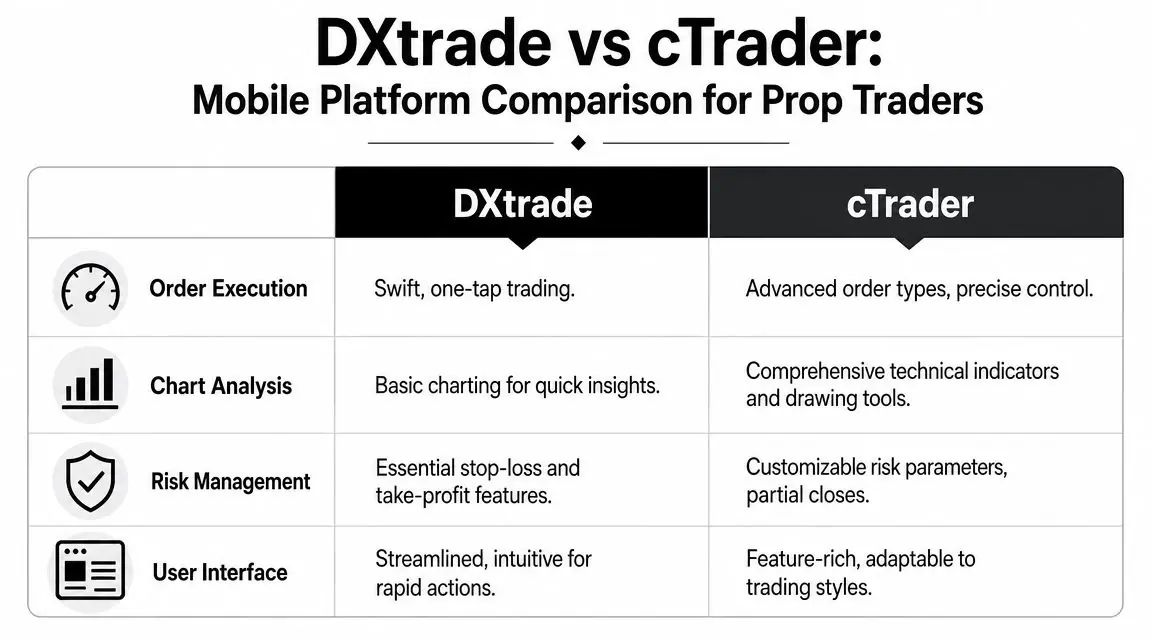
DXtrade Mobile and cTrader Mobile both let you manage trades on the go, but they feel different in actual use. For prop traders, that difference shows up in routine tasks, not in feature lists.
How they tend to differ in practice
DXtrade Mobile usually feels more stripped down. That's useful if your main goal is to check positions, place or close trades quickly, and manage basic risk without too many layers.
cTrader Mobile generally gives you more depth on charting and trade control. If you like more visibility into the order process and a richer chart interface on mobile, it often feels more natural.
Here's the practical difference:
| Task | DXtrade Mobile | cTrader Mobile |
|---|---|---|
| Quick position check | Fast and straightforward | Clear, but slightly more feature-dense |
| Place trade with SL/TP | Efficient for simple execution | More detailed order control |
| Chart review | Enough for quick checks | Better if you lean on indicators and drawings |
| Risk monitoring | Clean for open position management | Strong if you want more detail on position handling |
For the prop trading workflow
If your mobile use is mostly defensive, DXtrade's simpler layout can be an advantage. Less screen clutter often means fewer mistakes when you need to act fast.
If you regularly adjust trades with more nuance, cTrader may suit you better. It tends to fit traders who want a bit more control without opening a laptop.
A lot depends on how you already work at the desk. If your core process is fast execution and simple management, DXtrade usually fits. If your style includes more chart interaction, cTrader often feels more complete.
For a broader platform decision before choosing your challenge environment, it helps to compare the best FX trading platform options from the perspective of execution style, chart workflow, and risk controls.
Which one should you choose
Don't pick based on brand loyalty. Pick based on your mobile job description.
Choose the platform that helps you do these things with the fewest taps:
- See current exposure immediately
- Modify stop-loss without confusion
- Close a trade fast
- Review account history and open risk clearly
If you need a tutorial every time you move a stop on mobile, the app is too complex for emergency use.
That matters more than any marketing line about advanced features.
Using Mobile Apps in a Prop Trading Environment
In prop trading, the phone's real value is defensive. It helps you avoid account damage when life pulls you away from the desk. That's the role worth protecting.
A funded account or challenge account usually has strict loss rules. That changes how you should think about mobile access. The goal isn't constant participation. The goal is to avoid preventable mistakes.
Where mobile helps most
The strongest use cases are simple:
- Closing a trade early if your planned invalidation is reached while you're away
- Reducing size if exposure is too large for current conditions
- Checking floating drawdown before it drifts into account-rule territory
- Confirming orders executed correctly after entry from desktop
This is why many disciplined traders keep the app installed even if they do almost all analysis elsewhere.
One practical example is a trader who enters during London session, leaves the desk for a meeting, and keeps the phone ready only for risk tasks. That's good use. The phone protects the account. It doesn't run the strategy.
Where mobile creates problems
The same app that lets you save a bad situation can also create one.
Common failures look like this:
- You get a price alert and take a trade that wasn't in the plan.
- You open the app out of boredom.
- You start managing every candle because the phone is always in reach.
- You revenge trade after seeing red P&L while away from the desk.
Those are not platform issues. They're behavior issues made easier by access.
A prop trader's mobile framework
For prop accounts, keep your mobile app inside a narrow operating box:
- Analysis happens on desktop
- Entries happen on desktop unless there's a genuine exception
- Mobile is for monitoring and emergency action
- No new trades from the phone unless they were planned in advance
- If emotions are heightened, close the app
That framework sounds strict because it needs to be.
In practice, some firms and traders also use mobile-friendly platform access alongside other tools, including copy trading app setups when trade monitoring and account oversight need to happen across devices. But the same rule applies. Mobile should support supervision, not invite careless execution.
Your phone should help you respect rules you already set. It shouldn't become the place where rules disappear.
For a prop trader, that's the whole game. A mobile app doesn't need to make you more aggressive. It needs to make you harder to break.
Best Practices and Common Mistakes to Avoid
A lot of traders assume more access means better performance. That sounds logical, but trading behavior doesn't always work that way. Research discussed by UNSW BusinessThink found that mobile app adoption did not statistically improve portfolio performance, increased trend-chasing by 2.1%, and showed the best outcomes in a blended approach where about 50% of trades were mobile, with roughly 1.63% monthly performance gains.
That fits what many active traders already know from experience. Constant access can improve response time, but it can also increase noise, impulsive entries, and emotional management.
Best practices that actually help
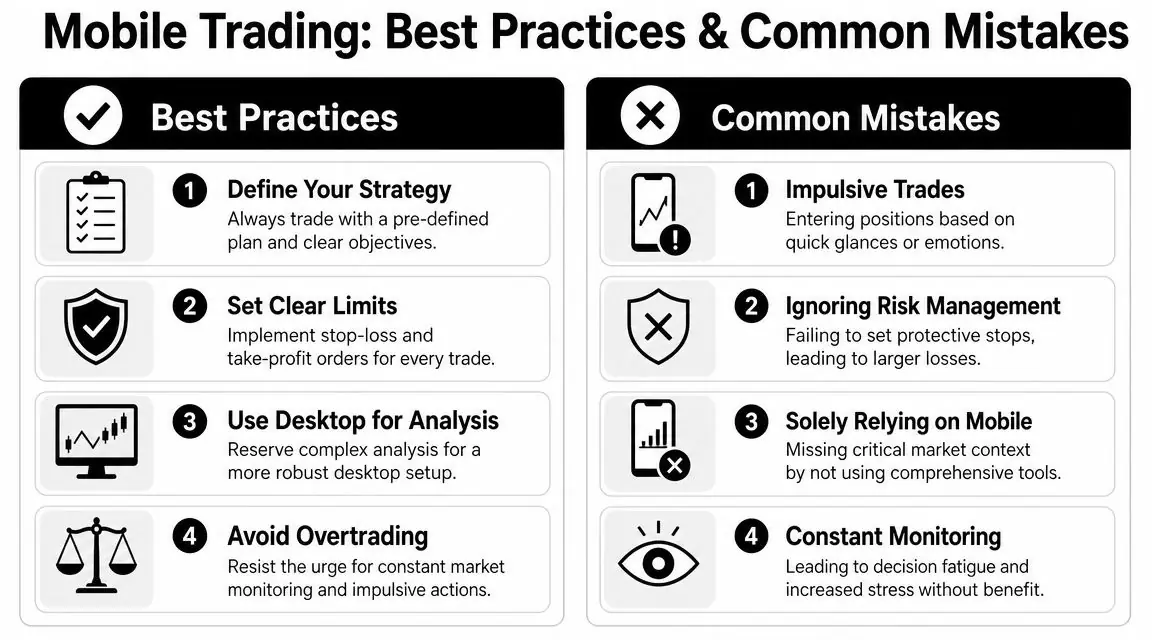
Use mobile trading with rules, not vibes.
- Pre-define mobile permissions. Decide in advance what you're allowed to do on your phone. Example: close trades, move stop to planned level, check risk. Nothing else.
- Keep alerts narrow. Set alerts only around planned levels, open positions, and account thresholds.
- Use desktop for serious analysis. If a setup needs multiple timeframes, news context, or detailed chart work, wait for the desk.
- Check connection before action. If data is weak or unstable, don't force execution.
- Secure the device properly. A phone used for trading should be treated like a financial account endpoint. If you want a practical baseline, this AuditYour.App mobile security guide gives a useful overview of mobile app security habits.
Mistakes that wreck discipline
These are the patterns that usually hurt traders most:
- Taking unplanned trades from notifications
- Watching P&L too often
- Moving stops emotionally
- Trading on public Wi-Fi
- Using the phone as the main analysis screen
- Checking charts every spare minute
The problem isn't just bad entries. It's attention fragmentation. The phone makes it easy to stay mentally half-in, half-out of the market all day.
A simple mobile trading checklist
Before using application mobile trading with real risk, run this checklist:
- Is this trade already planned?
- Am I managing risk, or chasing movement?
- Can I see size, stop, and target clearly?
- Is my connection stable enough to trust the app?
- If this action goes wrong, does it threaten my account rules?
If any answer feels shaky, wait.
The best mobile trade is often the one you don't take.
That's especially true in prop trading. You don't need more taps. You need fewer bad ones.
Frequently Asked Questions About Mobile Trading
Can I realistically pass a prop firm challenge using only a mobile app
It's possible, but it's not the setup I'd recommend. A phone can handle monitoring and basic execution, but desktop is still better for analysis, planning, journaling, and reviewing risk before you click. If you try to pass a challenge only on mobile, you're accepting more screen limitation and more room for impulsive mistakes.
For most traders, the smarter approach is simple. Use desktop as the main workstation. Use mobile as backup and risk control.
How secure is it to trade on public Wi-Fi
It's not a good habit. Even if your trading app has strong login protection, public networks add avoidable risk. If you need to check positions, that's one thing. If you're placing or modifying live trades, a private and stable connection is the safer choice.
At minimum:
- Use biometric or passcode lock
- Enable 2FA
- Keep software updated
- Avoid sensitive actions on public Wi-Fi
Does mobile trading use a lot of mobile data and battery
It can, especially if you keep charts open, stream real-time data for long periods, and leave notifications active across multiple markets. Battery drain is usually the bigger practical issue during active sessions.
A few habits help:
- Lower screen brightness
- Close unused apps
- Limit background chart monitoring
- Carry a charger or power bank
- Disable non-essential alerts
Is mobile trading good for beginners
Yes, but only if beginners understand the limitation. A mobile app makes access easy. It doesn't make decision-making easier. New traders often confuse convenience with readiness.
The better path is to learn analysis and risk management first, then use mobile as a support tool.
If you want a prop environment where platform choice, clear loss rules, and mobile access matter, take a look at MyFundedCapital and compare its funding programs, account types, and platform options before you start a challenge. Trading involves risk of loss. This article is educational only and not financial advice.