

 AR
AR
 NL
NL
 FR
FR
 DE
DE
 ES
ES
 IT
IT
 PL
PL
 SV
SV
 PT
PT


You've probably opened NinjaTrader, stared at a blank workspace, and realized the platform is powerful enough to help you trade well or help you make faster mistakes. That's the fundamental issue with futures trading in NinjaTrader. The platform itself isn't the edge. Your setup, execution rules, and risk discipline are.
If you're aiming for consistency and eventually a funded account, you need more than a generic platform walkthrough. You need a working process that starts in simulation, uses clean order execution, and respects drawdown from the first click. Trading involves risk of loss, and this guide is educational only, not financial advice.
Your First Steps with NinjaTrader and Futures Data
Most new traders waste time in the wrong order. They install the platform, open random charts, and start clicking around before they've sorted out data, instruments, or sim mode. That usually leads to confusion, not progress.
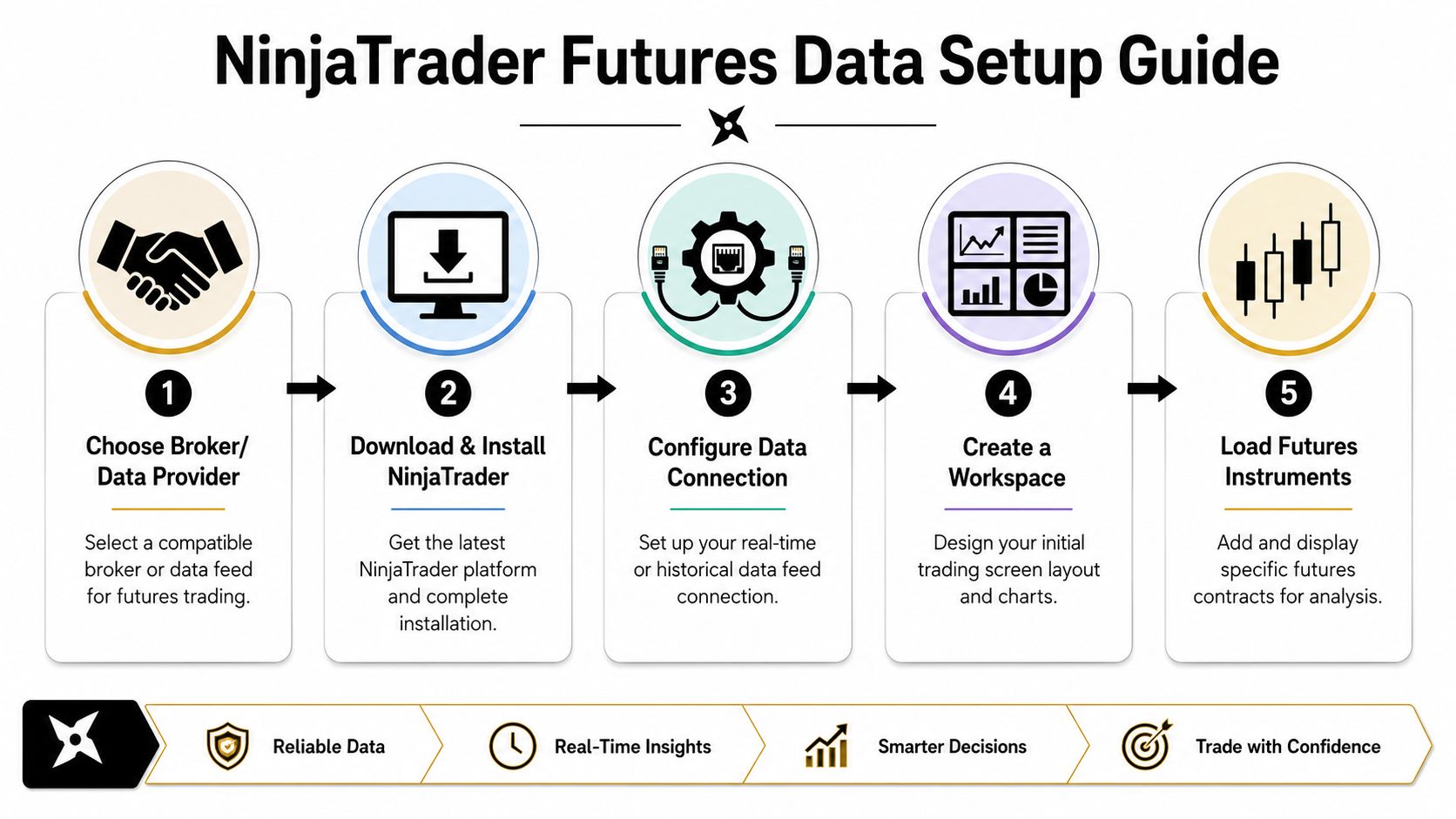
The right sequence is simple. Get the platform running, connect data properly, and start in simulation with live quotes before you think about placing real trades.
Start with the platform and sim account
NinjaTrader is widely used because it lets traders begin with charting, backtesting, and simulation before they commit real capital. If you're just setting up, use the simulation environment first and make sure every part of your workflow works there.
A practical starting order looks like this:
- Download the platform first. Use a clean install and avoid loading extra indicators on day one. If you need the platform files, use this NinjaTrader 8 download guide.
- Log in and confirm sim mode. Don't assume you're on simulation. Check it.
- Add your basic futures watchlist. Keep it narrow. One equity micro and one or two additional markets is enough.
- Connect market data only after the platform is stable. If the platform freezes or disconnects, solve that before you build a workspace.
Practical rule: If you can't place, modify, and cancel a simulated order smoothly, you're not ready for a funded evaluation or live account.
Know what you're paying for
A lot of traders overestimate what they need at the start. You don't need a bloated stack of paid tools to practice serious futures trading in NinjaTrader.
Two cost points matter early:
- Market data cost. NinjaTrader provides futures market data for $4 per month through NinjaTrader Continuum and requires at least one trade per calendar month to keep that subscription active, with access to real-time and historical pricing from CME, CBOT, COMEX, and NYMEX, as noted in this NinjaTrader Continuum data explanation.
- Broker access model. NinjaTrader supports over 1.9 million users globally, offers $50 intraday margins on Micro E-mini contracts and commissions as low as $0.09 per contract, according to the official NinjaTrader site.
That combination matters because it lowers the cost of practicing with real-time data and small contract exposure.
Build a sensible beginner setup
Don't try to configure everything at once. Your first usable setup should include:
- One primary chart. Use it for structure and trade location.
- One execution window. Usually the SuperDOM or chart trader, not both at the start.
- A small instrument list. MES, MNQ, or one market you can follow.
- Simulation first. Live market data in sim is far more useful than guessing off delayed charts.
If you're targeting a prop-style environment later, this matters even more. You need to know where your data comes from, how your orders route inside the platform, and whether your workspace stays stable during active sessions.
Configuring Your Workspace Charts DOM and Order Flow
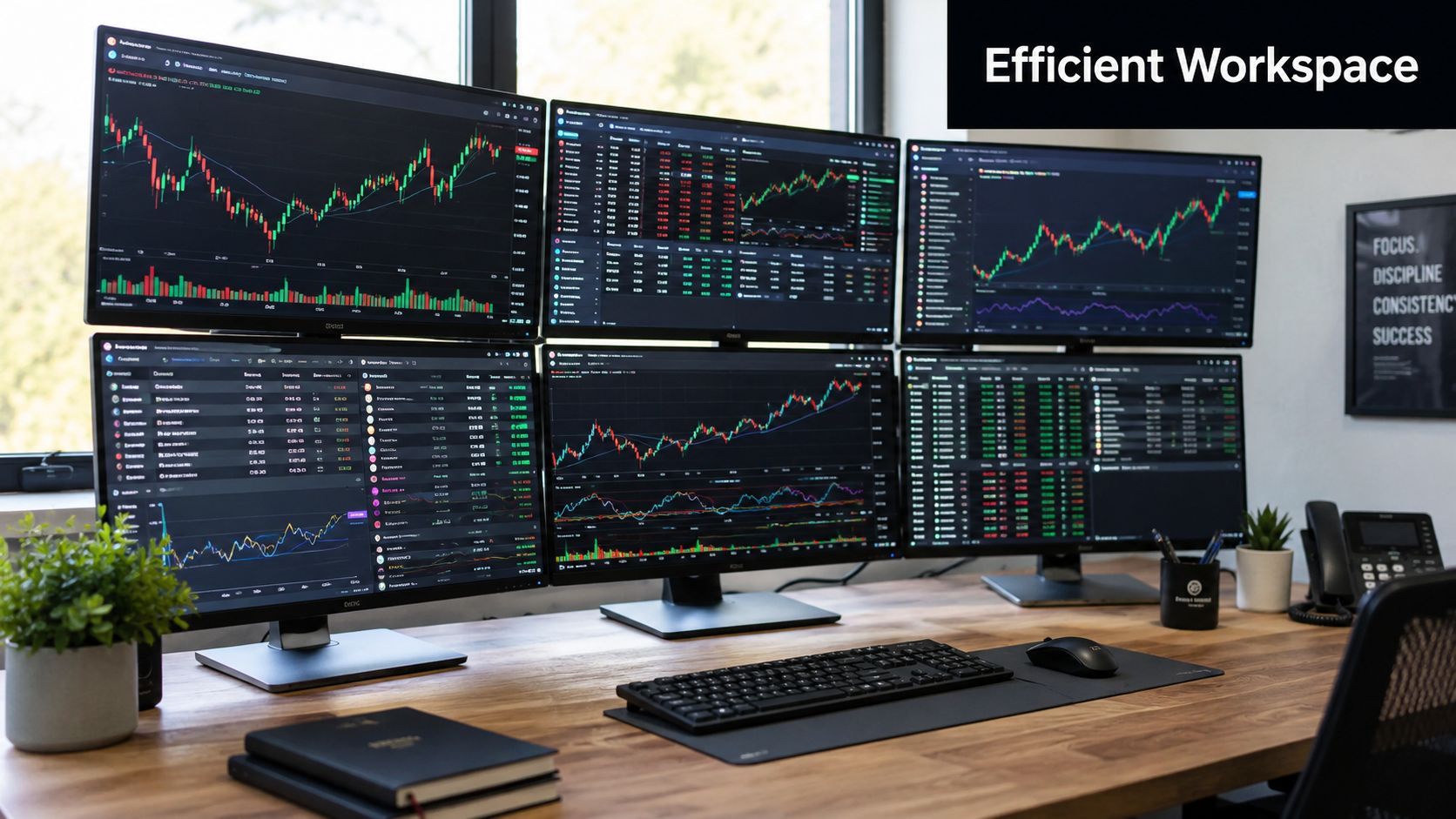
An empty screen is harmless. A cluttered screen is expensive. Most traders who struggle with futures trading in NinjaTrader don't need more indicators. They need less noise and a layout that makes decision-making faster.
Build the workspace around three functions: analysis, execution, and context.
Charts that help you decide
Your chart should answer a few questions quickly. Where is price relative to the current session range? Is the market rotating, trending, or stalling? Where would your trade idea be wrong?
That means your chart layout should stay lean.
A practical chart setup usually includes:
- Candlesticks as the base view. Keep the display easy to read.
- Session markers or trading hours templates. You want consistent context.
- One or two decision tools. Not five. If you use moving averages, use them because they help you define trend or reclaim, not because they look professional.
- Volume-based context. Order flow tools can help identify acceptance and rejection around key prices. If you're learning those concepts, this order flow analysis guide is a useful companion.
Avoid the common beginner trap of stacking indicators that all tell you the same thing in different colors. If one indicator says momentum is slowing and another says trend is flattening, that may not be confirmation. It may just be duplicated lag.
A clean chart lets you see invalidation before you see opportunity. That's how disciplined traders stay out of bad trades.
SuperDOM for precise order entry
The SuperDOM is where many futures traders become more efficient. It gives you a ladder view of price, bid and ask levels, and order placement controls in one place. That matters when you need to enter, adjust, or scratch a trade without hunting through menus.
Use it for these jobs:
- Entry placement. Limit and stop entries are easier to position precisely.
- Working order management. You can move or cancel orders fast.
- Visualizing nearby liquidity. It won't predict direction, but it helps you see where activity is concentrated.
What doesn't work is treating the DOM like a signal generator. New traders often assume every flicker in bid or ask size means something actionable. Usually it doesn't. The DOM is best used as an execution tool first, a context tool second.
Order Flow Plus and market context
Order Flow+ tools are useful when you already know what question you're asking. They're not useful when you're searching for a reason to click buy or sell.
The most practical use cases are:
| Tool | Best use | Common mistake |
|---|---|---|
| Volume Profile | Finding high-acceptance and low-acceptance price areas | Drawing conclusions without session context |
| Bid/Ask view | Seeing how trade activity is transacting at price | Reading every burst as a reversal signal |
| Depth view | Watching nearby order concentration | Assuming displayed liquidity will always hold |
If you're trading micros or minis for a prop challenge, focus on repeatable reads. For example, a volume profile can help you identify whether price is rotating around value or moving away from it. That's useful because it changes how aggressive your entry should be and where your stop belongs.
Keep your screen honest
A solid workspace does three things well:
- It reduces hesitation. You know where to look for structure and where to place the order.
- It reduces execution errors. You don't click the wrong instrument or quantity.
- It reduces story-telling. The less visual clutter you have, the less likely you are to invent a trade.
That's the ultimate standard. Not whether your workspace looks advanced, but whether it helps you make fewer bad decisions.
Executing Orders with Precision Using ATM Strategies
Order entry is where discipline becomes visible. Plenty of traders can explain risk management. Fewer build it into the trade before the position is live. In NinjaTrader, the most practical way to do that is with ATM Strategies, or Advanced Trade Management.
ATM matters because it turns your plan into pre-set behavior. Instead of improvising your stop, target, or scale-out after entry, you define those rules first.
Simple order types versus ATM logic
You still need to know the standard order types:
- Market order gets you in immediately at the best available price.
- Limit order lets you name your price.
- Stop order triggers once price reaches your level.
Those are basic tools. ATM sits on top of them and manages what happens next.
With an ATM template, you can define:
- Protective stop-loss placement
- One or more profit targets
- Auto break-even behavior
- Trailing stop logic
That's a major advantage for traders who tend to hesitate or interfere with trades mid-flight.
Why this matters for micro futures
NinjaTrader offers $50 intraday margins specifically for Micro futures contracts and $500 margins for popular markets like Crude oil, Gold, and Natural gas, according to NinjaTrader pricing. Lower intraday margins make micros accessible, but they also tempt traders to oversize.
That's where ATM helps. Accessibility doesn't remove risk. It just means you can structure trades with smaller contract exposure and still stay precise.
If your stop, target, and size aren't set before entry, you're not trading a plan. You're managing emotion in real time.
A practical MES ATM template
For a trader learning on Micro E-mini S&P 500 (MES), a simple ATM template is usually better than a clever one. The point is consistency.
Here's a workable example structure.
| Parameter | Setting | Rationale |
|---|---|---|
| Instrument | MES | Micro contract keeps size manageable while you learn execution discipline |
| Entry type | Limit or market, depending on setup | Use limit for planned pullbacks, market for confirmed momentum entries |
| Stop-loss | Predefined and fixed before entry | Prevents widening the stop once the trade is live |
| Profit target 1 | Partial scale-out at first planned objective | Reduces position stress and locks in part of the move |
| Profit target 2 | Runner to a higher timeframe level | Keeps upside open when trend continues |
| Auto break-even | After price confirms in your favor | Helps reduce emotional trade management |
| Template name | Save as one setup only | Avoids switching templates constantly and creating inconsistency |
How to build it without overcomplicating it
A new trader should keep the process tight:
- Choose one setup only. Don't build separate ATM templates for every mood.
- Define where the trade is wrong first. That sets the stop.
- Set target logic around actual structure. Prior high, prior low, range edge, or another clear market reference.
- Save the template and reuse it. You want comparable results across trades.
- Review fills afterward. If slippage or poor entries keep appearing, that's an execution problem, not an ATM problem.
ATM won't fix a weak strategy. It will fix a common trader problem, which is abandoning discipline after the order fills.
For funded-account style trading, that's a big deal. Most failures don't come from one bad indicator choice. They come from one avoidable mistake repeated often enough to break the account.
Validating Strategies with Backtesting and Walk-Forward Analysis
A trading idea feels smart until it meets data. In futures trading with NinjaTrader, that test starts in the Strategy Analyzer, but it shouldn't end there. Basic backtests are useful. They're also easy to abuse.
Many traders run a historical test, see a good-looking equity curve, and assume the system is ready. That's how overconfidence gets built on fragile assumptions.
What a basic backtest can and can't tell you
Backtesting is useful for one reason. It helps you answer whether your idea had any historical logic at all.
That includes questions like:
- Did the setup produce a positive expectancy over a sample?
- Were drawdowns manageable?
- Did one market condition carry all the results?
- Did the strategy depend on one narrow parameter setting?
That's the key point. A backtest should help you disqualify weak ideas quickly. It shouldn't be treated as proof that a strategy is ready for live or funded deployment.
If you want a step-by-step process for testing ideas more rigorously, this guide to backtesting trading strategies is worth reviewing alongside NinjaTrader's own tools.
Why walk-forward analysis matters
NinjaTrader's own strategy development material warns against over-optimization. A common pitfall is fitting the strategy too tightly to historical data, which can produce inflated win rates that fall apart in live trading. NinjaTrader also notes that proprietary systems can range from 35% to 95% win rates, while sustained results above 85% require advanced skill, as covered in this performance evaluation reference.
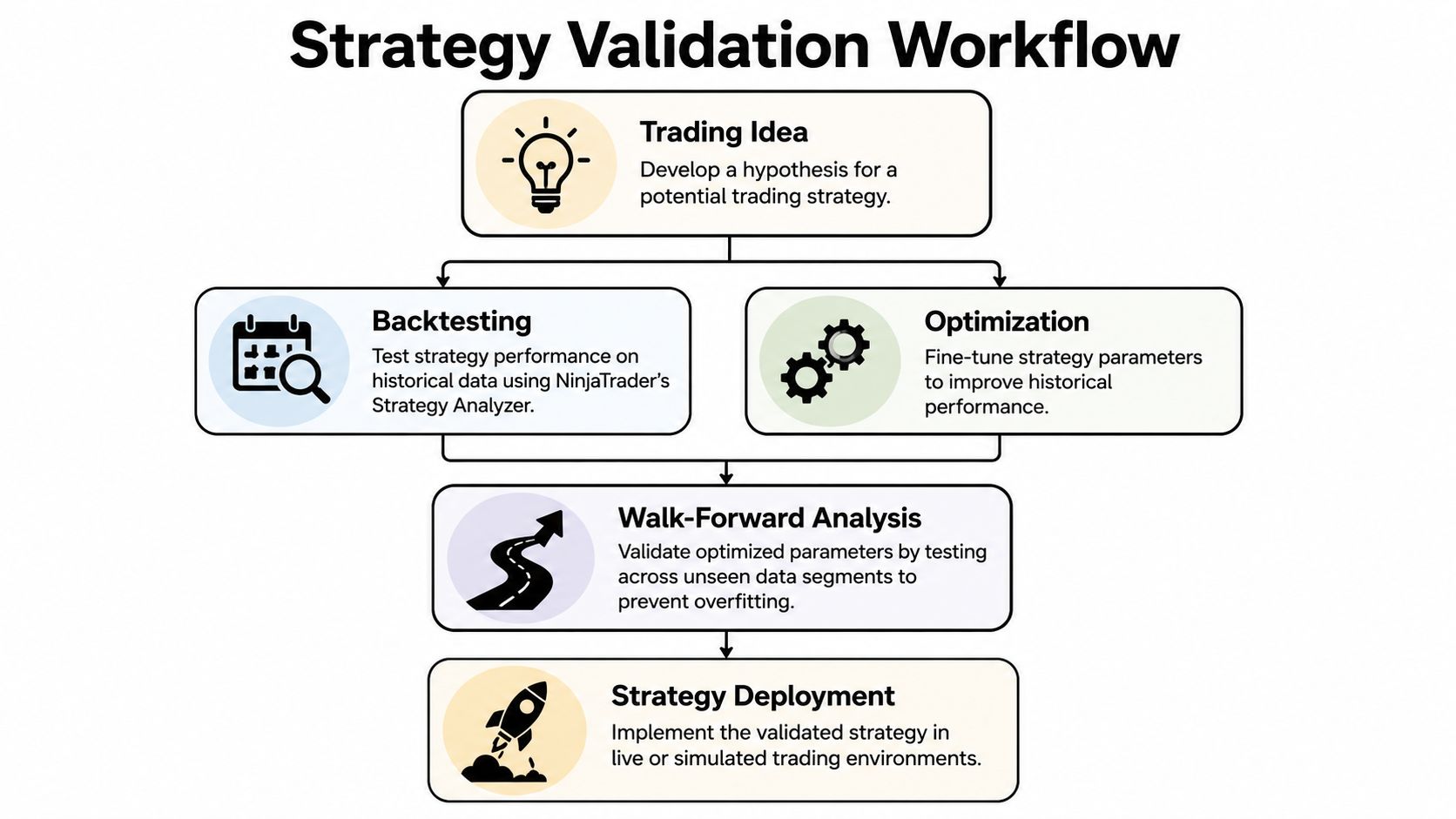
That's why walk-forward analysis matters. Instead of optimizing on one block of data and celebrating the result, you optimize on one segment and test on unseen segments. Then you repeat the process across multiple periods.
In practical terms, walk-forward helps you answer a harder question: does this strategy still behave reasonably when the market changes?
Reality check: A strategy that only works after heavy optimization usually isn't robust enough for live pressure.
A good validation process
The strongest workflow is sequential, not random.
- Start with a simple hypothesis. Example: trade pullbacks only when the market accepts above a prior session area.
- Backtest the core rules. Don't optimize yet.
- Review trade distribution. Look at where gains and losses cluster.
- Optimize carefully. Change only the parameters that matter.
- Walk forward across fresh segments. Weak systems usually get exposed at this stage.
- Run in simulation. Watch how the strategy behaves in a live session environment.
The sim-to-live gap you need to respect
There's one issue many traders ignore. Simulation can build confidence, but it may not fully reflect live-market execution stress, especially around slippage and order fill latency during volatile conditions. NinjaTrader promotes simulation for practice, but the gap between sim fills and live fills is still something traders need to account for qualitatively when they move toward a funded account environment.
That matters even more for algorithmic traders and prop challenge candidates. A strategy can look stable in backtest and clean in sim, then struggle once quotes move faster and fills get less forgiving.
The solution isn't to avoid simulation. It's to use it properly. If your strategy only survives under perfect fills, it isn't ready.
Essential Risk Management Rules for Funded Futures Traders
This is the part that decides whether the rest of your NinjaTrader skill matters. You can have a clean DOM, solid charts, and a tested setup. If you size trades badly, none of it survives contact with a prop challenge.
Risk management isn't a side topic for funded futures traders. It's the operating system.
NinjaTrader's account-sizing guidance is clear. Effective risk management means limiting risk to less than 1% of account equity per trade, with examples of $10 on a $1K account and $100 on a $10K account, as explained in NinjaTrader's futures trading account size article.
The rule that keeps you in the game
If you're trading micros or minis inside a challenge model, start with this order of operations:
- Define max risk for the trade. This comes from account equity and challenge rules, not from confidence.
- Place the stop where the setup is invalidated. Not where the loss feels comfortable.
- Size the contract count from the stop distance. Size is the output, not the starting point.
That last part is where traders fail. They choose the number of contracts first because the margin requirement looks small, then force the stop to fit.
Why micros matter for discipline
Micro contracts are often the better training ground for prop-style trading because they let you respect a tight loss framework while still executing real setups. The market doesn't care that the contract is smaller. Your habits still show up.
Use micros when:
- Your stop needs room. A smaller contract often lets the setup breathe.
- You're adapting to drawdown rules. Smaller size makes daily loss control easier.
- You're proving consistency. Stable process matters more than aggressive scaling.
Discipline, patience, and risk aversion aren't optional traits in futures trading. They're what keep a good strategy alive long enough to matter.
A simple funded-trader checklist
Before any trade, ask:
- Is the risk below my per-trade limit?
- Does the stop match the chart, not my emotions?
- Does this size still fit if slippage worsens the fill?
- Would I take this exact trade in a simulated evaluation account?
If any answer is no, pass on the trade. Missing one setup won't ruin a challenge. One oversized trade can.
Frequently Asked Questions About NinjaTrader
Is NinjaTrader good for beginners in futures trading?
Yes, if you treat it like a professional platform and not a toy. It gives beginners access to simulation, charting, backtesting, and execution tools in one environment. The mistake isn't starting with NinjaTrader. The mistake is trying to use every feature at once.
Should I trade micros or minis first?
Most newer traders should start with micro futures because smaller exposure makes it easier to follow strict risk rules. That's especially important if you're preparing for a funded account or challenge environment where daily loss control matters. Minis can make sense later, but only after your execution and sizing are consistent.
Can I trust simulation results?
You can trust simulation for process practice, platform familiarity, and rule testing. You shouldn't treat simulation as proof that live execution will feel the same. Fill quality, slippage, and decision-making pressure can change once real consequences are attached to the trade.
What matters more in NinjaTrader, charts or execution tools?
Both matter, but execution errors usually cost traders faster. A decent chart with a disciplined ATM setup will usually serve you better than a beautiful chart layout with sloppy order handling. Build the chart to find trades. Build the execution process to survive them.
If you want a prop firm built around transparent rules, simulated capital, and clear paths to scale, take a look at MyFundedCapital. You can compare account types, review the risk parameters, and start a challenge when your NinjaTrader process is stable enough to trade with discipline.
