

 AR
AR
 NL
NL
 FR
FR
 DE
DE
 ES
ES
 IT
IT
 PL
PL
 SV
SV
 PT
PT


A TradingView demo account, also known as paper trading, is a risk-free market simulator built right into the platform. This guide will show you how to set it up, use it to test strategies, and prepare for real-world challenges like prop firm evaluations.
Why a Demo Account Is Your Essential Trading Gym
Every trader, from absolute beginners to seasoned pros refining a new system, needs a place to practice without pressure. Your demo account is your personal trading gym—a controlled space where you can build the muscle memory and mental fortitude that real-world trading demands. The key benefit is experiencing live market conditions without the financial and emotional sting of losing real money.
- Systematically Test Your Edge: Does your trading plan actually work? A demo account is where you find out. You can apply your strategy in real-time, letting the data, not fear, tell you if you have a genuine edge.
- Master the Platform: Fumbling with order buttons when real money is on the line is a recipe for disaster. Use the demo to learn the ins and outs of placing market orders, setting your stops, and managing take-profits until it's pure instinct.
- Build Your Psychological Armor: Practice executing your plan perfectly, especially when you hit a simulated losing streak. Developing this discipline is a skill in itself, and we cover it more in our guide on developing a trading mindset.
Preparing for Prop Firm Challenges
If you’re aiming to pass a funded challenge, this risk-free practice is non-negotiable. These evaluations have strict rules you must follow, like maximum drawdown limits and specific profit targets. A demo account is the perfect place to simulate these exact conditions before you even start your official evaluation.
The widespread availability of demo accounts on platforms like TradingView has been a game-changer for trader education. You can learn more about the specifics of how demo trading on TradingView works.
TradingView Demo Account Core Features
Here’s a breakdown of what makes the TradingView paper trading account a powerful tool for aspiring prop traders.
| Feature | Benefit for Traders | Relevance for Prop Firm Challenges |
|---|---|---|
| Realistic Market Data | Practice with live, real-time price feeds, not delayed or simplified data. | Essential for testing strategies under the same conditions you'll face in an evaluation. |
| Full Order Functionality | Place market, limit, stop, and bracket orders just like in a live account. | Allows you to master risk management (stop-losses) which is critical for staying within drawdown limits. |
| Customizable Account Balance | Set your starting virtual balance to mimic a prop firm's account size (e.g., $100,000). | Creates a highly realistic simulation of the challenge environment from day one. |
| Performance Tracking | Review your trade history, profit/loss, and performance metrics. | Helps you analyze your trading habits and identify weaknesses before risking a challenge fee. |
| No Financial Risk | Test aggressive ideas or new markets without fear of losing real capital. | Encourages experimentation and helps you find a strategy that fits the prop firm's rules and your personality. |
Ultimately, these features combine to create the ideal training ground. You can make your mistakes, learn your lessons, and refine your approach entirely on your own terms.
Disclaimer: Trading involves a substantial risk of loss and is not suitable for all investors. The content in this article is for educational purposes only and is not financial advice. Past performance is not indicative of future results.
Setting Up and Customizing Your Paper Trading Account
Getting started with a TradingView demo account is simple, but customizing it for effective training is where the real value lies. The default settings are just a starting point; you need to shape your demo environment to match the real-world conditions you plan to trade in.
First, open any chart. At the bottom, click the "Trading Panel" tab. You'll see a list of brokers, but for now, look for TradingView's own "Paper Trading" option. Hit “Connect,” and you're in. Your Trading Panel now shows your virtual balance, equity, positions, and order history.
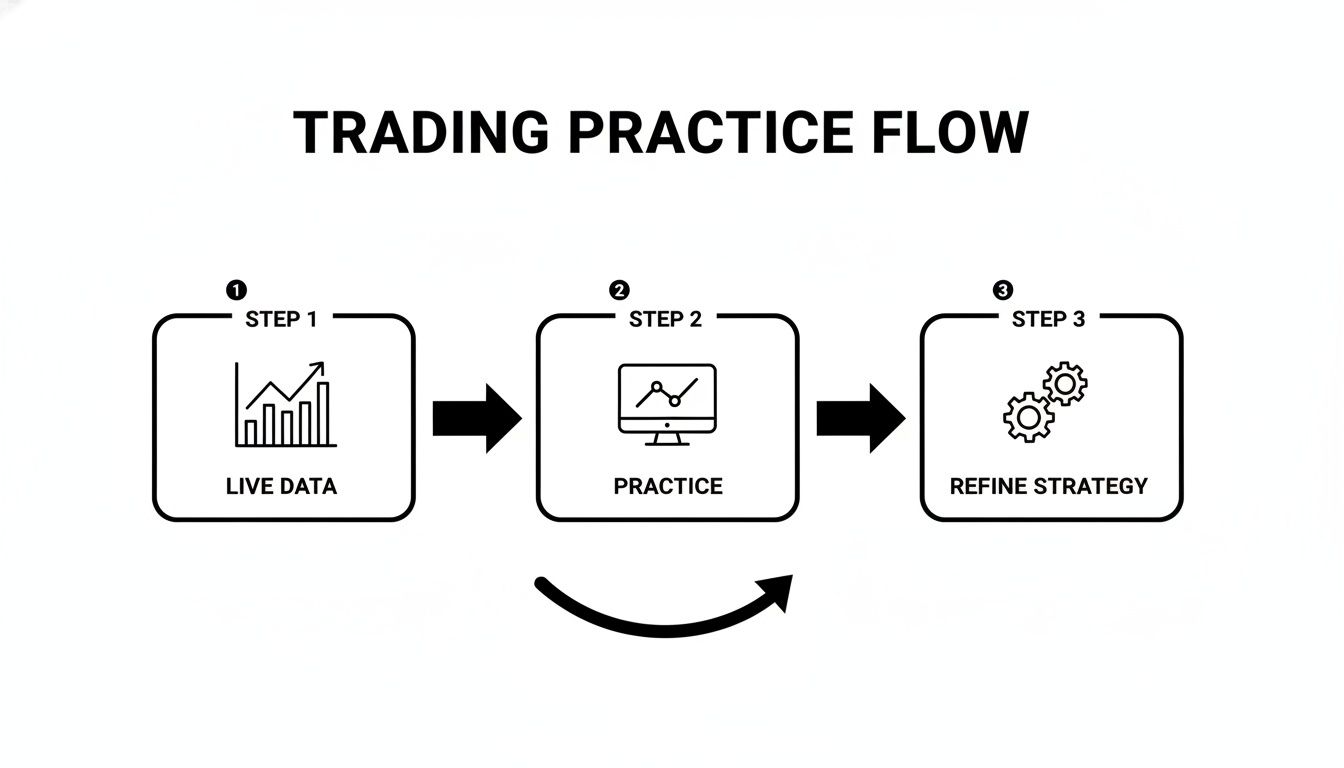
This process is a continuous loop: analyze live data, practice your execution, and refine your strategy based on the results.
Customizing Your Account for Realistic Practice
By default, TradingView gives you a $100,000 starting balance. Trading with an unrealistic sum is a classic mistake because it skews your risk management. If you're preparing for a $25,000 funded challenge, you must practice with a $25,000 balance.
Here's how to change it:
- Go to your Trading Panel and right-click on the paper trading account name.
- Choose “Reset Paper Trading Account.”
- Enter the exact starting capital you plan to trade with (e.g., 25000).
This simple change has a massive psychological impact, forcing you to think about position sizing and risk in a way that translates directly to your real-world goals.
Native Paper Trading vs. Broker Demo Accounts
TradingView offers two paths for paper trading. You can use its built-in platform or connect a demo account from a supported brokerage like TradeZero or CapTrader.
TradingView Native Paper Trading:
- Pros: Instant setup, no extra accounts needed, seamlessly integrated.
- Cons: Order execution is unrealistically perfect. You won't experience slippage, partial fills, or re-quotes, which are common in live trading.
Connecting a Broker's Demo Account:
- Pros: Provides a more realistic feel for a specific broker's execution, including fees and available markets.
- Cons: Requires creating a separate account with that broker, and your preferred choice might not be supported.
For most traders, especially those preparing for a prop firm challenge, TradingView’s native paper trading is sufficient. The primary goal is to master your strategy and risk management, and the built-in tools are perfect for that.
Placing and Managing Trades Like a Professional
A TradingView demo account is where you forge the habits that define your trading career. The real skill lies in executing and managing trades with unwavering discipline, and a simulated environment is the perfect place to build that muscle memory.
Placing an order is easy, but choosing the right order type at the right time separates novices from consistent traders.
Mastering Essential Order Types
Your ability to control entries and exits is the bedrock of risk management. TradingView’s paper trading gives you access to all the necessary order types.
- Market Order: An immediate buy or sell at the best available price. Use it when speed is critical, but be aware of "slippage" in live accounts, where your fill price may differ from the price you saw.
- Limit Order: A patient entry where you specify your price. Place a buy limit below the current market price or a sell limit above it. It's ideal when you've identified a key level and are willing to miss the trade if the price doesn't return to it.
- Stop Order (Stop-Entry): An order to enter a trade after price momentum is confirmed. A buy stop goes above the current price to enter an upward breakout, while a sell stop sits below the price to catch a downward breakdown.
For a deeper look at using these orders, you can discover the pros and cons of trading on a demo account on TradingView.
Setting Your Risk Parameters Before the Trade
A non-negotiable rule: never enter a trade without knowing your exit points for both a win and a loss. TradingView’s order ticket allows you to set your Stop Loss (SL) and Take Profit (TP) when you place the trade.
- Stop-Loss (SL): Automatically closes your position at a specific price to cap your potential loss. It's your most important risk management tool.
- Take-Profit (TP): Automatically closes your position when it hits a pre-defined profit target.
Setting these from the start removes emotion from the decision-making process once the trade is live. To build a robust strategy, check out our guide on Stop Loss and Take Profit.
Your number one job as a trader is to manage risk, not to make money. Use the demo account to make disciplined risk management an unbreakable habit. Always set your stop loss.
Example: Managing a Live EUR/USD Trade
Let's say you enter a long position on EUR/USD at 1.07250. Your stop loss is at 1.07000 (25-pip risk) and your take profit is at 1.07750 (50-pip reward), a 1:2 risk-to-reward ratio.
- Move to Breakeven: Price moves in your favor to 1.07500 (up 25 pips). You can drag your stop loss on the chart up to your entry price of 1.07250. The trade is now "risk-free."
- Trail Your Stop: Price climbs to 1.07600. You can trail your stop loss up to 1.07400, guaranteeing a simulated profit of 15 pips while giving the trade room to run.
- Scale Out: At 1.07600, you decide to secure some profit. Right-click the position in your Trading Panel, choose "Partially Close Position," and close 50% of the trade. This locks in profit while letting the rest run.
Mastering these active management techniques in your TradingView demo account builds the real-world skills needed to navigate a live funded challenge successfully.
How to Test and Refine Your Trading Strategy
This is where your TradingView demo account becomes your personal trading lab. Its purpose is to provide a safe environment to test, break, and rebuild your strategy until it's robust. This process separates traders who hope for the best from those who trade with a data-proven plan.
Manually Backtesting with the Market Replay Feature
Backtesting is applying your strategy to historical price data to see how it would have performed. TradingView's Bar Replay feature (available on paid plans) is an excellent tool for this.
Here is a practical checklist for manual backtesting:
- Write Down Your Rules: Be specific. For example: "On the 4-hour chart, go long when RSI crosses above 30 and price closes above the 20 EMA. Stop loss is 10 pips below the entry candle's low. Take profit is at a 1:2 risk-reward ratio."
- Go Back in Time: Choose a random historical period on your instrument's chart.
- Use Bar Replay: Move the chart forward one candle at a time.
- Trade by Your Rules: When a setup matches your rules, pause the replay. Mark your entry, stop, and target using the Long/Short Position tool. Record the outcome (win or loss) in a spreadsheet.
- No Cheating: Only take trades that perfectly match your written rules. Resisting the temptation to bend the rules is the entire point.
For more on this topic, our guide to the best back-test software for traders covers a range of useful tools.
Forward-Testing in Your Live Demo Account
Once backtesting shows your strategy has a historical edge, it's time for forward-testing—paper trading your strategy in the current, live market. This introduces real-time patience and discipline, as you have to wait for setups and manage open trades.
Backtesting shows you what should have worked. Forward-testing proves you can execute it in a live, unpredictable market. You need both.
The goal is to gather unbiased performance data. Aim to take and track at least 30-50 trades following your plan precisely to ensure your results are from skill, not luck.
Tracking the Metrics That Truly Matter
Your TradingView account history contains valuable data. To understand your performance, you need to track key performance indicators (KPIs) in a trading journal.
Here are the critical metrics you must track:
- Win Rate: The percentage of winning trades. A strategy with a 40% win rate can be very profitable if the wins are much larger than the losses.
- Average Risk-to-Reward (R:R) Ratio: The size of your average win compared to your average loss. A 2:1 R:R means your average win is twice the size of your average loss.
- Expectancy: This metric combines your win rate and R:R to show your average profit or loss per trade. It tells you if your strategy is profitable long-term.
- Maximum Drawdown: The largest peak-to-trough drop in your account equity. This is a critical metric for prop firm challenges, which have strict drawdown limits. For example, a strategy with a 15% historical drawdown is unsuitable for a challenge with a 10% maximum drawdown rule.
Use this data to make small, specific tweaks to your plan, then restart the testing cycle. This is how you build a trading plan that can withstand the pressures of the live market.
Don't Be a 'Demo King': Overcoming Common Paper Trading Pitfalls
Success in a demo account can be a dangerous trap. Strong performance with fake money doesn't guarantee you'll make a profit when your own capital is on the line. This is often called the "Demo King Syndrome"—a trader who excels in a simulated environment but fails the moment they go live.
The Real Difference: It's All in Your Head
The biggest gap between demo and live trading is your own psychology. When nothing is at stake, it’s easy to be a perfect trader. When real money is involved, fear and greed hijack your decision-making.
- Fear of Loss: This causes you to take small profits early or move your stop-loss on a losing trade, hoping for a reversal.
- Greed: This leads you to take oversized risks or hold onto a winning trade for too long, only to watch it reverse and wipe out your gains.
These emotions are absent in a demo account. For more on this, traders discuss the 'demo king syndrome' and its effect on TradingView.
The true test isn't if your strategy works on paper. It's whether you can work your strategy when you feel the very real fear of losing money.
Perfect Fills vs. Real-World Execution
Demo accounts provide an unrealistically clean trading experience, hiding the messy realities of a live market.
Here's what a demo account doesn't prepare you for:
- Slippage: When your fill price is different from the price you saw when you clicked "buy" or "sell."
- Partial Fills: Your order may not get filled all at once, especially with large positions in illiquid markets.
- Re-quotes: In a fast-moving market, your broker may offer a new, often worse, price for you to accept or decline.
How to Make Your Practice Count
Bridge the gap by making your demo trading as realistic as possible. This is your training ground, especially if you're preparing for a prop firm challenge.
Here is a simple checklist to follow:
- Set a realistic starting balance. If you're aiming for a $50,000 funded account, set your paper trading balance to $50,000.
- Follow your trading plan without exception. If a setup doesn't meet all your criteria, do not take the trade.
- Act as if real money is on the line. Verbalize your plan for each trade to create accountability.
- Conduct ruthless weekly reviews. Analyze your trade journal and ask: "Did I follow my rules 100% of the time?" Be brutally honest with yourself.
By taking these steps, your TradingView demo account becomes a boot camp for building the discipline and mental toughness needed to succeed.
Frequently Asked Questions (FAQ)
How do I reset my TradingView demo account balance?
In the Trading Panel at the bottom of your chart, right-click on your paper trading account name. Select 'Reset Paper Trading Account' from the menu. A window will appear where you can enter a new starting balance. It's crucial to set this to the same amount as any funded challenge you are preparing for (e.g., enter 25000 for a $25,000 account).
Is the data in a TradingView demo account real?
Yes, the price data (charts and indicators) is real and streams from the same sources as live accounts. However, the trade execution is a simulation. In a demo, orders fill instantly at the displayed price. In a live market, you will experience slippage, where the fill price differs slightly due to market liquidity and volatility. This is a key difference to be aware of.
Can I connect my prop firm account directly to TradingView?
This depends on the broker your prop firm uses. TradingView integrates with several brokerages, but many prop firms, including MyFundedCapital, use specialized platforms like DXtrade or cTrader which do not offer a direct trade-through connection. The most effective workflow is to perform your analysis on TradingView and then execute and manage your trades on the platform provided by your prop firm.
Ready to put your practice to the test? MyFundedCapital offers a clear path for disciplined traders to get funded.
Learn about our funding programs and start your challenge today.
