

 AR
AR
 NL
NL
 EN
EN
 FR
FR
 DE
DE
 ES
ES
 IT
IT
 PL
PL
 SV
SV


Running several accounts without a copier gets messy fast. You place a trade on one account, then rush to match it on the others, and that's exactly where sizing mistakes and rule breaches happen. The fxblue trade copier can help, but only if you treat it as a risk-control tool first and a convenience tool second.
What is the FX Blue Trade Copier
The fxblue trade copier most traders mean is FX Blue's Personal Trade Copier. Its job is simple: duplicate trades between MT4 and MT5 installations on the same computer. That includes copying from MT4 to MT5, MT5 to MT4, or between multiple terminals of the same platform.
FX Blue says the Personal Trade Copier is used by tens of thousands of traders on a daily basis and works with any MT4 or MT5 broker, which is why it has become standard infrastructure for many retail multi-account setups (FX Blue Personal Trade Copier page).
What it actually does well
This tool fits one very specific use case:
- Local account copying: You run several MetaTrader terminals on one VPS or desktop and want one account to act as the master.
- Cross-version duplication: You can bridge MT4 and MT5 without building your own workaround.
- Multi-account trade management: You can send one trade to several receiver accounts instead of entering each trade manually.
That makes it useful for traders running a personal account beside an evaluation or funded account, or for anyone managing a strategy across multiple MetaTrader logins.
What it does not do
A lot of setup problems start with wrong expectations.
Practical rule: If your terminals are on different machines, the Personal Trade Copier is the wrong product.
FX Blue separates its tools by architecture. The Personal Trade Copier is for the same machine. FX Blue's Internet Trade Mirror is the option intended for copying between different computers over the internet. If you miss that distinction, you can waste hours troubleshooting a setup that was never designed to work that way.
For prop traders, that matters because your copier setup has to match your workflow. A single VPS running all terminals is usually cleaner than mixing a home PC, a laptop, and a remote server. If you're comparing copier workflows with platform rules, it's also worth reviewing how copy trading apps fit funded account workflows.
Installation and Basic Server/Client Setup
Most fxblue trade copier failures are boring. The software is installed, but the sender and receiver aren't configured correctly, or MetaTrader permissions are blocking the EA. Clean setup solves most of it.
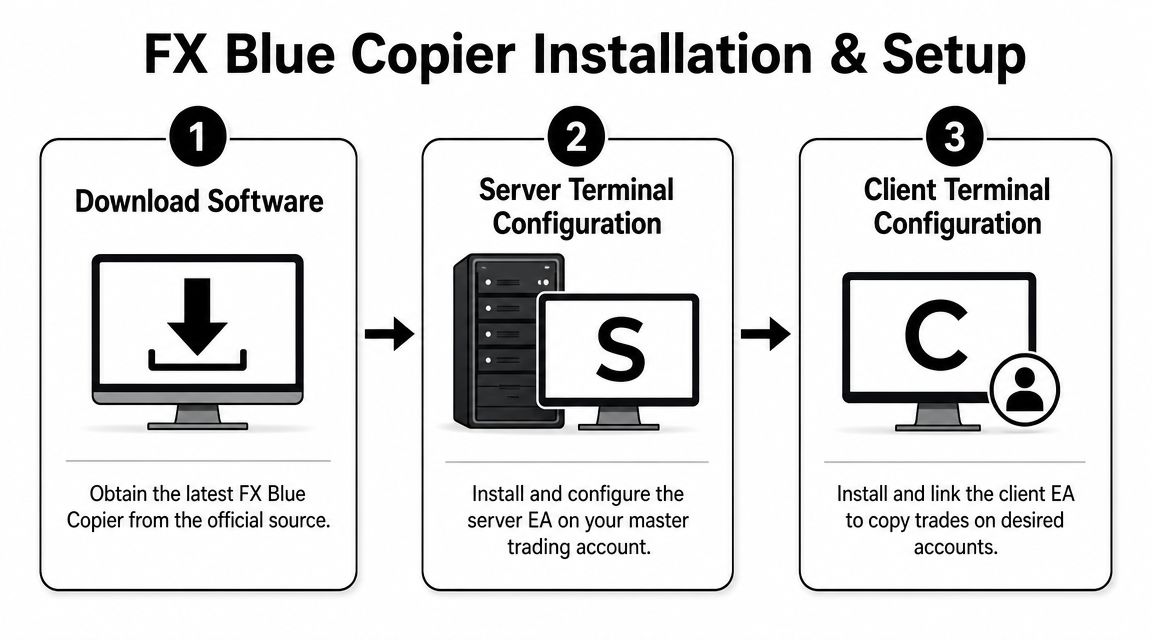
The basic layout
You need two roles:
Sender EA
Attach this to the chart on the master account. This account creates the trade instructions.Receiver EA
Attach this to each destination account. These accounts execute the copied trades.One machine
Keep every MT4 and MT5 terminal on the same desktop or VPS when using the Personal Trade Copier.
Installation checklist
Use this in order:
- Download the copier from FX Blue: Install it into every MT4 and MT5 terminal you plan to use.
- Open each platform after install: Make sure the sender and receiver EAs appear in the Navigator.
- Enable AutoTrading: If the MetaTrader AutoTrading button isn't active, the copier won't place trades.
- Allow DLL imports: In MetaTrader options and EA settings, this permission has to be enabled or the copier won't function properly.
- Attach sender to one chart: Any liquid chart will do. The chart itself is not the strategy.
- Attach receiver to each target account: Again, one chart per terminal is enough.
- Match the channel settings: Sender and receiver must be pointed at the same copy channel.
Why a VPS is usually the right choice
You can run the fxblue trade copier on a home machine, but that creates avoidable risk. A home internet drop, power cut, forced restart, or sleep mode can leave copied trades unmanaged.
A VPS keeps the setup online when your local computer is off. If you need a simple walkthrough for preparing the machine itself, Cloudvara's guide to server configuration is a useful reference before you install multiple terminals.
Don't judge a copier setup by whether it opens one test trade. Judge it by whether it survives overnight without a disconnect, terminal freeze, or permission issue.
Common setup mistakes
The pattern is usually one of these:
- Wrong product for the job: Trying to use Personal Trade Copier across different computers.
- Permissions disabled: AutoTrading or DLL imports not enabled.
- Mixed-up terminal roles: Sender attached to the wrong account, or multiple senders active when you intended only one.
- Platform confusion: MT4 and MT5 can work together, but you still need a clean terminal layout and naming convention.
If you're running mixed MetaTrader versions, keep the platform differences straight before you add copier logic. A quick comparison of MetaTrader 4 vs MetaTrader 5 helps avoid basic compatibility mistakes.
Configuring Lot Sizing and Risk Controls
A trader passes a challenge on the master account, then fails a receiver account on the same setup because the copier pushed size that made sense on one balance and broke the daily loss limit on another. This is the core task. The fxblue trade copier has to translate risk correctly for each account, not just duplicate the trade.
Why simple mirroring fails
Lot mirroring only works if the accounts are similar. Same balance, same contract specs, same drawdown limits, same purpose. In prop trading, that is rarely true.
A 1.00 lot trade on a personal account might be fine. The same 1.00 lot on a smaller evaluation account can chew through allowed drawdown fast, especially if the stop is wide or the symbol has a larger pip value than expected.
Treat the copier as a risk conversion tool. That mindset prevents a lot of avoidable breaches.
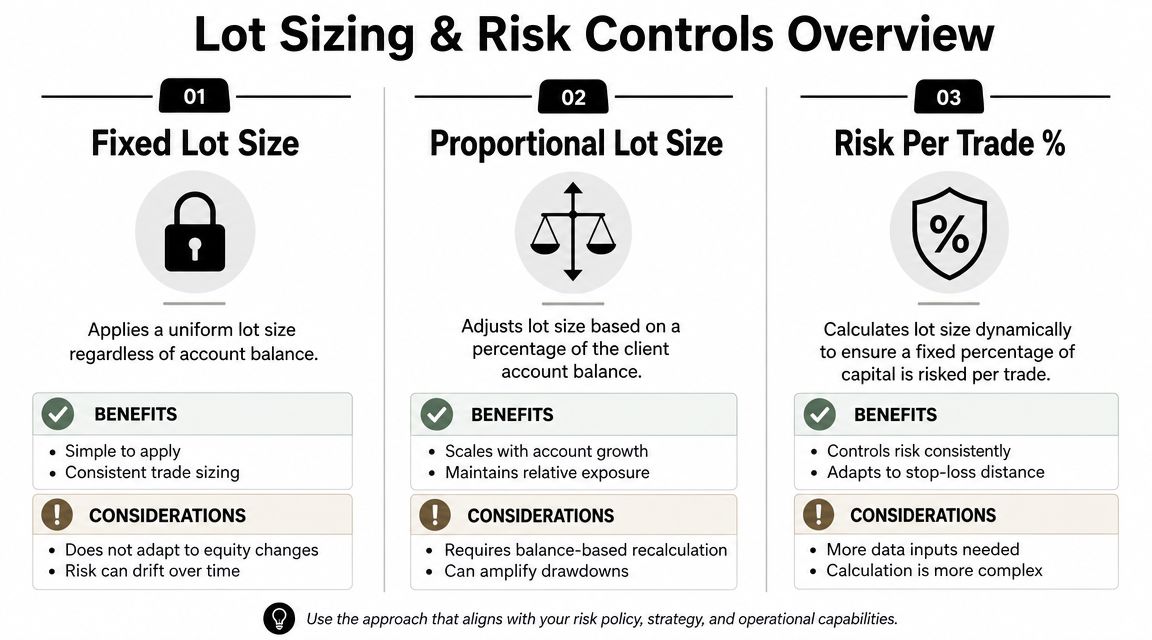
Three ways to size copied trades
The lot-sizing options are straightforward, but the trade-offs matter:
| Method | How it works | Good use case | Main risk |
|---|---|---|---|
| Fixed lot size | Every copied trade opens at the same lot size on the receiver | Matching a set of accounts you intentionally keep identical | Ignores differences in equity, stop size, and rule limits |
| Multiplier | Receiver size is a multiple of the sender size | Scaling a strategy up or down in a controlled way | Copies bad sender sizing logic if the master account is oversized |
| Cash-risk mode | Receiver size is based on allowed money risk for that trade | Prop accounts where loss per trade matters more than matching lots | Breaks down if stop-loss handling is inconsistent |
For prop-style use, cash-risk sizing is usually the safer choice. FX Blue's user guide explains that its cash-risk settings can calculate receiver lot size from a maximum loss amount, using either the sender's stop-loss or a defined fallback stop distance such as FixedSLPips (FX Blue Personal Trade Copier user guide).
That is the setting group worth understanding before you go live.
The setting that usually makes the most sense
If the receiver account has strict drawdown rules, start from permitted loss, not lot size. A setting like CashRiskEquityPercent does that. The logic is simple. If the trade hits stop-loss, the receiver should lose only the percentage of equity you pre-approved.
That matters more than copying the sender's 0.50 lot or 1.00 lot exactly.
In practice, this only works if your stop-loss data is clean. If the sender sometimes trades without a hard stop, the copier has to fall back to an assumed stop distance. That can be useful, but it also introduces model risk. If the assumed stop is tighter than the actual exit, the receiver can end up larger than intended.
Scaling by equity still needs judgment
Some traders use equity-based scaling so larger receivers trade more size than the sender. That can be reasonable on paper. It can also be a fast way to overtrade a funded account.
I use equity scaling carefully, and usually below what the math allows. Prop firms do not care that the copier formula was correct. They care whether the account stayed inside daily loss, max loss, and consistency rules. A mathematically correct multiplier can still be operationally wrong.
That is why receiver-level caps matter.
Settings I check on every receiver
Before copying live capital or a prop evaluation, review these one by one:
- Lot sizing mode: Use one logic per receiver. Fixed, multiplier, or cash-risk. Mixing them usually creates confusion.
- Maximum lot cap: Put a hard ceiling on size so one bad sender trade cannot balloon on the receiver.
- Minimum lot setting: Prevent tiny trades that get rejected or distort the intended risk model.
- Stop-loss basis: Confirm whether sizing uses the sender stop or a fallback pip value.
- Broker contract differences: Index, gold, and crypto symbols can have very different tick values across firms.
- Receiver-specific risk limits: One account may need half the risk of another, even if both copy the same sender.
A good rule for junior traders is simple. If you cannot explain the worst-case loss on the receiver before the trade is sent, the copier is not configured well enough yet.
What I would do first
For a first prop-safe setup, I would keep it conservative:
- Use cash-risk sizing on the receiver.
- Set a modest percentage risk per trade.
- Add a maximum lot cap.
- Confirm the stop-loss source the copier will use.
- Test on a demo receiver with the same broker specs, if possible.
- Review the copied trade history after a few sample trades, especially on symbols with unusual pip values.
The practical goal is not perfect replication. The goal is controlled exposure on every receiver account, even when the sender takes a loss.
Advanced Filtering and Latency Optimization
A good fxblue trade copier setup doesn't copy everything. It copies the right things, to the right accounts, under the right conditions.
Filtering trades on purpose
FX Blue supports selective replication by symbol, magic number, or order comment. That lets you separate one strategy from another instead of sending every order from the master account to every receiver. FX Blue's tutorial example shows that a multiplier of 10 can turn a 0.1-lot sender trade into a 1.0-lot receiver trade, but only if it matches the filter criteria (FX Blue tutorial example on YouTube).
Use filtering when:
- You run more than one EA: Copy only the trades from the strategy you want mirrored.
- You trade selected symbols: Keep one receiver limited to specific instruments.
- You separate manual and automated trading: Order comments can help isolate one workflow from the other.
What to filter first
If you're new, keep it simple:
- Start with symbol filters: Limit copying to the instruments you know are mapped correctly.
- Then add magic number filters: Especially if your master terminal runs several EAs.
- Use order comments last: Helpful, but easier to mis-handle if your strategy comments aren't consistent.
This reduces the chance of one stray position getting copied into an account where it doesn't belong.
If you can't explain why a receiver account should accept a certain trade, that trade shouldn't be eligible for copying.
Latency and execution habits
On a local same-machine setup, the copier architecture is already efficient. The weak points are usually elsewhere:
- Broker execution differences
- Poor VPS performance
- Too many terminals on one machine
- Messy symbol mapping and suffix mismatches
A few habits help:
- Keep all trading terminals on a stable VPS.
- Use a VPS location that makes sense for your broker setup.
- Don't overload the machine with charts, indicators, and unrelated tools.
- Test during active market periods, not only in calm sessions.
- Watch whether copied orders are arriving in the right symbols with the right size.
Latency matters, but sloppy filtering causes more damage than a small execution delay. Most beginners worry about milliseconds and ignore the fact that they're still copying trades they never intended to send.
Using the FX Blue Copier in a Prop Firm Environment
Most basic guides often conclude prematurely. In a prop setting, the fxblue trade copier is not there to save you time. It's there to keep your execution consistent without pushing you outside the rules.
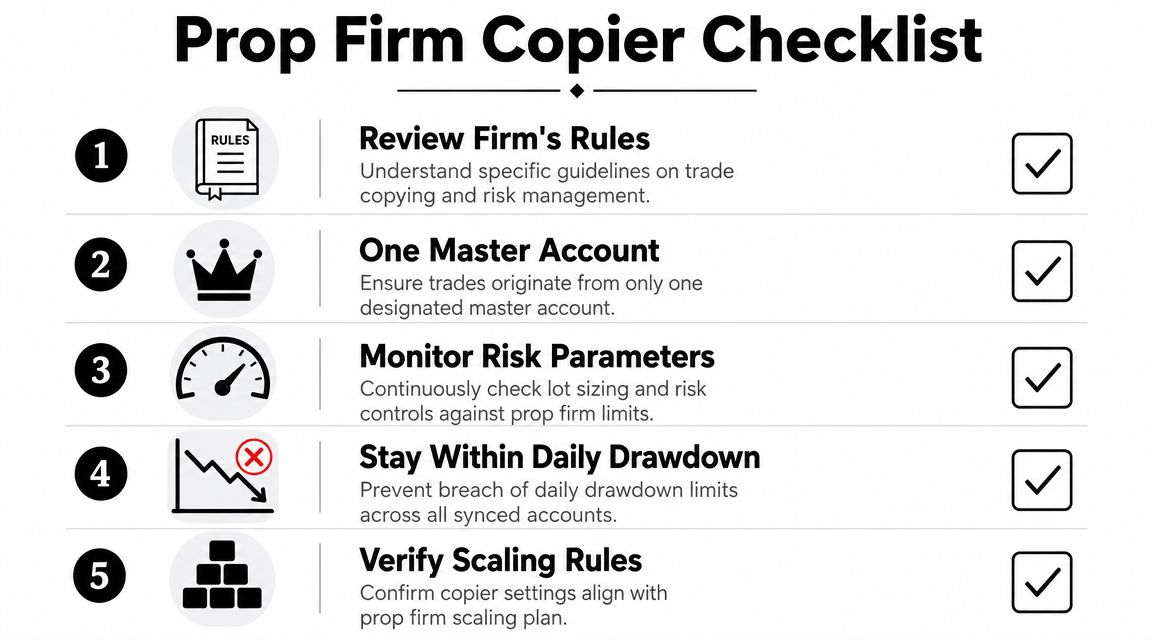
FX Blue tutorials make the key point clearly: mirroring trades can amplify risk and lead to rule violations, while controls such as max lot size, symbol filtering, and account-level drawdown protection need to be actively configured so the copier acts as a risk-shaping tool instead of a blind mirror (FX Blue risk-control tutorial on YouTube).
The prop trader mindset
In a funded workflow, one source trade can affect several accounts at once. That means one mistake can multiply:
- A bad lot-size setting
- A wrong symbol mapping
- A trade opened during restricted conditions
- A disconnect that leaves receiver positions unmanaged
That's why the correct question is not “Can FX Blue copy this trade?”
It's “Should this receiver account accept this trade at this size under these rules?”
A safer operating model
Here's the structure I'd use for prop-style setups:
| Decision area | Safer approach |
|---|---|
| Master account | Use one clearly designated sender |
| Receiver sizing | Use conservative, receiver-specific risk logic |
| Trade scope | Filter symbols and strategy sources |
| Lot protection | Set a hard max lot limit |
| Operations | Run everything on one stable VPS |
If your funded workflow includes approved copy-trading conditions, review them before you automate anything. For traders comparing firms and account policies, this list of prop firms that allow copy trading is a useful starting point.
The hidden operational risk
Many focus on software settings and ignore infrastructure. That's a mistake.
If your copier is local-only, your VPS becomes part of your risk management. Stable hosting matters. So does clean terminal organization. So does avoiding sudden downtime. If you're building a more resilient setup, even related hardware planning like expert uninterruptible power supply recommendations can help you think more seriously about continuity and failure points.
Where traders usually get in trouble
The common failure points are predictable:
- They copy from a large account into a smaller rule-constrained account
- They use a multiplier when they should use risk-based sizing
- They don't cap max lot size
- They ignore broker symbol differences
- They test with one trade and assume production is safe
One practical example is platform fit. FX Blue's Personal Trade Copier is built for local MT4/MT5 duplication. If your broader trading stack includes non-MetaTrader platforms, the setup logic changes. For example, MyFundedCapital supports manual, algorithmic, and copy trading across platforms including DXtrade and cTrader, so your copier choice has to match the platform mix rather than your preference alone.
The safest copier setup is usually the one that feels a little too conservative at first. That's a good sign, not a problem.
Brief Look at FX Blue Alternatives
FX Blue is still a strong option if your whole workflow lives inside MetaTrader on one machine. But not every trader fits that model anymore.
A recent comparison notes that as of 2026, the copier market has shifted toward cloud and multi-platform tools, while FX Blue remains strongest for local MT4/MT5 duplication. The same comparison points out that alternatives such as Duplikium support platforms like cTrader and DXtrade, which matters if you don't want your whole operation tied to one VPS or one platform family (QuantVPS comparison of FX Blue trade copier alternatives).
When FX Blue is enough
Use FX Blue when:
- All accounts are on MT4 or MT5
- You're comfortable running everything on one VPS
- You want detailed local control over copying and lot logic
When to look elsewhere
Consider alternatives when:
- You need copying across different computers
- You trade outside MetaTrader
- You want cloud-based infrastructure instead of one-machine dependence
That doesn't make FX Blue outdated. It just means you should match the copier to the job, not force the job into the copier.
Frequently Asked Questions
Can the FX Blue Personal Trade Copier copy between MT4 and MT5
Yes. That's one of its strongest practical uses. You can copy trades between MT4 and MT5 terminals as long as those installations are running on the same computer or VPS.
What is the most common reason the fxblue trade copier does not work
Usually it's a setup permission issue inside MetaTrader. Check that:
- AutoTrading is enabled
- DLL imports are allowed
- The sender and receiver are on the correct accounts
- Both sides are using the same channel settings
If one of those is wrong, the copier often looks installed but won't function correctly.
Does using a trade copier increase risk
Yes, it can. A copier multiplies execution across accounts, so a sizing mistake can spread quickly. Used properly, though, the copier can also reduce risk by enforcing consistent lot sizing, symbol filtering, and trade restrictions instead of relying on manual order entry.
Is FX Blue a good choice for prop traders
It can be, if your setup is MT4/MT5-based and you configure it conservatively. The key is not blind copying. Use receiver-specific lot controls, max-lot caps, careful filtering, and a stable single-machine setup. Trading always involves risk of loss, and this article is for educational purposes only, not financial advice.
If you're looking for a funded environment that supports manual, algorithmic, and copy-trading workflows, review the account options at MyFundedCapital and compare which challenge or instant funding path fits your platform and risk-management style.
